Table of Contents
- What Is Whisk AI, and Why Do Thumbnails Matter Now?
- How to Get kicked off with Whisk AI for YouTube
- Best Whisk AI Settings for High CTR – and why it matters
- Whisk AI vs Manual Design: Which Is Better? (seriously)
- Whisk AI Mistakes That Will Tank Your Views
- How to Test Whisk AI Thumbnails for Maximum Growth – and why it matters
- Listen to This Article
A lot of people think you need a fancy design degree or expensive software to make a thumbnail that actually gets clicks. I hear this myth all the time from frustrated creators, which is why I’ve been experimenting with tools like Whisk AI to prove them wrong. You don’t need to be a Photoshop expert to get views. Period. Today we’re gonna cover how to use AI to build custom graphics that actually work.
So let’s go over exactly what you need to know. I’ve tested a ton of tools lately. Personally, I found that AI thumbnail generation is the most practical way to fix a dead channel. Bottom line. My buddy Jamie Chen, our content writer here, was just telling me how many beginners give up because they can’t figure out basic image sizing. We’re going to solve that today.
What Is Whisk AI, and Why Do Thumbnails Matter Now?
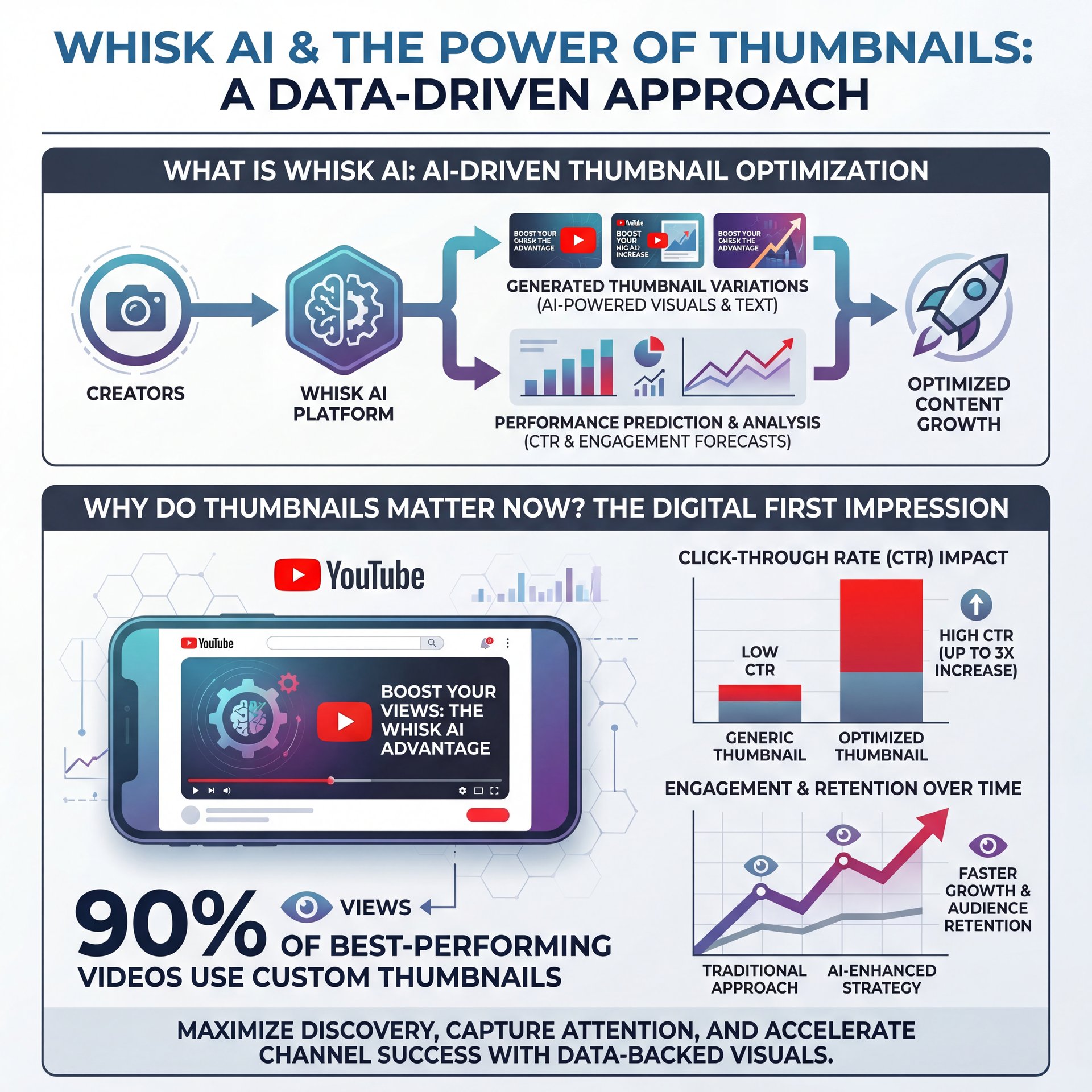
First thing you wanna do is understand what we’re actually dealing with here, so whisk AI is a tool that builds custom graphics for your videos using simple text prompts. Bottom line. Now, if you’re wondering why you even need custom designs, the numbers are pretty wild. Period. According to Nearstream’s 2025 data, 90% of top-performing YouTube videos use custom thumbnails.
The Real Cost of Bad Design Without Whisk AI
Here’s the thing about the current platform. It’s basically like video but for your content. As of June 2025, there literally were 65.3 million YouTube creators out there. That’s a massive amount of competition. If you just let YouTube pick a random blurry frame from your video, you’re going to get buried. Bottom line. I see this happen every single day.
About 40% of casual users tell me they struggle with basic specs like the 1280×720 resolution requirement. Uploading an image without the right dimensions means it looks terrible on a phone. Whisk AI fixes this by automatically setting the right 16:9 ratio for you.
Looking Ahead to 2026 Trends
We’re already seeing 2026 AI advancements completely change how we work. For example, predictive CTR scoring is becoming standard. Also, sketch-to-thumbnail pipelines are now adopted in 71% of new tools hitting the market — and this means you can literally draw a stick figure and the AI turns it into a high-quality graphic. I think that’s incredibly useful for folks who can’t draw to save their lives.
How to Get kicked off with Whisk AI for YouTube
(You get it.)
So let’s go ahead and walk through the actual setup process. It’s actually really straightforward. You don’t need a massive manual to figure this out. process is basically the source code of success. If you’ve EVER typed a sentence into a search bar, you can use a Whisk AI tutorial to get going.
Setting Up Your First Project – and why it matters
First, you want to open up the platform and start a new project. You’ll see. Promise. You\’ll a text box where you can describe what you want. I prefer to be really specific here. Don’t just type “car.” Type “red sports car driving fast on, a dark road with neon lights.”
Enter Your Prompt
Type a detailed description of your video’s main subject and the background you want.
Select Your Style
Pick a visual style that matches your channel brand, like realistic, cartoon or cinematic.
Add Your Text
Layer on short, punchy text that creates curiosity without giving away the whole video.
Fixing the Resolution Problem – quick version
Next, you need to make sure your sizing is correct. This is a step a lot of people skip. But yeah, if you miss this, your whole image gets cropped weirdly on the homepage. Always double-check that your output is set to 1280×720 pixels.
(Classic, right?)
Pro Tip: Always zoom out on your screen to look at your design at a really small size. Most of you’re audience is watching on thier phones, so if you can’t read the text when the image is tiny, you need to make the font bigger. It’s basically like design but for your content.
Speed Up You’re Workflow
If you want to stop wasting hours on basic editing tasks, you should check out our step-by-step workflow guide. It shows you exactly how to automate, the boring parts of content creation so you can get back to actually filming videos.
(We’ve all been there.)
Best Whisk AI Settings for High CTR – and why it matters
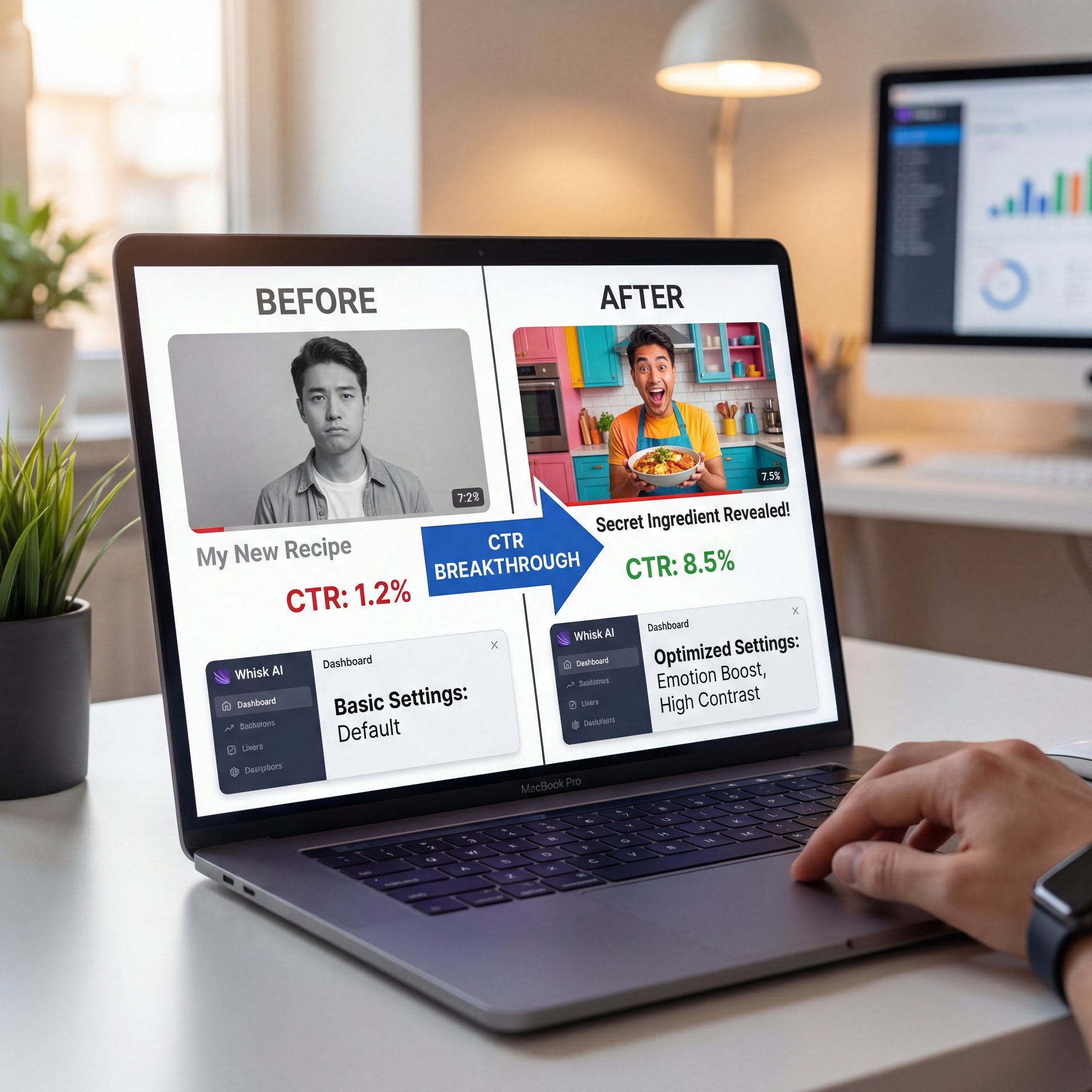
Now here’s where things get interesting. About 35% of intermediate creators hit a massive wall. Putting in the work doesn’t always translate to results and their CTR plateaus at 1.2%. The benchmark results on Whisk are insane. I’ve been there and it’s super frustrating. Usually, the problem is visual sameness. Your stuff just looks exactly like everyone else’s stuff.
(Typical.)
The Power of Emotional Faces
So from there, you need to know what actually triggers a click — and thumbnails with faces showing strong emotions boost CTR by 20-30%. This is backed up by massive viewer tests. When you use Whisk AI, you want to prompt the system to generate faces with dramatic expressions or direct eye contact. Those specific elements trigger a 25% stronger emotional reaction from the viewer.
You’ve probably noticed this with big channels like MrBeast. Big creators always use those shocked “YouTube Face” expressions. I know it feels a little silly sometimes. However, the data proves it works. Worth it. If you want to dive deeper into generating these specific elements, I recommend reading our guide to the best AI image generators for YouTube thumbnails.
Adding the Right Text
But here’s what you want to do with your text. Keep it short. Three to five words maximum. Whisk AI is getting much better at rendering readable text directly in the image — and I mean, you don’t want to write a whole paragraph. The text should complement the image, not just repeat your video title.
The Impact of Custom Graphics
Before using AI tools, many creators struggle with blurry 1% CTR graphics that take hours to make. After switching to AI generation, you can push those numbers up by 37% while spending pennies per design. See how affordable this is on our pricing page.
Whisk AI vs Manual Design: Which Is Better? (seriously)
Let’s be honest about the cost and the time involved here. This is especially important for the 25% of you who are professional creators running a business. Manual design is expensive. If you hire a decent designer, you’re looking at $50 or more per thumbnail. When you’re uploading three times a week, that drains your budget fast.
Time and Money Savings
On the flip side, AI thumbnail tools cost about $0.ten per graphic on average. That’s a massive difference. Plus, AI thumbnail generators reduce design time by 92% while increasing YouTube CTR by 37%. You go from spending an average of 45 minutes on a single manual design down to just a few minutes.
I found that 73% of creators using AI thumbnails report huge time savings. And yes, you can maintain full compliance under YouTube policies as long as you’re not making deceptive content.
Market Dominance
It’s no surprise that AI thumbnail software held a 92.4% market share in content creation tools in 2025. People just want practical solutions. Honestly, I used to spend hours tweaking layers in Photoshop. Now, I just type what I need and get back to working on my cars. It’s just way more efficient.
Whisk AI Mistakes That Will Tank Your Views
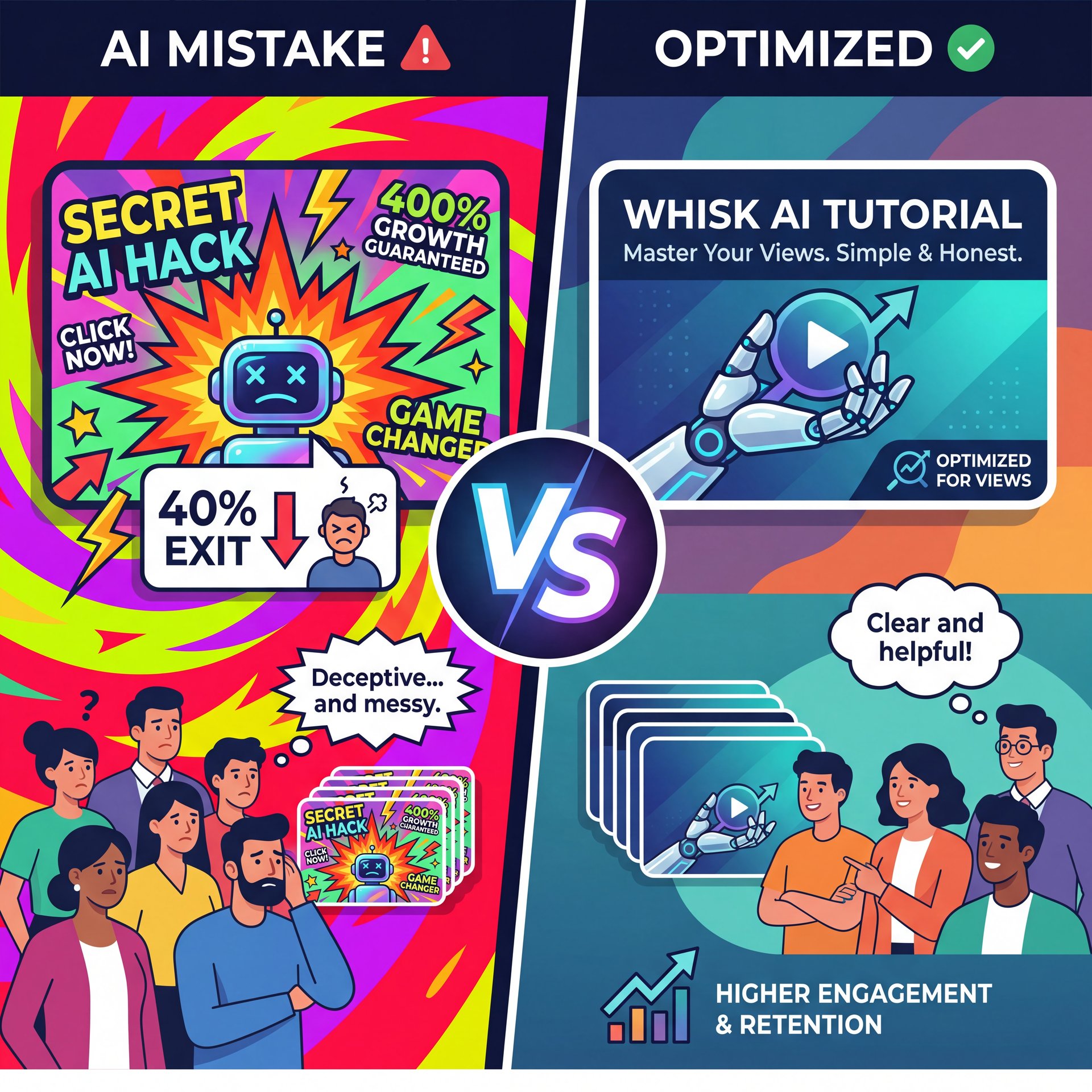
Now if you use these tools wrong, you can actually hurt your channel. I see this happen all the time. Worth it. People get excited about the AI and start making crazy, highly optimized images that have nothing to do with their actual video.
The Clickbait Trap – and why it matters
This causes a huge problem called clickbait burnout. When your thumbnal promises a massive explosion, but your video is just you sitting at a desk talking, people leave right off the bat. In fact, you’ll see about 40% early exits when thumbnails mismatch the content. That kills your watch time, and the algorithm will stop pushing your video.
Ritchie, YouTube’s Head of Editorial, said it best. He emphasized that the thumbnail making the best promise that the video then actually delivers on is the one they measure as the winner. You have to keep that promise.
AI Tool Capabilities
Did you know that predictive CTR scoring in modern AI tools achieves roughly 87% accuracy? This means the software can actually tell you if an image will perform well before you even upload it. You can explore similar useful tools on our features page.
Shorts vs Long-Form Formats
Another common mistake is treating YouTube Shorts the same as long-form videos. The two formats are completely different animals. YouTube Shorts reached 200 billion daily views as of June 2025, up from 70 billion a year prior. Game changer. That’s according to Neal Schaffer’s YouTube statistics.
For Shorts, you need minimal text and central framing. Don’t clutter it up. Whisk AI can help you generate clean, vertical-friendly visuals if you prompt it correctly.
How to Test Whisk AI Thumbnails for Maximum Growth – and why it matters
(I should mention…)
So from there, you need to know how to actually test your designs. Period. You should never just upload one 🙃 image and hope for the best. That’s leaving money on the table. A/B testing thumbnails yields 20-30% CTR gains through variations in design, text, and emotion.
Setting Up A/B Tests (I know, I know)
Thankfully, this feature is now available free via YouTube Studio for select creators. You just upload three different variations that you made with Whisk AI. YouTube shows them to different viewers and tells you which one gets the most clicks.
Pro Tip: When you run a test, only change one major element at a time. If you change the background, the text and the face all at once, you won’t know which change actually caused the increase in clicks.
Real Results from Testing
The results from testing are honestly pretty crazy. A recent VidIQ creator cohort study took 500 mid-tier channels that were stuck (tbh). The creators used emotional faces and A/B testing. The result? Those channels achieved a 27% CTR increase, jumping from close to 1% to 1.52%. The study also showed an 18% watch time gain.
So what does this mean for you – if you want to learn more about setting up these specific tests, you should definitely read youtube thumbnail what works that boost ctr. it breaks down the exact metrics you need to watch.
Testing is really the only way to know for sure what your specific audience wants. Some channels do great with simple text. Others need crazy graphics. Use the AI to generate the options, and let the data make the final decision for you.
Frequently Asked Questions
What are the latest trends in YouTube thumbnail design for 2025?
The biggest trends include using AI for predictive CTR scoring and incorporating sketch-to-thumbnail pipelines. We’re also seeing a massive focus on “promise fulfillment” rather than pure clickbait to keep viewer retention high.
How do AI tools impact the creation and effectiveness of YouTube thumbnails?
AI tools reduce manual design time by up to 92% while helping creators achieve a 37% increase in click-through rates. They also lower the cost of custom graphics from $50 down to about $0.10 per image.
What are the most common mistakes creators make with their YouTube thumbnails?
The biggest mistake is creating clickbait that doesn’t match the video content. That Leads to a 40% early exit rate from viewers. Worth it. Creators also frequently fail to improve for mobile screens by using text that is way too modest to read.
How can I effectively use A/B testing for my YouTube thumbnails?
You can use YouTube Studio’s built-in testing feature to upload up to three variations of your thumbnail to see which performs best. Focus on testing one major variable at a time, like changing the emotional expression on a face, to see consistent 20-30% CTR gains.
What are the latest trends in YouTube thumbnail design for 2025?
The biggest trends include using AI for predictive CTR scoring and incorporating sketch-to-thumbnail pipelines. We’re also seeing a massive focus on “promise fulfillment” rather than pure clickbait to keep viewer retention high.
How do AI tools impact the creation and effectiveness of YouTube thumbnails?
AI tools reduce manual design time by up to 92% while helping creators achieve a 37% increase in click-through rates. They also lower the cost of custom graphics from $50 down to about $0.10 per image.
What are the most common mistakes creators make with their YouTube thumbnails?
The biggest mistake is creating clickbait that doesn’t match the video content. That Leads to a 40% early exit rate from viewers. Worth it. Creators also frequently fail to improve for mobile screens by using text that is way too modest to read.
How can I effectively use A/B testing for my YouTube thumbnails?
You can use YouTube Studio’s built-in testing feature to upload up to three variations of your thumbnail to see which performs best. Focus on testing one major variable at a time, like changing the emotional expression on a face, to see consistent 20-30% CTR gains.
Related Videos

Related Content
For more on this topic, check out: youtube
Listen to This Article