Table of Contents
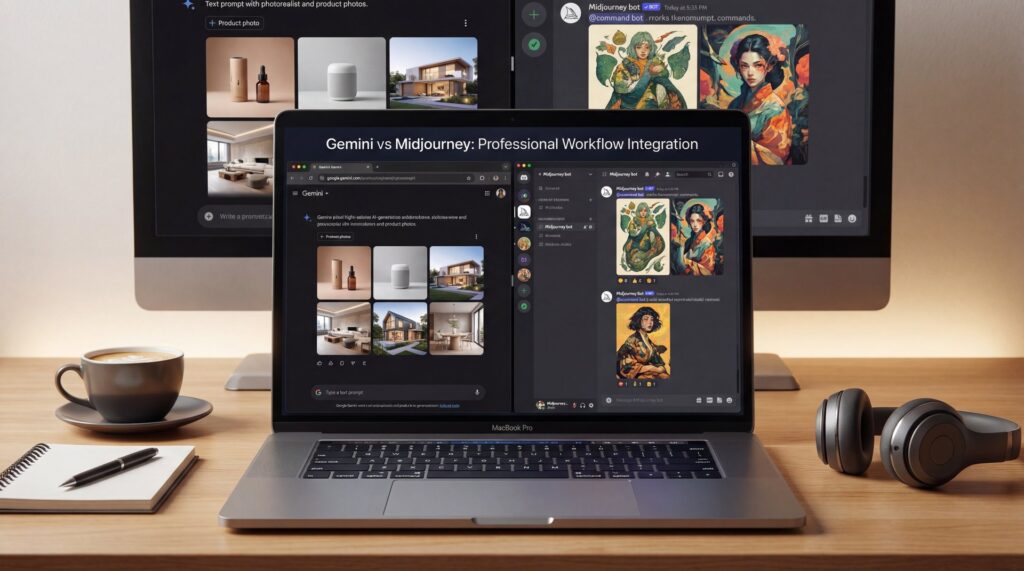
What if you’ve been asking the wrong question about AI art tools this whole time? Instead of “Which one is better—Gemini or Midjourney?” the pros I work with keep asking, “Where does each one shine in my workflow?” That tiny shift—from winner-takes-all to team sport—is the real Gemini vs Midjourney secret. And in 2025, it’s not even much of a secret among power users anymore.
The numbers tell a compelling story here. For instance, 90% of professional AI media creators turn to Midjourney for at least 90% of their initial image generation work. Though they often switch to other options, like Google’s Imagen 3 Pro through Gemini, when they need better character consistency and text rendering. At the same time, Gemini has shown impressive growth. It attracted 206.4 million unique visitors in October 2025, which marks a 69% increase from August. Plus, it logged 4.52 pages per visit compared to ChatGPT’s 3.84. These figures highlight stronger user engagement, so Gemini vs Midjourney isn’t about competition but about complementing strengths in a workflow.
Why pros treat Gemini vs Midjourney as a team-up

Let’s be real. You use Midjourney when you want that instant, “wow, save that” aesthetic. Its style variety and speed make it a creative compass. In Fast Mode, Midjourney V7 clocks 9–22 second generations depending on server load. That’s exactly why it’s irresistible for exploration.
However, if your storyboard needs the same character across five scenes holding a coffee cup and reading a subway sign—in English, Japanese or Spanish—Midjourney still struggles. It can’t keep names consistent and text legible in the frame. That’s where Imagen 3 Pro enters like a steady-handed cinematographer.
(Here’s the kicker.)
The 2025 shift: multi-image fusion
That’s where things shifted in 2025 with Google’s updates. Imagen 3 Pro stepped up big. It now lets users blend up to 14 input images while maintaining consistent rendering of 5 people across scenes. This addresses key issues in storytelling like matching outfits, props, and lighting from one frame to the next. Plus, it handles text rendering right in the image, making multilingual elements legible without extra effort.
If you’re just a casual user, this means fewer frustrating “why does my character keep morphing?” moments. For creators, it means you can lock in, you know, a character in frame 1 and still recognize them in frame 30. For professionals, this translates to fewer tweaks, fewer re-renders, and ultimately, lower cost per deliverable with more predictable timelines.
The hybrid advantage
Pros run a simple split: begin with Midjourney when you want variety fast. Then pivot to Imagen 3 Pro when you need continuity and clean text. Finish in your upscaler or editor of choice for polish. Measured end to end, hybrid workflows improve production efficiency by 30–40% compared to single-tool reliance. You’re not chasing perfection in one tool—you’re assigning each step to the tool that’s best at it.
Pro Tip: Treat Midjourney like your concept artist, you know, and Imagen 3 Pro like your continuity supervisor. When you define roles for tools, your prompts get sharper and your iterations get faster.
What changed in 2025—and why it affects your workflow
The year 2025 didn’t just bring “one more model” to the table. Instead, it pushed things forward in two key directions at once: much better reasoning, and improved visual reliability. Gemini 3 Pro rolled out with some seriously strong benchmark results. It hit 72.1% on SimpleQA Verified and 81% on MMMU-Pro. And yes, Andrej Karpathy calling it “clearly a tier 1 LLM” really matters, because it signals true parity at the top of the stack.
On the image side, Imagen 3 Pro’s 14-image fusion became the quiet workhorse update. Being able to feed a mini board—face angles, outfit references, prop close-ups—into a single request and get coherent results across five characters is exactly the upgrade narrative creators needed. Meanwhile, Midjourney pushed forward on style control and fidelity with its V8 roadmap, though text and multi-scene character locking remain gaps.
Engagement data signals workflow depth
Gemini’s popularity isn’t just hype. It drew 206.4 million unique visitors in October 2025, showing 69% growth. Plus, it logged 4.52 pages per visit and a 28.96% bounce rate, easily beating ChatGPT’s 3.84 and 31.18%. So it’s clear users are engaging deeply. This pattern supports workflows that involve multiple steps, from initial ideas to final production.
:::did_you_know
🤔 Did You Know? Engagement and Speed Reality
Gemini logged 4.52 pages per visit in October and a 28.96% bounce rate, easily outpacing ChatGPT’s 3.84 and 31.18%. Midjourney V7 typically churns out images in 9–22 seconds in Fast Mode, which is precisely why pros start their ideation there. Curious how these stages fit into a full production flow? You can explore how we structure creative passes on Banana Thumbnail.
:::
(Where was I?)
The hybrid workflow that saves 30–40%
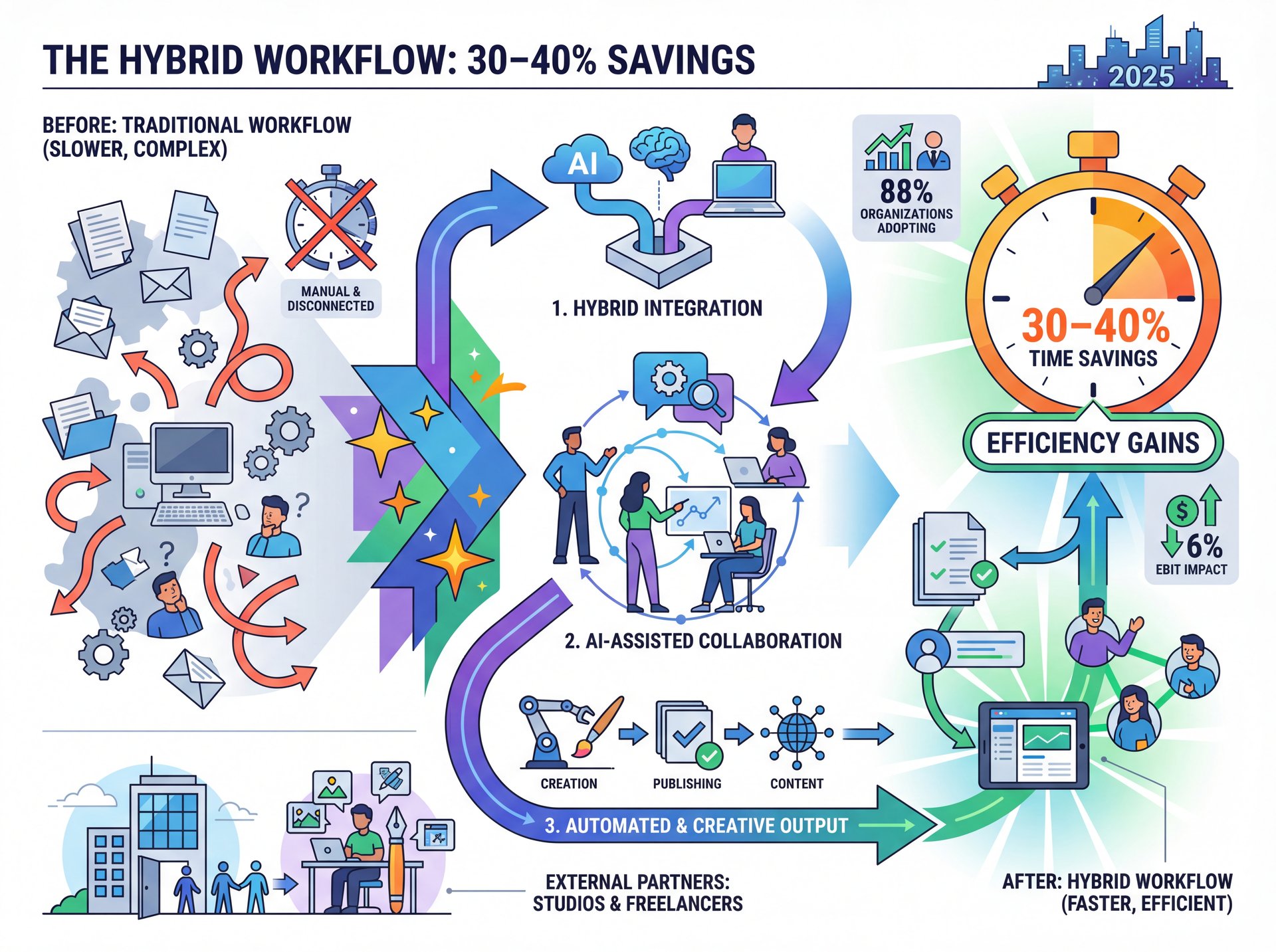
Let’s put the “team sport” into steps. If you want consistent characters and typography without losing Midjourney’s aesthetic spark, run this exact flow. It’s not theory—it’s what studios and freelancers adopted throughout 2025 because it shaved real hours off delivery.
Explore With Style in Midjourney
Generate 12–24 variations using your style references and mood keywords. Save your top 3–5 favorites and make notes of common traits like lighting, color palette, or wardrobe cues.
Lock Characters in Imagen 3 Pro
Provide 4–ten reference faces/outfits (you can use up to 14 inputs in total) and clearly specify character names and their relationships. Request 2–3 different scenes to thoroughly test continuity and various camera angles.
Finish and Polish
Send your final images through your preferred upscaler or editor. If you need text to be absolutely perfect, either render it directly in Imagen 3 Pro or carefully layer it in during post-production. Finally, export the images in the correct sizes for your platform.
Why it converts time into ROI
There’s one enterprise reality people skip: 88% of organizations use AI regularly. But only 6% actually see 5%+ EBIT impact (Source: McKinsey’s 2025 State of AI). It’s not the tool; it’s the workflow. When you standardize who does what—Midjourney for the “what ifs,” Imagen 3 Pro for the “keep it consistent,” and your editor for the final five%—you move from play to process.
What to watch out for
Don’t try to make, you know, a single prompt too perfect too early on. Keep at least two different style branches alive untill your client or your audience clearly signals their preferred winner. Also, if you need multilingual signage or product labels inside the image frame, definately plan for that in Imagen 3 Pro before you commit to a full sequence.
Pro Tip: Save your “hero” character sheet early—include front, 3/4, profile views, key expressions and outfit details. Then reference this pack across every Imagen 3 Pro request to maintain identity.
Cost math: image pricing and free tiers
Let’s talk dollars, because for professionals this matters as much as pixels. On a Standard Plan ($30/month), Midjourney’s cost works out to about $0.033 per image. Gemini’s API list pricing averages about $0.039 per image in similar conditions. That appears higher at first glance. But Gemini’s free tier quotas make it cheaper for sub-100 image workflows each month.
The right tool per budget scenario
(Stay with me.)
For casual users generating fewer than 100 images a month,—wait, no— Gemini’s free access is ideal. It lets you experiment with ideas and text elements before committing to a paid option. Creators handling 100–400 images benefit from Midjourney’s speed for bulk ideation. Then they shift to Imagen 3 Pro to minimize revisions on characters and text, which lowers the effective cost per usable image. Professionals dealing with 400 or more images should lean on the hybrid setup. Midjourney covers exploration affordably, and Imagen 3 Pro cuts down on costly do-overs.
The hidden cost: re-renders
Midjourney’s text weakness often forces a second pass in post. Imagen 3 Pro’s direct, multilingual text rendering means fewer Photoshop layers and faster turnaround on localized assets. Over a quarter, that time delta often beats a small per-image premium.
:::common_mistake
⚠️ Common Mistake: Forcing Text in Midjourney
Trying to embed brand names, dates, or multilingual copy inside Midjourney images leads to rework. Route text-critical frames through Imagen 3 Pro or plan your type in post. See how we split type work in real projects in our workflows.
:::
Character consistency and text rendering compared
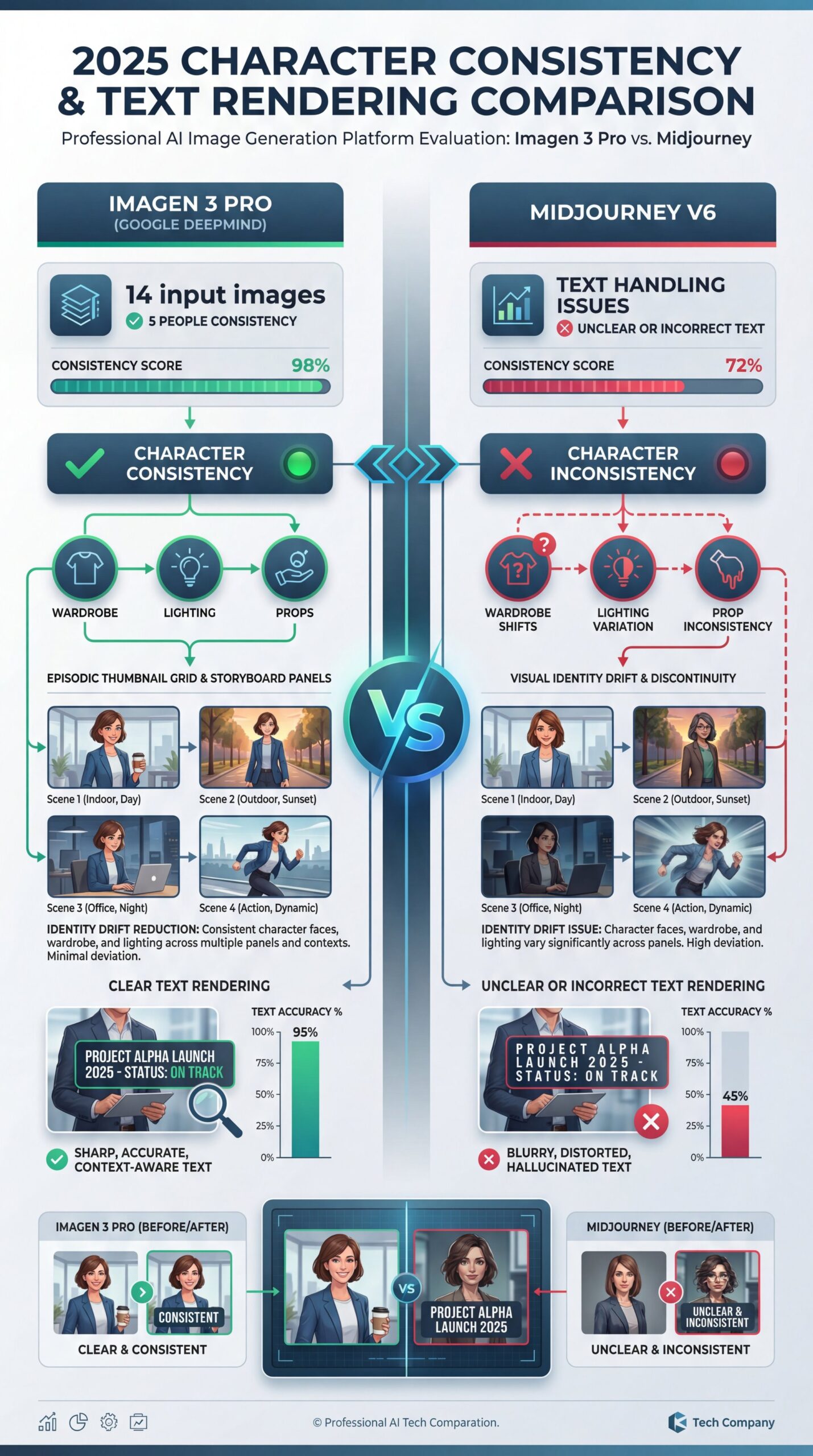
Character consistency is the number-one pain point for storyboards, comics, ads with recurring talent, and episodic thumbnails. In 2025, Imagen 3 Pro’s ability to accept up to 14 input images while maintaining consistent rendering of five people across scenes changed the math. It reduces identity drift and lets you carry wardrobe, lighting style, and prop continuity from panel to panel.
Text handling: the clear distinction
The gap in text handling is another clear distinction. Midjourney often produces unclear or incorrect text. This is – well, it’s especially true with specific names or multiple languages. Imagen 3 Pro, however, generates legible, multilingual text right within the image. That’s crucial for designs involving packaging, signs, or overlays where text is integral.
Reference strategies that work
Provide face angles. Give your character a name. Feed 6–10 shots covering expression range and hair variance. Attach 1–2 environment references so lighting is predictable. Then ask for 2–3 scenes that vary camera distance (medium, close-up, establishing) to verify consistency before you go wide.
:::quick_tip
💡 Quick Tip: Lock the Face, Then the World
In Imagen 3 Pro, send at least 6 facial angles and 2 outfit references, then add a room or enviroment cue. Ask for the same character in two different camera distances to test continuity. We keep a ready-made prompt scaffold in our workflow guide.
:::
Who should start where?
If you’re casual and the Discord interface feels chaotic, you’re not alone. Many folks are confused by command syntax and fast-scrolling feeds. Start with Gemini’s friendlier UX to try text-in-image posters, product cards or moodboards. True story.. Then, when you’re ready for deep style exploration, hop into Midjourney for variation sprints. Bring your favorite 3–4 looks back into Imagen 3 Pro to lock characters and text.
For creators, the real hurdle is 😬 achieving reliable characters across a series of images, complete with readable text. That’s why so many start their ideas in Midjourney for quick vibes. Then they refine in Imagen 3 Pro to avoid endless tweaks. This method works well for thumbnails, decks, or any sequenced content where continuity keeps things professional.
Professionals, your challenge is scale and ROI. You require cost-effective, reliable image generation with clear impact on timelines and margins. Remember the industry baseline: 88% of organizations use AI regularly, yet only 6% reach five%+ EBIT lift. The difference isn’t the model, it’s your process discipline. That means version control, reference packs, prompt libraries, batch renders, and a standing rubric for when to switch tools.
📋 Quick Reference: When to Use Which
- Midjourney: fast style exploration, composition trials, mood discovery
- Imagen 3 Pro: character consistency, multilingual text-in-image, multi-scene continuity
- Final polish: upscaling, retouch, export sizes
Need a ready-made pipeline to copy? See the templates on Banana Thumbnail Features.
Frequently Asked Questions
What’s the best tool for beginners confused by Discord?
Start with Gemini for friendlier UX, then use Midjourney for style exploration once you’re comfortable.
How does pricing compare per image?
Midjourney’s Standard Plan averages ~$0.033/image; Gemini’s API is ~$0.039/image, but Gemini’s free tier is cheaper under 100 images.
Which tool wins at character consistency across scenes?
Imagen 3 Pro—its 14-image fusion can keep up to 5 characters consistent across shots.
Why is text rendering such a big deal?
Midjourney struggles with legible, multilingual text; Imagen 3 Pro can place readable copy directly inside images.
What’s the pro workflow in 2025?
Explore in Midjourney, finalize consistency and text in Imagen 3 Pro, then upscale and export.
Does tool choice really change business impact?
Only if paired with process discipline—88% use AI, but just 6% see five%+ EBIT lift without workflow redesign.
Is Gemini actually competitive with top models now?
Yes—Gemini 3 Pro posts 72.1% on SimpleQA Verified and 81% on MMMU-Pro, and is seen as a tier-1 LLM.
How fast is Midjourney for ideation?
Fast Mode returns images in about 9–22 seconds depending on load, ideal for variation sprints.
If you want to see this in action, check out this helpful tutorial:
Pro Hybrid Workflow: Midjourney to Imagen 3 Pro
Related Videos
Related Content
For more on this topic, check out: midjourney
Listen to This Article