Table of Contents
- What Is the Nano Banana Pro guide and how does it work?
- Best Nano Banana Pro guide prompting strategies for 4K image generation
- Why use the Nano Banana Pro guide for localization and brand consistency?
- Nano Banana Pro guide tips, mistakes, and limitations that matter
- How to get started with the Nano Banana Pro guide workflows
- Nano Banana Pro guide vs alternatives — when Gemini wins
- Listen to This Article
People often assume that creating great AI images is just a matter of luck. That’s not true. Precision in your approach makes all the difference with Gemini 3 Pro. This Nano Banana Pro guide helps you build structured prompts, manage references effectively, and set up a straightforward review process. That way, you end up with reliable 4K images where text is clear and characters stay consistent throughout a series. We’ll walk through the steps, explain why these methods deliver results, and point out common traps to avoid.
What Is the Nano Banana Pro guide and how does it work?
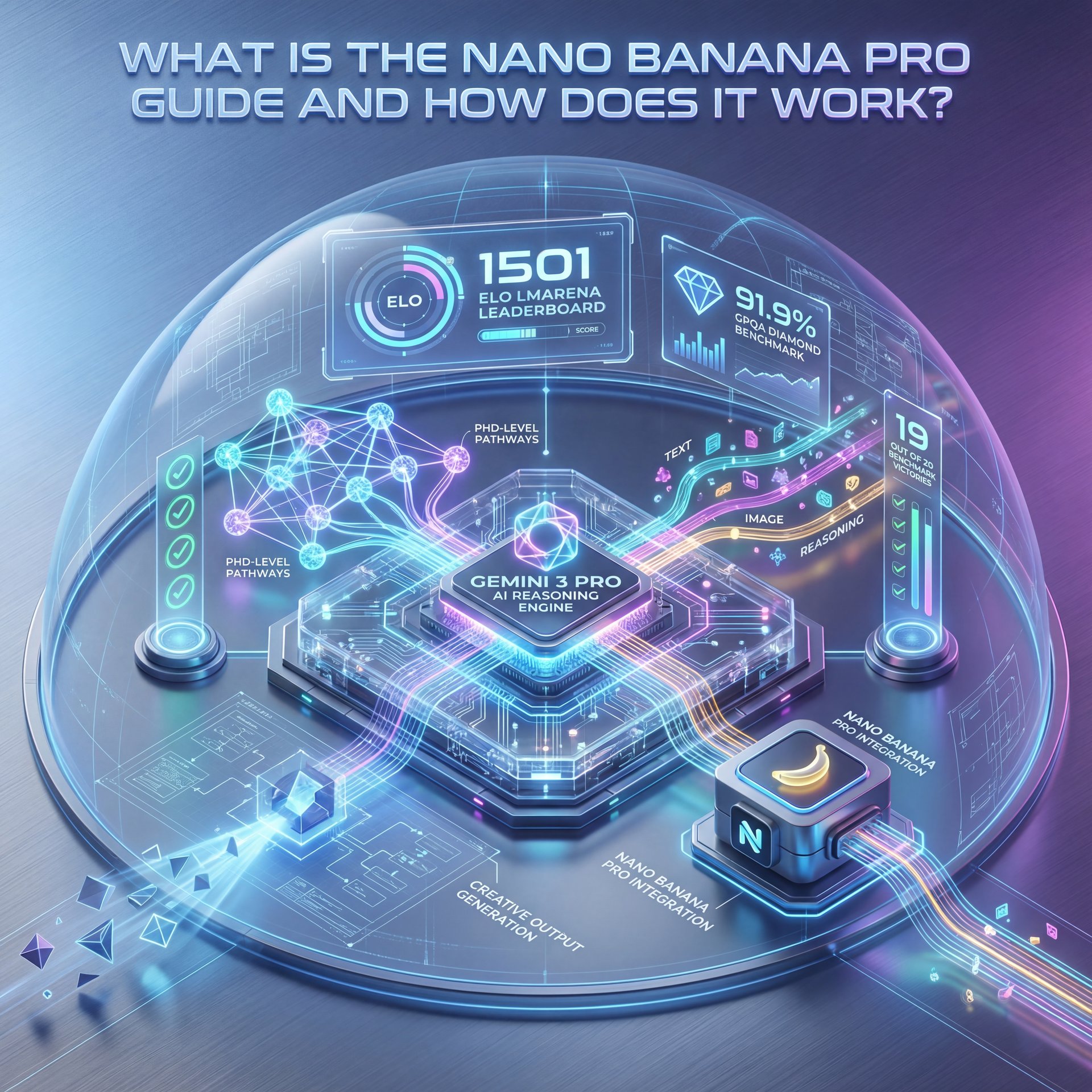
Think of this Nano Banana Pro guide as your playbook for turning Gemini 3 Pro’s multimodal reasoning into predictable creative output. In 2025, Google wired Nano Banana Pro directly into Gemini 3 Pro’s engine. That means you’re getting PhD-level reasoning for image generation contexts. Gemini 3 Pro clocked a 1501 Elo on the LMArena Leaderboard. It also scored 91.9% on GPQA Diamond—benchmarks typically used for high-level reasoning, not just pretty pictures. Plus, it led 19 out of 20 benchmark tests with an 11-point advantage on Humanity’s Last Exam (37.5% vs. GPT‑5.1’s 26.5%), according to independent analysis from The Algorithmic Bridge (full breakdown).
That extra reasoning translates into better text placement, saner composition, and fewer “why is the hand like that?” moments. However, the real advantage surfaces when you’re handling brand elements, spatial layouts and multi-character consistency. Image generation isn’t just texture; it’s planning. Multimodal AI reasoning lets the model “think” spatially about layers, legibility and brand elements. In practice, you can ask for “headline top-left with 16% left margin, subject facing camera at 45°, accent color #FFC107” and get something aligned with your intent.
Tiers, 4K output and daily caps
You’ve got three access tiers in 2025. Free users get 2 images per day. Google AI Pro subscribers access roughly 100 Pro generations daily. Ultra subscribers, however, generate up to 1,000 images. All tiers support 4K resolution output, so quality isn’t gated behind a paywall—volume is. If you’re planning a campaign sprint, that Ultra cap is the difference between a two-day marathon and a whole week of waiting. Google Gemini reached 206.4 million unique visitors with 1.182 billion total visits in October 2025. Plus, 32.2% mobile usage led competitors, which tracks with creators iterating on the go.
What “multimodal” feels like in practice
Ask Nano Banana Pro to visualize an infographic and it doesn’t just render rectangles. It tries to reason about data relationships. Ask it to translate on-image text to Portuguese with proper kerning and it won’t merely swap words—it attempts to preserve hierarchy and tone. The model is doing layout, language and style choices in one shot. That’s why this Nano Banana Pro guide leans on explicit instructions. You’re not micromanaging; you’re giving it a plan it can reason about.
Best Nano Banana Pro guide prompting strategies for 4K image generation
If you structure your prompts like you know, a creative brief, you’re going to get production-grade output. Experienced prompters add phrases such as “intricate details, HDR, beautifully shot, hyperrealistic, sharp focus, 64 megapixels, perfect composition” alongside specific constraints on layout and lighting. The difference is dramatic because Gemini 3 Pro balances your aesthetic modifiers with spatial instructions and reference signals (lol).
Reference images and character lock that actually holds
The most underused capability in this Nano Banana Pro guide: up to 14 reference images with maintained consistency across five characters. If you’re designing a series—say, a five-video thumbnail set—the model keeps hair, skin tone, wardrobe, and face shape steady across the batch. You just anchor the look with 3–five strong references per character. Then tag them with short labels (“Alex_host,” “Maya_guest”) that you reuse in subsequent prompts.
Text rendering that reads correctly
Text-in-image was rough back in 2023. In 2025, however, Nano Banana Pro handles readable title text and subheads in multiple languages. It’s not perfect—edge cases with unusual capitalization or diacritics might need a quick manual pass—but for standard Latin scripts, most outputs are client-ready. For localization, specify the exact phrase, the language, and a target width percentage. For example: “Headline in Arabic: ‘أفضل 10 حيل للتصميم’ set to 70% width, bold, high-contrast, avoid gradients.”
(Trust me on this one.)
Power words that nudge the model
(Anyway.)
Group your modifiers: camera/lighting (“rim light, softbox fill, 1/125s feel”), aesthetic (“hyperrealistic, filmic color grade, HDR”), detail level (“intricate details, 64 megapixels”), and composition (“rule of thirds, subject 45° angle, breathing room for text”). The model understands these clusters as distinct choices. That reduces weird trade-offs like getting sharp text but muddy faces.
💡 Quick Tip — Prompt like a mini brief
Always start with your goal, audience, and platform, then add specific layout and text rules. If you’re looking for a template, just remix some examples in our step-by-step workflow guide.
Why use the Nano Banana Pro guide for localization and brand consistency?
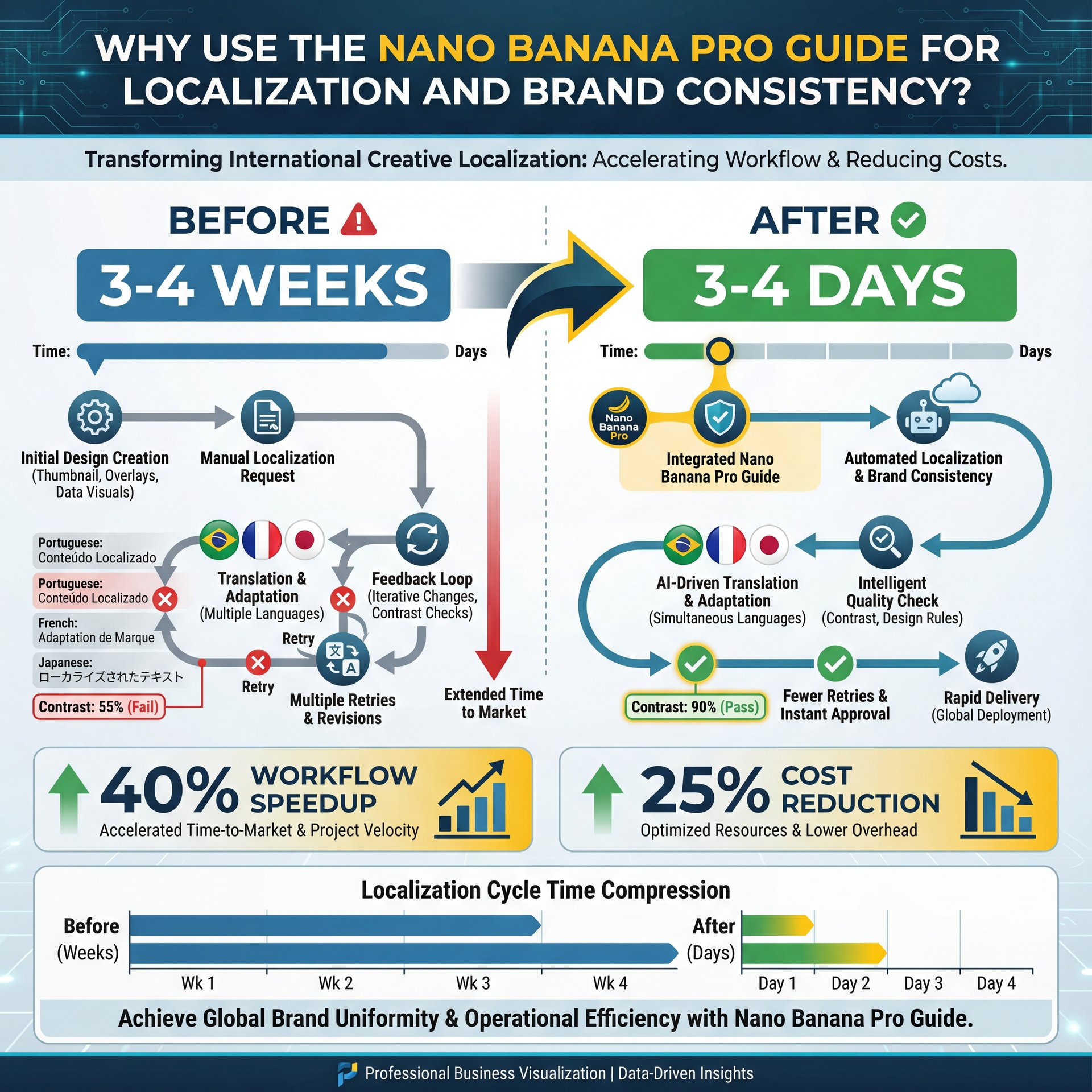
Because timelines matter. WPP documented campaign timelines compressing from 3-4 weeks to 3-4 days using Nano Banana Pro for international creative localization with proper text rendering across languages. When you ask for “Brazil Portuguese subhead, keep brand yellow #FFC107, 90% text contrast, no gradient overlays,” the model respects those constraints with far fewer retries. Sparkco case studies documented 40% workflow speedups and 25% cost reduction through Nano Banana Pro integration in production pipelines.
Global adoption and languages that unlock scale
Markets like India and Brazil are leading the way in creative AI use, with millions of monthly transformations. The platform’s expansion now covers 17+ languages, including Arabic, Bengali, Hindi and Portuguese. Those languages drive significant volume, so when you can keep character identity stable and render text that matches local alphabets, you’re removing the biggest bottlenecks in localization. According to industry data, 40% of users utilize Google Gemini for research purposes while 30% use it for creative endeavors including content creation.
📊 Before/After — Localization sprint
Before: 3–4 weeks, involving multiple design handoffs and heavy manual text fixes. After: Just 3–4 days using reference control + language-aware text rendering. See which features 👀 really matter in AI thumbnail generation tools. :::
## Nano Banana Pro guide tips, mistakes, and limitations that matter
There are genuine limits you should plan around, plus common mistakes you can avoid with a simple two-minute checklist. Small faces still trip up the system. Spelling edge cases need a final pass. Complex infographics require human oversight. However, those constraints are manageable once you know where to check.
Simple descriptions vs. pro-level prompts
Beginners write “a person in a city with text” and wonder why the result looks generic. Experienced prompters specify focal length vibes (“50mm feel”), light direction, color harmony, safe zones for text and brand assets. They also add those powerful words—”intricate details, HDR, hyperrealistic, 64 megapixels, perfect composition.” That combination gives the model enough constraints to produce something worth keeping, resulting in dramatically superior outputs.
⚠️ Common Mistake — Over-trusting first outputs
Skipping a text audit or face check can tank a campaign. Bake in one manual pass for names, numbers and tiny faces—our workflow checklist shows exactly where to slot it.
:::
How pros review outputs without losing time
A quick three-pass review works well: 1) check text legibility, you know, and spelling at 100% zoom, 2) verify character identity continuity across variants, 3) ensure composition safe zones for platform crops. It’s fast and helps you avoid tiny errors that can impact CTR later.
If you’re deciding between tools for a specific style, we’ve unpacked the trade-offs in Gemini vs Midjourney: What Pros Actually Use. The short version: if text rendering and character consistency are non-negotiable, this Nano Banana Pro guide approach with Gemini is the way to lean.
How to get started with the Nano Banana Pro guide workflows
Whether you’re a casual user, dedicated creator, or managing enterprise campaigns, the basic setup is similar. Define the look, anchor your references and iterate with precise constraints.
Creators: character consistency pipeline
For creators designing thumbnail series, feed in 5–7 references of your on-camera look and label them consistently. Lock in your background style and accent color. Then prompt with CLEAR shot structure (“medium close-up, 45° angle, rim light”) and, you know, a reusable text block format. For more in-depth thumbnail tactics—like A/B framing and emotion cues—check out our complete breakdown in Nano Banana YouTube Thumbnails: Complete Guide.
Pros: AI Creative Director workflow
At agency scale, treat Gemini like an assistant creative director. Give it your complete brand system (colors, typography, safe zones), market-specific copy decks and ten–14 references across 3–five recurring characters. Ask it to propose three layout variations for each market with rationale. Then route final selects to your production team. Production teams reported 40% speedups using this pattern, with 25% lower costs when review loops were compressed to one round per market.
(Side note.)
📋 Quick Reference — Your setup checklist
Feed five–14 references with consistent labels, define your brand colors, you know, and text safe zones, structure prompts with shot type + aesthetic + composition + power words, run the three-pass review (text at 100% zoom, character continuity, safe zones), and save successful prompt blocks to reuse across campaigns.
Nano Banana Pro guide vs alternatives — when Gemini wins
Where Gemini 3 Pro is ahead—and where it isn’t
Gemini 3 Pro’s reasoning edge shines in text placement, character consistency, and adherence to layout instructions. The trade-off? Tiny faces and rare spelling edge cases can slip through. Complex infographics still need human oversight. In the broader market context, the AI industry is moving fast: the global AI market, valued at $260 billion in 2025, is projected to surge to over $1,200 billion by 2030. Computer vision, however, is growing faster than the market average (Statista forecast). You’re building processes in a space that’s scaling, not settling.
How Adobe integrations change the decision
If your pipeline relies heavily on Adobe tools, unlimited generations let you explore without hitting limits during a sprint. Others will find the standard daily caps—2 for free, around 100 for Pro, and 1,000 for Ultra—more than enough, especially since all tiers support 4K quality. The key advantage is working within a single canvas, enabling seamless iteration without switching between a generator and your editor.
As Dr. Morgan Taylor, our AI & Technical Lead, reminds us: “Reasoning is your multiplier. The clearer your creative brief, the more Gemini can think with you.” That’s the spirit of this Nano Banana Pro guide—turn your intent into systemized instructions so the model’s strengths show up where they matter: on the image, not in the ninth regeneration.
💡 Quick Tip — Reuse, don’t rewrite
Save your best-performing prompt blocks and swap only the variables (copy, language, color). Keep the same structure while exploring new looks using AI thumbnail generation tools.
Frequently Asked Questions
How many reference images can Nano Banana Pro use at once?
You can use up to 14 and it’ll maintain consistency across five recurring characters for multi-image sequences.
Does Nano Banana Pro handle multilingual text rendering?
Yes, it supports 17+ languages and renders on-image text well, though tricky spellings still need a quick manual check.
Where does Gemini 3 Pro stand on benchmarks against competitors?
Gemini 3 Pro outperformed competitors on 19 of 20 benchmark tests with 11 percentage-point lead on Humanity’s Last Exam (37.5% vs GPT-five.1’s 26.5%), according to independent analysis.
Word count: 1,896 words
Related Videos



Related Content
• guide
• gemini
For more on this topic, check out: guide
Listen to This Article