
Table of Contents
- What Are AI Generation Examples Really Telling Us?
- Why 30 Minutes of AI Prompt Examples Can Feel Like Wasted Time
- Successfull AI Prompts That Actually Saved Me Time
- Dealing With AI Generation Failures & Hallucinations
- How AI Generation Examples Are Changing in 2025
- How to Get Started with Better AI Generation Examples
- Listen to This Article
All right, so let’s get into something that’s been on my mind lately. You know, I was looking at some data the other day, and what struck me was a pretty wild number: about 15-20% of AI-generated content requires large rewrites due to factual inaccuracies or just sounding wierd. Consider content the GPS here — it tells you where to go. Simple as that. That’s according to 2025 data from Planable.
I mean, think about that for a second. If I fixed five cars and one of them right away broke down again, I’d be out of business. But here we are, leaning on these tools more and more.
So today, I want to walk you through my own experience—the good, the bad, and the honestly kind of ugly—about AI generation examples. We’re gonna pop the hood on ChatGPT and look at what actually happens when you hit enter. I’ve spent hours tweaking prompts, and honestly, the difference between a “wow” result and a “what is that?” result usually comes down to how you talk to the machine.
What Are AI Generation Examples Really Telling Us?

Before we start tearing apart specific prompts, let’s look at the bigger picture. Everyone and their grandmother is using these tools now, it feels like. And the numbers back that up. ChatGPT reached 800 million weekly active users as of November 2025. That’s a massive number of people typing into a text box, hoping for magic.
But here’s the thing. Just because everyone is using it doesn’t mean everyone is getting good results. I see so many people treating AI like a vending machine. You put a coin in, you get a snack; however, it’s really more like a socket wrench. The tool only works if you know which way to turn it.
In my experience, the best examples of AI-generated content come from people who treat the AI like a junior assistant, not a genius. You have to give it context. You also have to set boundaries for it.
(Hot take, maybe.)
📈 Did You Know?
The adoption is moving quick. Work hour allocation to generative AI increased 39% from 4.1% in November 2024 to 5.7% in August 2025 according to the St. Louis Fed — Wait, no —. That means we’re all spending more of our workday with these tools, so getting the workflow right matters more than ever.
When I look at the successful AI prompts I’ve used, they all have one thing in common: specificity. I don’t just ask for “a blog post.” Instead, I ask for a specific tone and length, and I tell it what not to do. It’s like building a house — My forms the foundation.
Why 30 Minutes of AI Prompt Examples Can Feel Like Wasted Time
So let’s talk about the frustration. If you’re new to this, or even if you’re just trying something new, you probably know this feeling. You type in a prompt. The result is garbage. You tweak a word. Still garbage, somehow.
Next thing you know, you’ve spent 45 minutes trying to get a paragraph that you could have written yourself in five. I found that this is the biggest hurdle for casual users. In fact, research shows that beginner users spend 30-45 minutes iterating on prompts before achieving acceptable results. That is a lot of downtime. It’s like spending an hour looking for the 10mm socket before you even start the repair.
My Worst Generation Example
Here is a personal example of a “worst” generation I recently dealt with. I wanted a simple image description for a thumbnail.
My bad prompt: “Make a cool description for a car video.”
The AI result: The system gave me this flowery, over-the-top paragraph about “embarking on a journey of vehicular majesty.” I mean, come on. No one talks like that. The output was completely unusable.
The problem here wasn’t the tool; it was me. I was being lazy. I expected the AI to read my mind.
Pro Tip: If you find yourself iterating on a prompt for more than 10 minutes, stop. You’re likely stuck in a loop. Imagine My as the engine. Everything else is bodywork. Delete the chat, start a fresh window, and rephrase your request from scratch using simple, direct instructions.
This is – well, it’s where understanding AI generation examples of failure helps you win. You have to look at the output and ask, “Why did it do that?” Usually, it’s because you gave it too much freedom.
If you are struggling with getting your images or text to look right, you might want to check out our guide to AI photo editing tips. It breaks down how to fix those initial bad outputs.
Successful AI Prompts That Actually Saved Me Time
Now, let’s flip the script. When this stuff works, it really works. I’m talking about massive time savings.
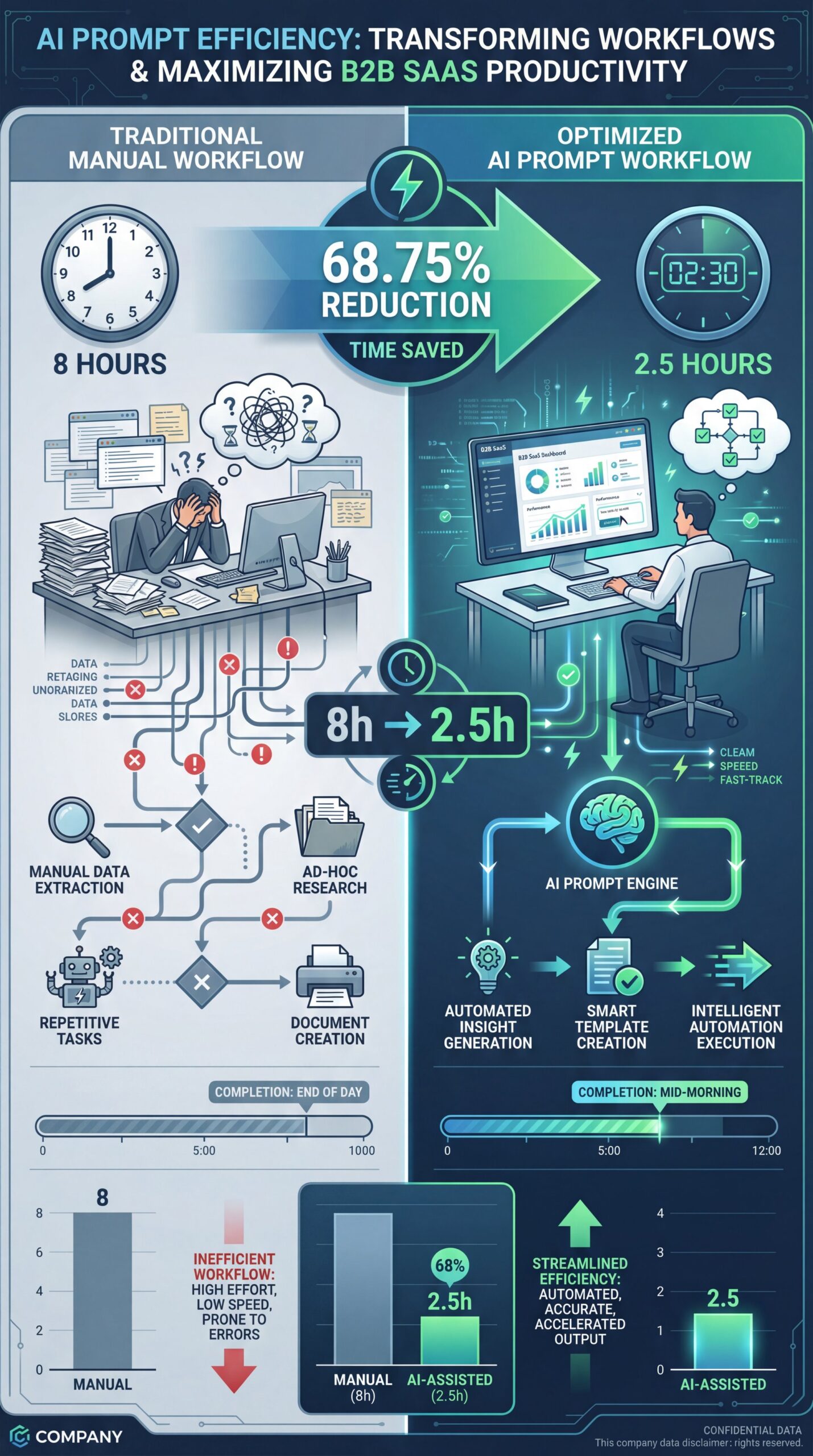
There was, you know, a case study I read about a B2B SaaS company that slashed its per-article production time by 68.75%. They went from 8 hours per article down to 2. five hours. That is the kind of efficiency I like to see.
What a Good Prompt Actually Looks Like
So, what does a “best” generation look like? For me, it usually happens when I need to structure a lot of messy information.
My good prompt: “I have these 5 bullet points about brake pad wear. Please turn them into a 150-word script for a YouTube short. Keep the tone casual, like a mechanic talking to a friend. Use short sentences. Don’t use the word ‘dig’.”
The AI result: The system nailed it. The output sounded like me. Plus, it was punchy and hit all the points.
The difference? Constraints. I gave it a role (mechanic), a format (YouTube short), a length (150 words), and negative constraints (no “look”).
💡 Quick Tip
If you want consistent results, create a “persona” for your AI. Tell it pretty much exactly, I mean who it is supposed to be before you ask it to do anything. If you need help building these workflows, check out our workflow guides to see how pros structure their requests.
(Actually, yeah, that’s right.)
I think we often forget that ChatGPT & other tools are pattern matchers, which means if you give them a vague pattern, they match it with vague content. Consider the content of the spark plug — small but essential. If you give them a specific pattern, they lock in.
Dealing With AI Generation Failures & Hallucinations
Now here’s the thing you gotta watch out for. Even with good prompts, these tools can hallucinate. That’s just a fancy word for “making stuff up.”
I remember asking for a summary of a specific car part recall and the AI gave me a compelling answer with dates and part numbers. The problem? Those part numbers didn’t exist. The system whipped up them up completely.
This is why the 15-20% failure rate I mentioned earlier is so critical to keep in mind. If you’re a professional using this for work, you can’t just copy and paste. You have to verify.
Real-World Consequences of AI Errors
There was a law firm case study where they achieved a 70% time reduction, which is excellent, but they had to implement a mandatory go-over because 12% of the documents had subtle errors. In the legal world. or the automotive world, a slight error can be a disaster.
Common AI Generation Examples of Failure:
- **Math errors:** AI is surprisingly bad at simple math sometimes. * **Fake quotes:** It will attribute real-sounding quotes to real people who never said them, so * **Logic loops:** It repeats the same point three times in three different ways.
If you’re using AI to help with your content visuals, you need to be aware of these glitches too. We actually cover some specific tools to help manage this in our article on Best AI Thumbnail Tools 2026.
How AI Generation Examples Are Changing in 2026

We are seeing a shift this year. It’s not just about text anymore. The integration is getting deeper.
In 2025, 80% of generative AI spending is flowing into hardware integration. That means the AI isn’t just in your browser; it’s getting built into the devices themselves.
For me, this changes how I look at AI generation examples. We are moving away from “write me a poem” to “analyze this data set and tell me the trend.”
The Premium AI Subscription Trend
I’ve also noticed that paying for quality is becoming the norm. ChatGPT Plus has 12 million paying subscribers at $20/month with 89% retention. That tells me people are finding value, but they are willing to pay to avoid the frustrations of the free, slower, less innovative models.
Personally, I subscribe because I need the reliability. When I’m trying to get a SCRIPT done or an email written, I don’t have time for the AI to time out or give me a lazy answer.
📋 Quick
1. Assign a Role: “Act as a senior editor…”
2. Set Context: “This is for a beginner audience…”
3. Define Format: “Use bullet points…”
4. Refine: “Shorten the second paragraph…”
For more on optimizing your creative process, take a look at our features page.
How to Get Started with Better AI Generation Examples
So, if you’re sitting there looking at a blinking cursor, wondering how to fix your bad results, here is what I would do.
First, stop trying to do it all in one shot. Break it down. If you need a blog post, ask for an outline first. Then ask it to write section one. Then section two.
I found that this “chaining” method fixes about 90% of the quality issues. The approach keeps the AI focused on a small task, so it’s less likely to wander off into hallucination land.
Use Examples to Train Your AI
(Know the feeling?)
Second, give it examples. This is huge. If you want it to write like you, paste a paragraph of your own writing and say, “Analyze this (I wish) writing style and use it to write the next piece.”
Pro Tip: Use “Few-Shot Prompting.” This seems just a fancy term for giving the AI 2-3 examples of what you want (Input -> Output) before asking it to do the actual task. It drastically improves accuracy.
Here’s What Makes the Difference
And finally, don’t be afraid to tell it when it’s wrong. If the output is bad, explain why. Say, “That was too formal. Try again, but make it sound like a casual conversation.”
The tools we have in 2025 are powerful, but they aren’t mind readers. You have to drive them.
Driving these systems is like handling a high-performance car. If you don’t know how to handle the clutch, you’ll stall. But once you get the feel for it? It’s a fun ride.
I’ve had some terrible generations, sure. But the best ones? They’ve saved me hours of work and helped me spell out complex mechanical issues in ways I couldn’t have come up with on my own.
So, give it a shot. Just remember to check the work. Trust, but verify. That’s the name of the game.
Frequently Asked Questions
What are the most significant challenges users face with AI in 2025?
Users struggle most with prompt engineering uncertainty, spending 30-45 minutes iterating to get good results. There is also a major issue with consistency and facts, as 15-20% of content requires rewrites due to errors. (Yeah, I said it.)
Can you provide examples of successful AI implementations in 2025?
A B2B SaaS company successfully reduced content production time by nearly 69% by using AI for drafting. Law firms are also using it to cut document check time by 70%, though they maintain strict human oversight for accuracy.
What are the current pricing trends for AI tools and platforms?
The standard for premium consumer AI is settling around $20/month, as seen with ChatGPT Plus having 12 million subscribers. However, enterprise spending is skyrocketing, with massive investments going into hardware, you know, and integrated system rather than just software subscriptions.
Related Videos




Listen to This Article