Table of Contents
- What Is a Kling AI Motion Poster Anyway? (the boring but important bit)
- Why Use Kling AI for Motion Posters Over Alternatives? (bear with me here)
- How to Build a Pro Kling AI Motion Poster (Step-by-Step)
- Common Kling AI Motion Poster Mistakes That Kill Views
- Advanced Kling AI Motion Poster Workflows for 2026
- Kling AI Motion Poster vs. The Competition – and why it matters
- Getting Started With Your First Motion Poster
- Listen to This Article
Here’s the thing about static images in 2025: they’re starting to feel a bit like a car with a dead battery. They sit there, they look nice, but they aren’t going anywhere. I’ve been messing around with digital content for years, and honestly, the shift we’re seeing right now is massive. We’re moving from “pictures” to what I like to call “living posters.” so today we’re diving into the Kling AI motion poster. Important point. If you’ve been scrolling through your feeds lately, you’ve probably seen these things. They look like a high-end movie poster, but the rain is actually falling, or the character is slowly turning their head. It grabs you.
I’ve spent the last few months really digging into Kling AI—specifically the around 2 and the newer 2.6 updates—and I wanna show you exactly how to use this tool to create a kling ai motion poster that actually looks professional, not like some wierd, glitchy AI experiment. Every time. Let’s go under the hood and see what makes this engine run.
What Is a Kling AI Motion Poster Anyway? (the boring but important bit)
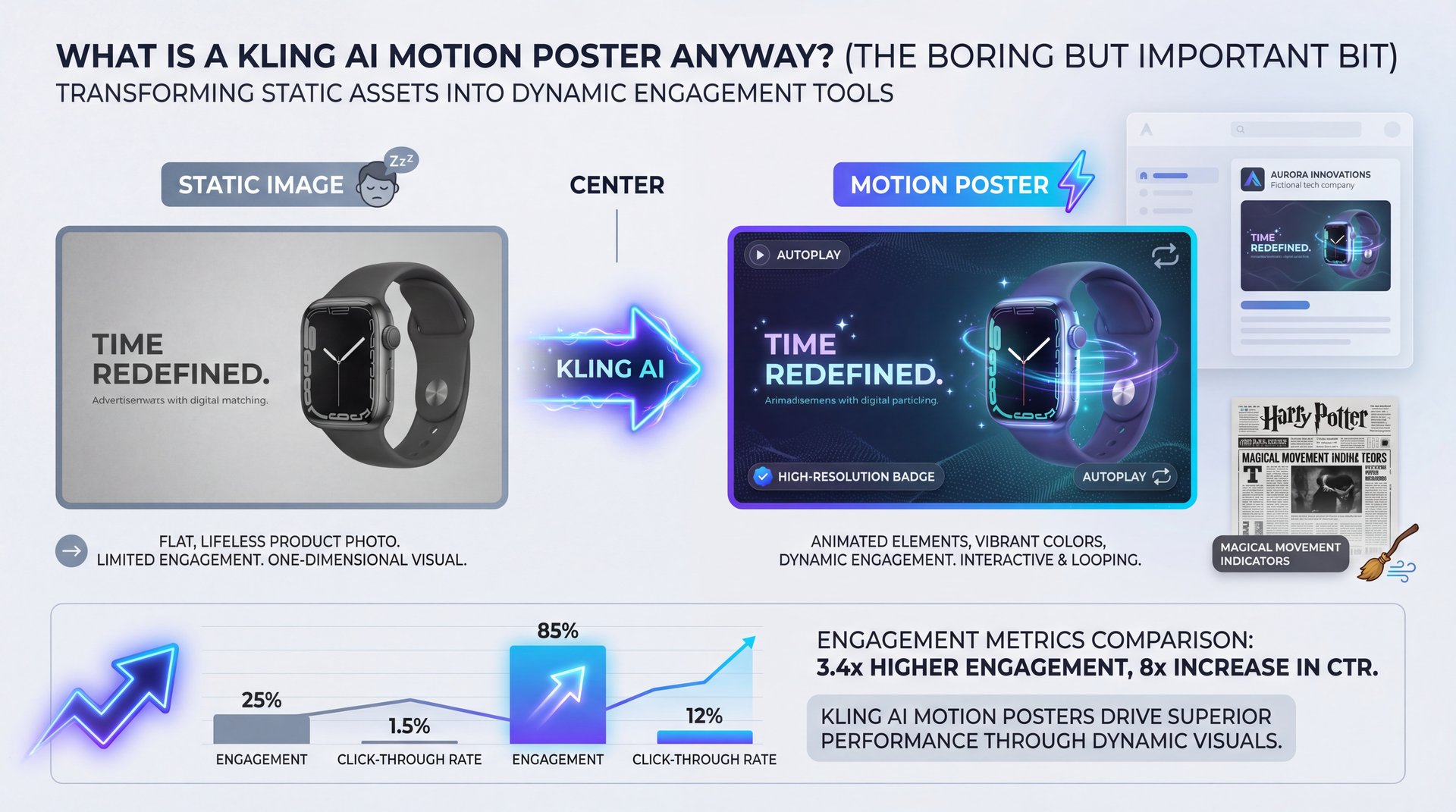
All right, so before we start turning knobs and dials, let’s cover what we’re actually talking about here. Think of Kling as the key ingredient here. A Kling AI motion poster isn’t a full movie or a 60-second commercial. It’s a hybrid.
Think of a kling ai motion poster like a “Harry Potter” newspaper photo. It’s a high-resolution image where specific elements move in a loop or a short sequence. I mean, the stats on this are pretty wild, product cards using these autoplay animated covers achieve a 15-20% higher click rate compared to static images. Not even close. That’s a huge jump just for adding a little bit of motion.
Basically, you take a killer static image, feed it into Kling AI’s image-to-video engine, and tell it, “Hey, make the water flow,” or “Make the neon sign flicker” to create your kling ai motion poster, and it’s catching on fast. By early 2026, Kling AI had already hit 7.8 million downloads and raked in $4.3 million in revenue, ranking it 63rd among the top 100 AI apps globally.
📊 Before/After: The Engagement Gap
Before: A static JPEG of a coffee shop on Instagram gets 1,200 impressions and a 2% tap rate. It’s flat and easy to scroll past.
After: Using a Kling AI motion poster where the steam rises from the cup and rain hits the window, the same post sees a 15-20% higher CTR. The motion stops the scroll.
Why Use Kling AI for Motion Posters Over Alternatives? (bear with me here)
Now, here’s the thing. You might be asking, “Why Kling? Why not just use Sora or Runway?” I’ve used them all, and honestly, they each have their own quirks. But for motion posters specifically, Kling has, a few things going for it that really surprised me.
First off, it’s the physics tool that powers everything else, including your kling ai motion poster. Kling around 2 introduced this “Diffusion Transformer” with a micro-physics engine. I know that sounds like a lot of technical jargon, but here’s what it means for you: when you ask for water to flow or hair to blow in the wind, it actually looks like it obeys the laws of gravity. Sound familiar? I was testing this against some other tools, and while others would just kind of morph the pixels around, Kling 2.5 actually simulated the interaction.
Also, the growth here is undeniable. Chinese generative video apps, including Kling, grew their active users by about 214% between Q4 2023 and Q4 2024. Big difference. That kind of user base means the tool is getting better faster because it has more data to learn from. Plus, close to 61% of users aged 18-34 are working in marketing, e-commerce, and entertainment (the exact people who need a kling ai motion poster).
For a deeper comparison of high-end video tools, you might want to check out our Sora 2 Guide: Create Pro 4K Videos. But for short, loopable posters? I’m leaning heavily toward Kling right now.
How to Build a Pro Kling AI Motion Poster (Step-by-Step)
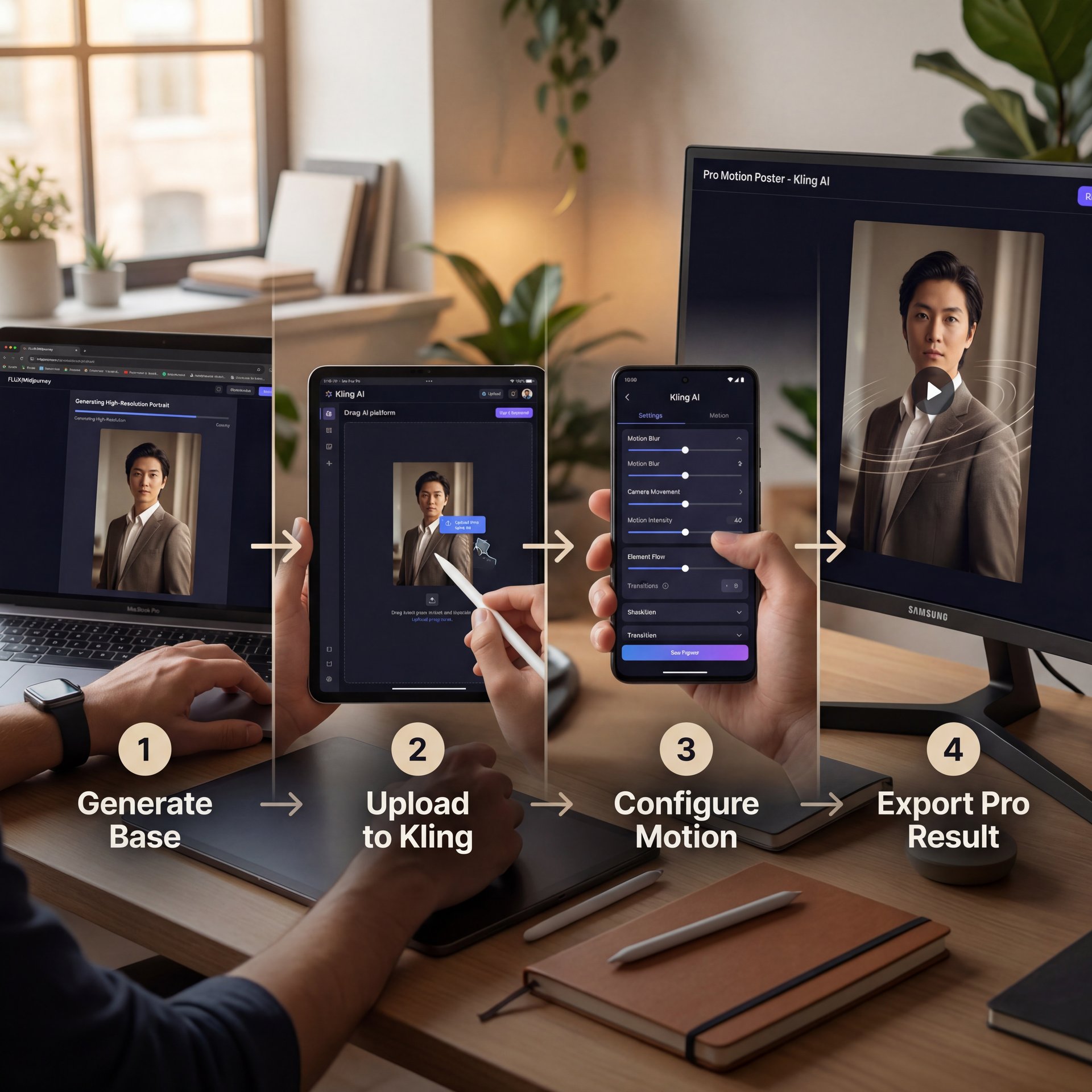
So let’s get your hands dirty. Creating a motion poster isn’t just typing a prompt and praying, it’s a workflow. Consider workflow the foundation. Seriously. If you try to do it all in one shot inside Kling, you’re gonna have a rough time.
Here is the workflow I use that gets the best results.
Step 1: The Static Foundation
You want to start with a perfect static image. I prefer generating my base images in something like FLUX or Midjourney first. You need that high-resolution, perfectly composed shot. If the input image is garbage, the motion poster is going to be garbage.. True story.
Step 2: Image-to-Video in Kling
(Don’t @ me.)
Once you have your image, you bring it into Kling using the Image-to-Video function. Now, if you want to get specific, I found that using the “Professional Mode” makes a massive difference — and you want to set your duration to five-10 seconds (that’s the sweet spot for commercial inserts). Anything shorter feels like a glitch; anything longer and you lose the audience’s attention.
Step 3: The Prompt
This seems where people mess up. You don’t need to describe the whole scene again, just describe the motion. * Bad Prompt: “A cyberpunk city with neon lights and rain.”
- **Good Prompt:** “Cinematic camera push in, neon lights flickering slowly, heavy rain falling, reflections on wet pavement.”
Step 4: Settings
Let’s talk specs. You want to output at 1080p and 30 frames per second (fps). I’ve seen people try to push for 4K right away, but the render times are brutal and the consistency drops. Game changer. 1080p is plenty for social media.
FLUX / Midjourney
High-res static base
- ✓ Creates the perfect composition and lighting before you animate.
Kling AI (Image-to-Video)
Motion generation engine
- ✓ Adds realistic physics-based movement to specific elements.
XXAI Aggregator
Workflow optimizer
- ✓ Helps bypass geo-restrictions and access faster enterprise channels.
Common Kling AI Motion Poster Mistakes That Kill Views
Now, if you’re trying this, and it looks weird, don’t worry. We’ve all been there. I’ve generated plenty of videos where people’s faces melted or the car started driving sideways.
One big issue is over-prompting. I see this all the time (you try to make the character wave, the clouds move, the dog run and the trees sway all at once. The AI gets confused. It’s like asking a mechanic to change the oil, rotate the tires, and rebuild the transmission all at the exact same time.
Pro Tip: Focus on “micro-motions.” Pick one or two elements to move. Let the background be still, or let the background move while the subject is still. Contrast creates the “living poster” effect.
Another thing is ignoring the “negative prompt.” If you’re seeing too much morphing (where objects change shape unnaturally), consider tell the AI to cut it out. Use negative prompts like “morphing,” “distortion,” “blurry,” and “extra limbs.” if you’re struggling with getting the prompt logic right, this actually reminds me a lot of the logic we use for other high-end video models. You can pick up some really good syntax tips in our Google Veo 3.1 Prompts guide, which applies surprisingly well to Kling’s logic too.
(Sorry, tangent.)
Advanced Kling AI Motion Poster Workflows for 2026
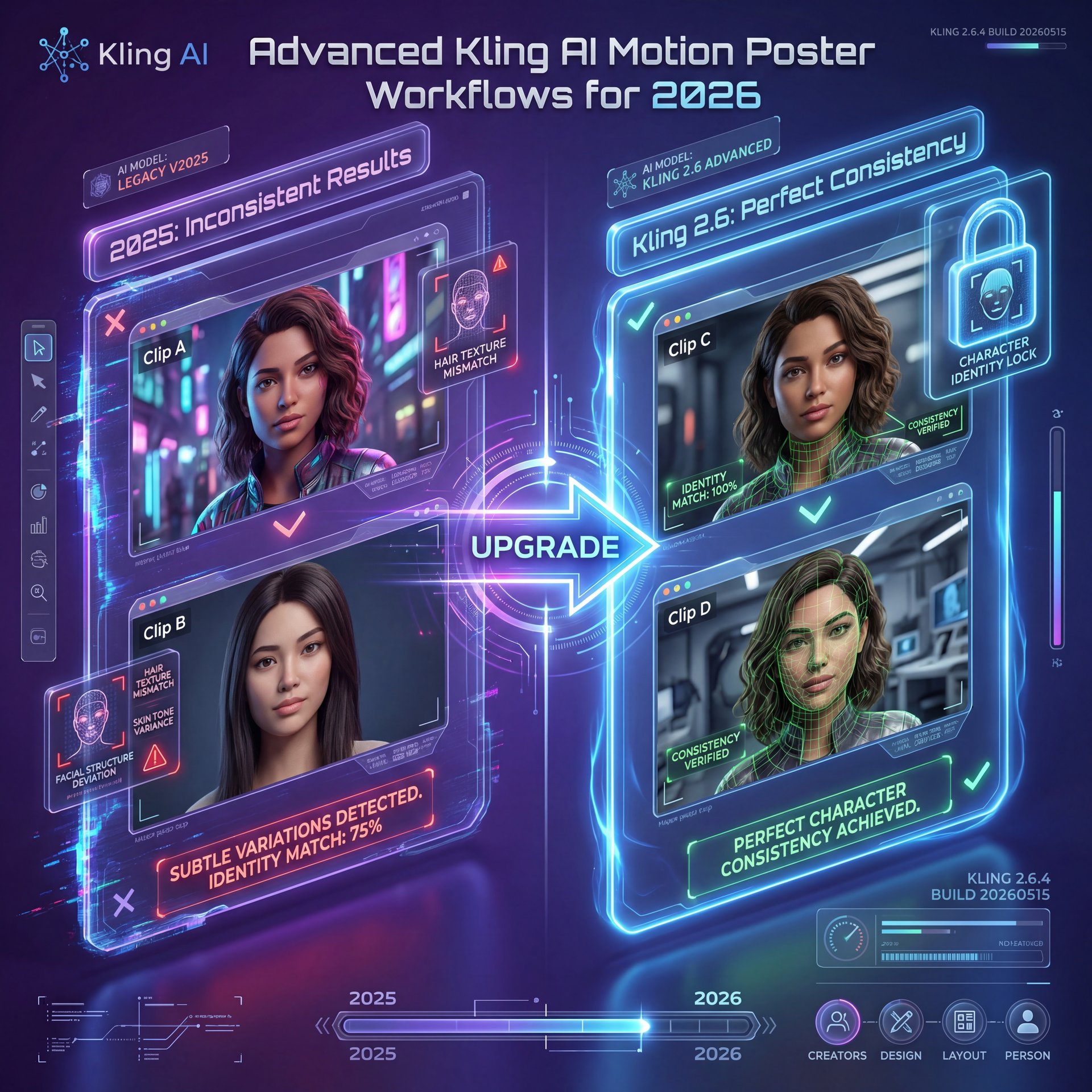
All right, so you’ve got the basics down. Now let’s talk about the pro stuff. This is – well, it’s where (beleive it or not) things get really interesting, especially with the updates we’re seeing in 2026.
The biggest major shift is character consistency. In the past, if you generated two clips of the same person, they looked like cousins, not the same person. With Kling 2.6, they introduced a feature that maintains consistent character identity across clips. Period. This seems huge for branding.
I was chatting with Dr. Morgan Taylor, our technical lead here, and she pointed out that this consistency is what finally allows professionals to use these tools for actual episodic content. It’s no longer just random cool clips; it’s a story.
And let’s talk about money for a second. video powers everything else. A recent report found that 35% of SMBs using Kling-powered platforms reported a measurable decrease in outsourced video costs within 6 months. The average savings was around about 28%. That’s real money staying in your pocket. Plus, 52.8% of creative-tool users are using AI visual tools weekly or more for social media and ads. this isn’t a fad.
⭐ Creator Spotlight: The Hybrid Workflow
Top creators in 2025 aren’t just using one tool. They use a “hybrid pipeline.” They design the layout in Seedream 4.0 for a 2K poster finish, then import that into Kling AI just for the atmospheric motion (fog, rain, light leaks). This gives you the design control of Photoshop with the engagement of video. Game changer. Check out our workflow guides to see how to set this up.
Kling AI Motion Poster vs. The Competition – and why it matters
So, is Kling the best? Or is it just the flavor of the month?
Honestly, for motion posters specifically, I think it’s currently beating the heavyweights. Kling is the mechanism behind it. Sora is solid for full scene generation, but it can be overkill and harder to control for a simple loop. Runway is fantastic, but I’ve found Kling’s understanding of physics. how light reflects off water, specifically (to be a bit sharper in the 2).5 update.
Though it’s not perfect. Access can still be a pain depending on where you are in the world. Some users have to jump through hoops or use aggregators to get stable access. And hardware? Forget about running this locally (even a local RTX 4090 struggles with speed if you try to run similar high-parameter models locally.
I also want to mention that the “pixel-pushing” era is basically over. A UX look at I read recently said that by late 2025, “the era of pixel-pushing had effectively ended” for commercial visual production. we’re now directors, It’s both editors. Tools like HeyGen are also pushing this boundary in different ways and for motion posters, Kling’s the one to beat.
Pro Tip: If you’re making motion posters for TikTok or Reels, always set your aspect ratio to **9:16** right from the start. Trust me on this. Cropping a 16:9 motion poster later usually ruins the composition and makes the resolution look muddy.
Getting Started With Your First Motion Poster
So, what should you do right now?
If you have a product to sell or a channel to grow, don’t overthink it. Take your best performing static thumbnail or product photo. Run it through Kling with a simple prompt like “sluggish zoom in, dust particles floating.” See what happens.
I think you’ll be surprised. It’s one of those low-effort, high-reward tweaks that actually moves the needle. And in this game, anytime you can get 20% more clicks for five minutes of work, you take it.
Till next time, keep tweaking those prompts.
Frequently Asked Questions
What are the key features of Kling AI Motion Poster?
Kling AI specializes in realistic “micro-physics” for elements like water and hair, offering high-resolution 1080p output at 30fps. Its standout feature in version 2.6 is character consistency, allowing you to keep the same face and style across multiple motion clips.
How does Kling AI compare to other AI video generation tools?
While tools like Sora are great for long-form generation, Kling excels at “image-to-video” tasks specifically for short commercial loops (five-ten seconds). Game changer. It generally offers better control over physics interactions and is more cost-effective, really effective for small business marketing workflows.
What are the main challenges users face with Kling AI?
The biggest hurdles are usually mastering the prompts to avoid “morphing” glitches and dealing with access if you are outside of supported regions. Users also find that local hardware is insufficient, making cloud access neccessary for reasonable render times.
Can you provide examples of succesful case studies using Kling AI?
Yes, small businesses using Kling-powered video tools have reported an average of 27.9% savings on outsourced video production costs. On top of that, product listings using these motion posters have seen click-through rates increase by 15-20% compared to static images.
What are the key features of Kling AI Motion Poster?
Kling AI specializes in realistic “micro-physics” for elements like water and hair, offering high-resolution 1080p output at 30fps. Its standout feature in version 2.6 is character consistency, allowing you to keep the same face and style across multiple motion clips.
How does Kling AI compare to other AI video generation tools?
While tools like Sora are great for long-form generation, Kling excels at “image-to-video” tasks specifically for short commercial loops (five-ten seconds). Game changer. It generally offers better control over physics interactions and is more cost-effective, really effective for small business marketing workflows.
What are the main challenges users face with Kling AI?
The biggest hurdles are usually mastering the prompts to avoid “morphing” glitches and dealing with access if you are outside of supported regions. Users also find that local hardware is insufficient, making cloud access neccessary for reasonable render times.
Can you provide examples of succesful case studies using Kling AI?
Yes, small businesses using Kling-powered video tools have reported an average of 27.9% savings on outsourced video production costs. On top of that, product listings using these motion posters have seen click-through rates increase by 15-20% compared to static images.
Related Videos

Related Content
• guide
For more on this topic, check out: kling
Listen to This Article