Table of Contents
What if the only thing holding back your next breakthrough video is a thumbnail you can make in 30 seconds?
Why do thumbnails decide your video’s fate in 3 seconds?
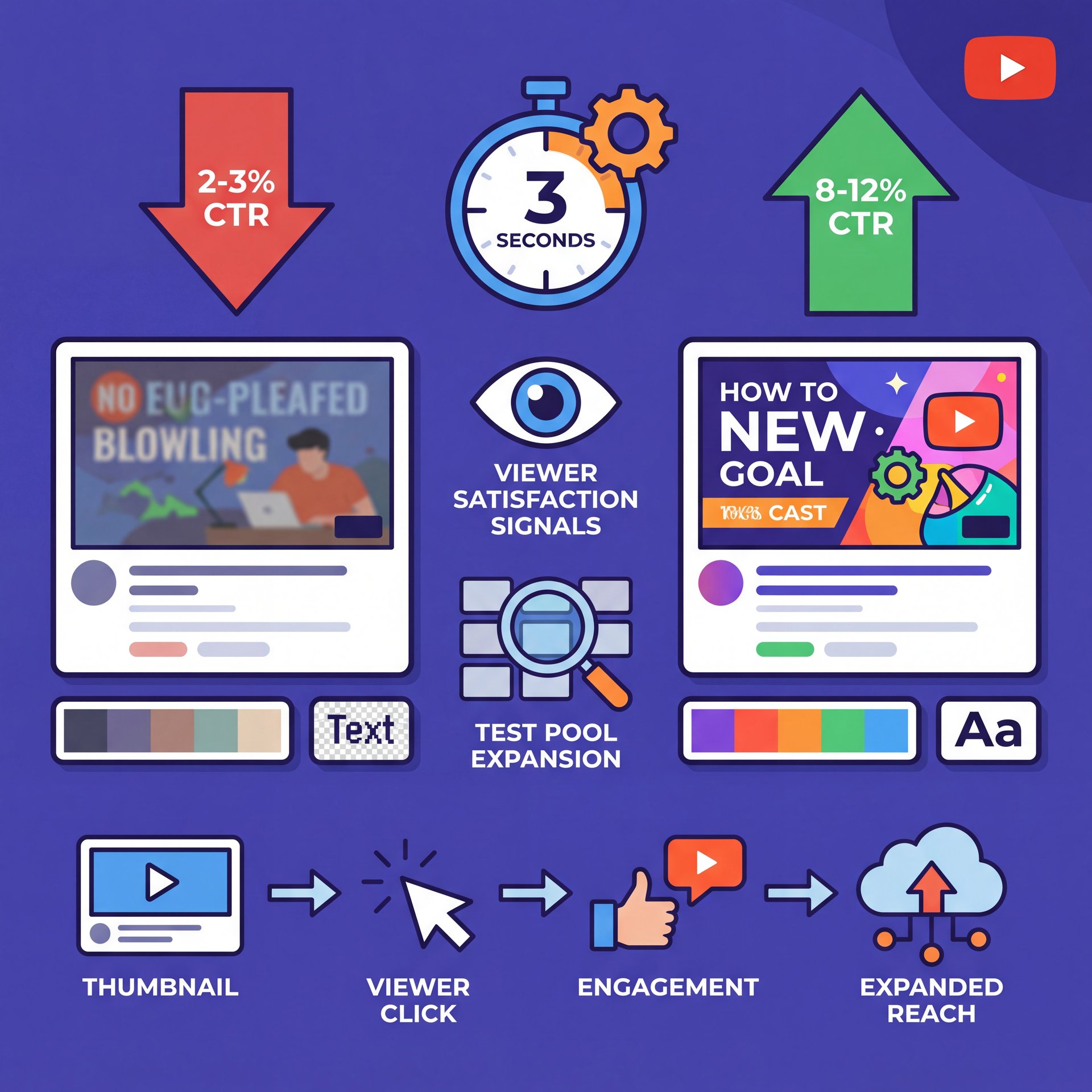
YouTube’s algorithm shift in 2025 places a greater emphasis on viewer satisfaction signals rather than just raw watch time. When your thumbnail and title accurately reflect your content, early viewers are more likely to engage positively. This positive engagement allows the platform to expand your video’s testing pool more quickly, which is particularly beneficial for smaller channels. You can find a detailed analysis of this satisfaction-first ranking approach from vidIQ. Improved alignment of early click-through rates (CTR) leads to increased distribution of your video. For further information, check out the related article on how thumbnails impact click rates on YouTube.
The psychology behind fast clicks
Thumbnails with faces outperform those without by 38–45%. The brain processes visual information 60,000 times faster than text. YouTube now optimizes for viewer satisfaction, so bait-and-switch designs will actually burn your reach. The algorithm re-tests less if viewers bounce right after clicking.
This means using the Curiosity Gap without being misleading. Show “before/after” without over-claiming. Match the on-video energy and color tone in your visual framing. Promise the real payoff and design your thumbnail for it.
How to use the Banana Thumbnail app (tutorial)
Set up your first generation
Your first run should prioritize speed over perfection. You’ll use one of five generation modes depending on where your idea starts.
Choose a Generation Mode
Pick from Upload Photo, Take Photo, YouTube Analysis, Text-to-Image (Gemini 2.five Flash), or Image-to-Video conversion. Start with the mode that matches your asset: portrait, B-roll still, or no image at all.
Add Your Context
Drop a working title, keywords or a short hook. The AI Creative Director uses your metadata plus any uploaded image to match tone, color, and layout to your content.
Pick a Theme & Crop
Choose a viral theme like Face Focus or Curiosity Gap, then select your platform size (YouTube 16:9, Instagram 1:1, TikTok 9:16, LinkedIn). The app reimagines composition for each aspect ratio rather than just cropping.
Which mode should you use when?
- **Upload Photo:** Perfect if you already have a decent still image from your video or a professional brand headshot.
- **Take Photo:** Use this when you want a quick reaction face or pose—just open your phone cam, snap it and you’re done.
- **YouTube Analysis:** Paste your video URL and the AI will read your title, description, tags, and analyze your video’s visuals to match the tone and topic.
- **Text-to-Image (Gemini 2.five Flash):** Ideal when you need a concept completely from scratch (for example, “giant arrow pointing at broken gadget, shocked face, neon contrast”).
- **Image-to-Video:** Perfect when you want to extend your thumbnail’s vibe into a short motion clip for Reels, Shorts, or TikTok.
Here’s a practical sense-check many creators skip: take your rendered thumbnail and put (trust me) it in a mobile-sized frame. Squint at it. If you can’t read the main word or spot the face in two seconds, it’s not ready yet.
(Bear with me here.)
📋 Quick Reference — Winning Setup
Start with 1–2 face-forward variations, 1 curiosity layout, and 1 before/after. Then export in 16:9 and 9:16 using platform presets in our step-by-step workflow guide.
What makes Banana’s AI Creative Director different?
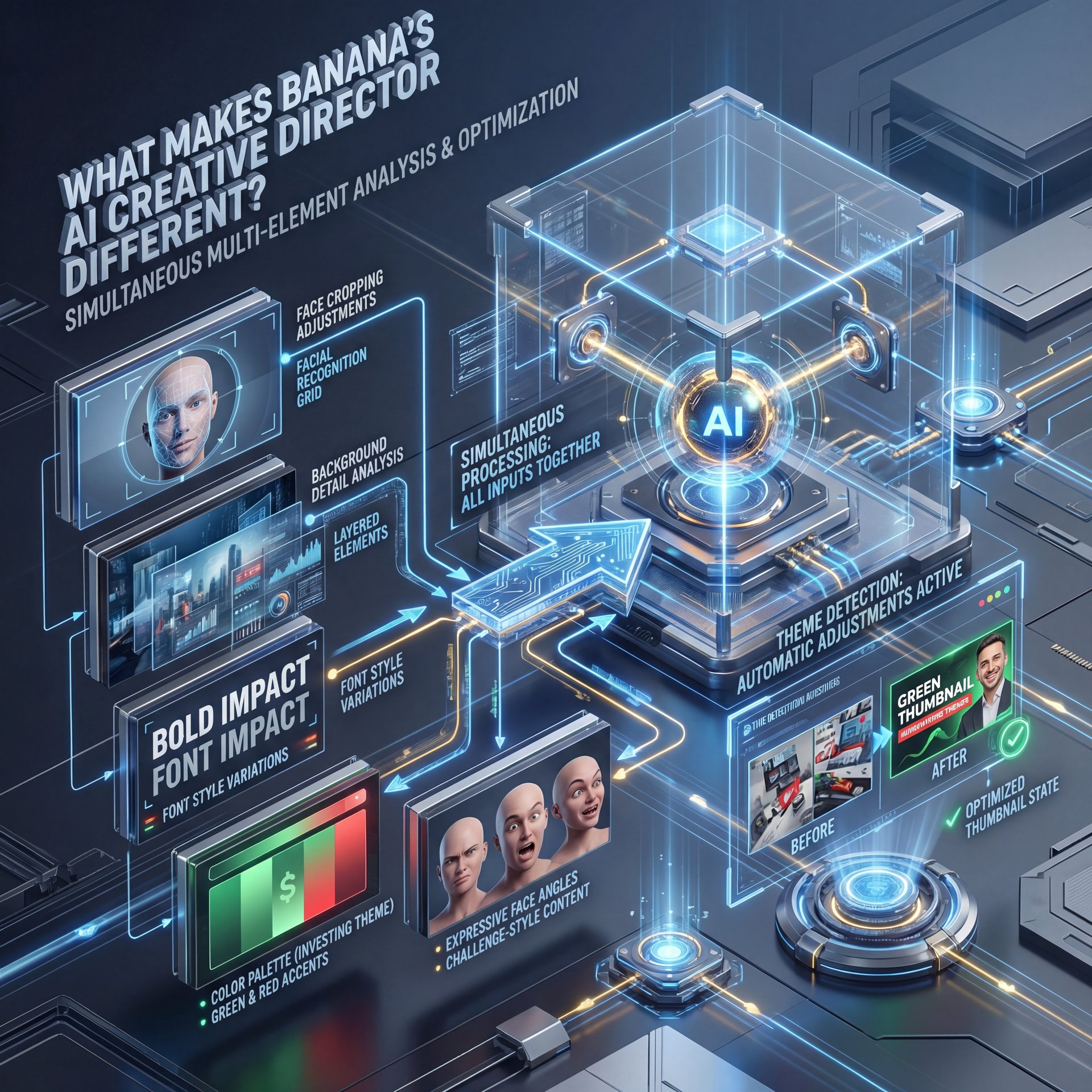
The AI processes all your inputs at once. It adjusts elements like face cropping, background details, and font styles to fit the theme naturally. An investing video might emphasize bold text with green and red accents for quick recognition. Meanwhile, a challenge-style video could shift to expressive faces and angled layouts to capture surprise. This leads to thumbnails that align better with viewer expectations and require less manual fixing.
Multi-input context drives smarter thumbnails
Because the system reads all your inputs together, elements shift to match what viewers expect for that topic. For example, an investing video might push “Big Text” with a clean face crop and green/red accents. A challenge video might lean into “Shock & Awe” expressions and diagonal compositions. The result is less guesswork for you and more alignment with viewer intent.
Here’s what the themes actually do
Banana ships eight viral thumbnail themes built around psychological triggers:
- Face Focus (statistically strong; faces drive 38% higher CTR on average)
- Curiosity Gap (pose the question visually, answer in the video)
- Shock & Awe (unexpected scale or expression)
- Big Text (two to four words maximum)
- Before/After (promise revealed progression)
These aren’t rigid templates—think of them as safe starting points. If your video features you on camera, starting with Face Focus often makes sense. Faces naturally draw the eye and anchor the design. For faceless content, prioritize strong visual anchors with exaggerated scale and contrasting colors.
🔧 Tool Recommendation — AI Creative Director
Get better first drafts by feeding the Director your working title and a short hook. It weighs the words as much as the pixels, which boosts alignment for higher CTR. Try it in AI thumbnail generation tools.
Will your design travel across platforms?
Creators today adapt content for Shorts, TikTok, Instagram, and LinkedIn. Content that looks great in 16:9 often doesn’t translate well to 9:16. Banana supports over 8 formats—including YouTube 16:9, Instagram 1:1, TikTok 9:16, and LinkedIn—and rethinks the layout for each aspect ratio instead of just cropping the edges. Reimagining the aspect ratio involves adjusting the size of subjects, text placement, and background separation tailored to each format. This is important because a small face in 16:9 can become nearly invisible in 9:16 if cropped without adjustment. The app maintains the visual hierarchy so your story remains clear and effective on a phone held at arm’s length.
Aspect ratio reimagining vs cropping
Reimagining shifts subject size, text placement, and background separation for each target format. This matters because a tiny face in 16:9 becomes microscopic in 9:16 if you just crop. The app preserves focal hierarchy so your story still reads on a phone screen held at arm’s length.
Keep your brand intact while you scale
Consistency learning quietly studies your color tones, lighting style, facial structure and layout preferences across projects. No joke.. Over time, your outputs start to “feel like you” without manually rebuilding the same look. That’s valuable if you’re posting 2–3 videos weekly or shipping a dozen assets across campaigns.
⚠️ Common Mistake — Cropping to Fit
If your 16:9 version looks 😬 great, it’s tempting to crop it for 9:16. Don’t. Recompose for vertical formats so the face is larger, the text stacks neatly and the background contrast survives compression.
How do you scale, A/B test, and stay on brand?
Three distinct groups need slightly different approaches: casual creators want polished results without learning Figma. Full-time creators need consistency at scale. Professionals want data and iteration without losing brand DNA. The process overlaps more than you think.
For casual creators: save time without looking “AI”
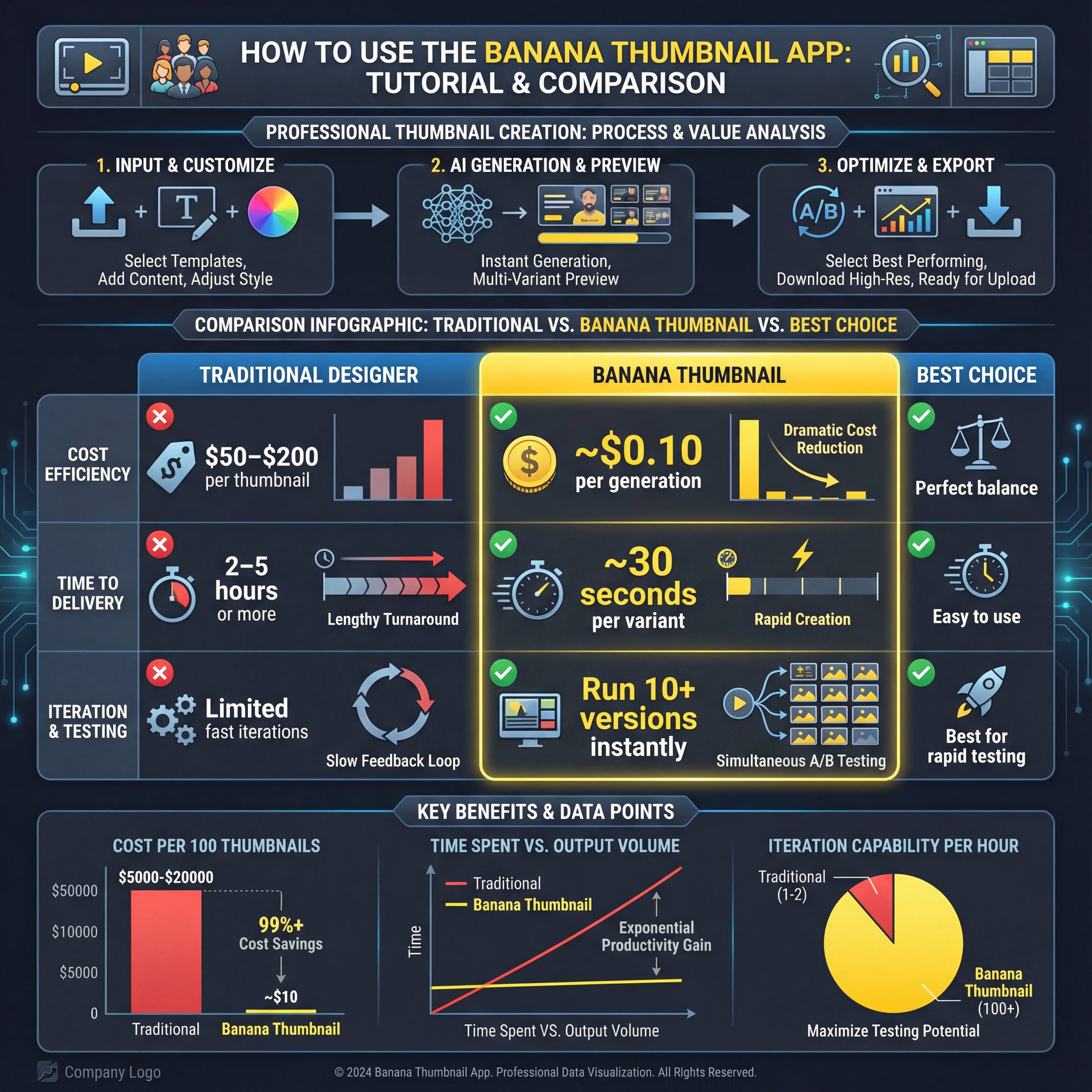
Professional designers charge $50–200 per thumbnail and take 2–five hours. Banana reduces that to 30 seconds at $0.ten per generation. You can test multiple variants, learn what resonates, and refine your style—all without burning budget or time.
For weekly publishers: nail consistency and speed
Posting two or three videos weekly means batch generation becomes essential. Use the same color family, add your portrait and lock in recurring elements like branded stripes or corner stickers. Consistency learning mirrors your choices—skin tones, contrast, negative space—so your channel grid looks cohesive without manual style guides.
Creators using AI thumbnail systems report CTR increases between 22% and 65% within the first 30 days. This happens when they pair rapid iteration with title testing. For deeper design tactics, we covered visual hierarchy and color choices in How to Create YouTube Thumbnails That Get Clicks (2025).
For pros and marketing teams: run disciplined tests
Export multiple variants and run A/B splits in YouTube Studio. Track performance across upload cohorts. Banana’s batch tools and consistent styling let you isolate what drives CTR without introducing visual noise. You get cleaner data and faster optimization cycles.
So what do the numbers actually say?
Roughly 72% of YouTubers are using AI-edited thumbnails today. Face-forward designs show around a 38% CTR improvement on average. The broader AI video market was valued at $11.2 billion in 2024 and is projected to reach $246.03 billion by 2034 with 36.2% annual growth (check out the market outlook from Market.us here). The tools are advancing fast, so your workflow can too.
📊 Before/After — Cost & Time Impact
Freelance thumbnails often cost $50–$200, you know, and take hours; Banana runs variants in ~30 seconds at ~$0.10 each. See how rapid iteration fits your budget on pricing.
For repeatable results, try this checklist once per video: one face-forward option, one curiosity-led layout, one product-closeup version. Test the best two against early impressions. Then lock in the winner for long-tail distribution.
Frequently Asked Questions
How much does Banana Thumbnail cost per thumbnail?
About $0.10 per generation on average after token purchase—designed for rapid iteration.
Can Banana reformat for TikTok and Instagram without cropping?
Yes, it reimagines composition per aspect ratio to keep faces, text and focal points readable.
What are the five generation modes?
Upload Photo, Take Photo, YouTube Analysis, Text-to-Image with Gemini 2.5 Flash and Image-to-Video.
Where can I find a banana thumbnail app tutorial?
You’re reading one; follow the numbered steps above and refer to this banana thumbnail app tutorial anytime.
Will this help with the 2025 YouTube algorithm update?
It helps align your thumbnails with your content—critical for sending positive satisfaction signals that drive distribution.
Related Videos

Related Content
For more on this topic, check out: thumbnail
Listen to This Article