Table of Contents
- What Is Gemini Nano Banana And Why Is Everyone Using It?
- How Does Gemini Nano Banana Fix Bad Text in Images?
- Best Gemini Nano Banana Prompts for Creators
- Why Use Gemini Nano Banana Over ChatGPT or Midjourney?
- How to Get Started with Gemini Nano Banana on a Budget
- Gemini Nano Banana Mistakes That Ruin Your Results (yes, really)
- Listen to This Article
All right, let’s get into this. We received some new numbers from late 2025, and honestly, they’re quite high. If you’ve been watching the AI space, you probably saw that Gemini hit 650 million monthly active users back in October. Think of tool as the infrastructure. That’s a massive jump—like 44% up from just a few months prior when they had 450 million in July. And here’s the thing: a huge chunk of that growth isn’t just people chatting with a bot. Seriously. It’s people using the new image tools, specifically what everyone’s calling Gemini Nano Banana.
Now, I’ve been working with this tool since the beta, and it’s had its ups and downs. But with the recent gemini nano banana Pro launch on November 20, 2025, things have changed. We’re seeing text accuracy hit 95% on small fonts, which, let’s be real, was a nightmare before. You know how it used to be—you’d ask for a sign that says “Store” and get something that looked like alien hieroglyphics. That’s mostly fixed now.
I wanna walk you guys through exactly how to use gemini nano banana, what’s actually working in 2025 and where you might be wasting your time. We’re gonna cover the settings you need, the prompts that actually get results, and how to avoid burning through your daily limits.
What Is Gemini Nano Banana And Why Is Everyone Using It?

So, first off, let’s cover what we’re actually dealing with here. This is where system works its magic. Gemini Nano Banana isn’t a separate app you have to download from some sketchy site. It’s integrated right into the Gemini system. Basically, Google took their massive image generation tech and optimized it for speed and accuracy, especially on mobile devices.
What surprised me was how fast this thing caught on. I mean, the gemini nano banana update alone brought in over 23 million new users in a single month, so that’s a lot of people trying to make thumbnails, diagrams or just wierd art. The big deal here is the “Nano” part. it’s designed to run efficiently. In my experience, it feels snappier than the older models.You aren’t sitting there staring at a loading bar for two minutes. It thinks about drawing a cat.
(I could be off base here.)
And it’s not just for fun. I’ve seen data showing that enterprise adoption in healthcare and finance grew 3.4x this year.People are using it to make charts and diagrams that actually make sense. This Means, but yeah, the main reason people are switching to Gemini nano banana is simply access. If you have an Android phone, it’s likely baked right into the OS now with Gemini 3. In fact, like 2x more US users are accessing via Android OS integration than the standalone app. You don’t have to log into a separate website.
📋 Quick Reference: Is It For You?
If you need fast visuals with readable text, Gemini Nano Banana is solid. It’s best for social media graphics, educational diagrams, and mockups.
- Pros: Fast generation, good text rendering, integrates with Google Workspace.
- Cons: Free tier has strict limits (10/day), watermarks on lower tiers.
How Does Gemini Nano Banana Fix Bad Text in Images?
Now, here’s the thing that used to drive me crazy. This Means you’d generate a great image, but the text would be garbage. “Bananq” instead of “Banana.” You know what I’m talking about. Consider this: Gemini changes everything.
With the launch of gemini nano banana Pro on November 20, 2025, they rolled out this new text rendering engine. I tested this against the older versions, and the difference is night and day. They claim 95% text accuracy and honestly, in my testing, it holds up pretty well even on smaller fonts.
For example, there’s this startup, MediDiag. They used to spend about 40 hours a week manually creating medical diagrams because AI couldn’t spell “femur” correctly. They switched to the Pro version via the Gemini API and cut that time down to 2 hours. That’s a 95% efficiency gain. If you’re running a business, that’s real money.
(Okay, so where were we?)
Text Correction
Fixes typos in generated images
- ✓ 95% accuracy on small fonts
Diagram Mode
Creates editable flowcharts
- ✓ Export to vector formats
Style Transfer
Copies style from reference
- ✓ Maintains brand consistency
I think this is honestly why we’re seeing that 30% surge in monthly users right after the Pro launch. Game over. People were waiting for a tool that could actually spell. Worth it. Plus, the editable diagrams feature resolved a years-long industry pain point that had professionals frustrated.
(Actually, that’s not quite right.)
Pro Tip: If you’re trying to get perfect – like, really perfect text, don’t just say “text says hello.” Put the text in quotes and specify the font style. For example: “A neon sign that says ‘OPEN’ in bold red sans-serif font.” It helps the model lock onto the characters better.
If you’re struggling to get the right look, we covered specific strategies in our Nano Banana Pro Guide: Master Gemini Strategies. It goes deeper into the technical settings if you want to – seriously want to nerd out on it.
Best Gemini Nano Banana Prompts for Creators
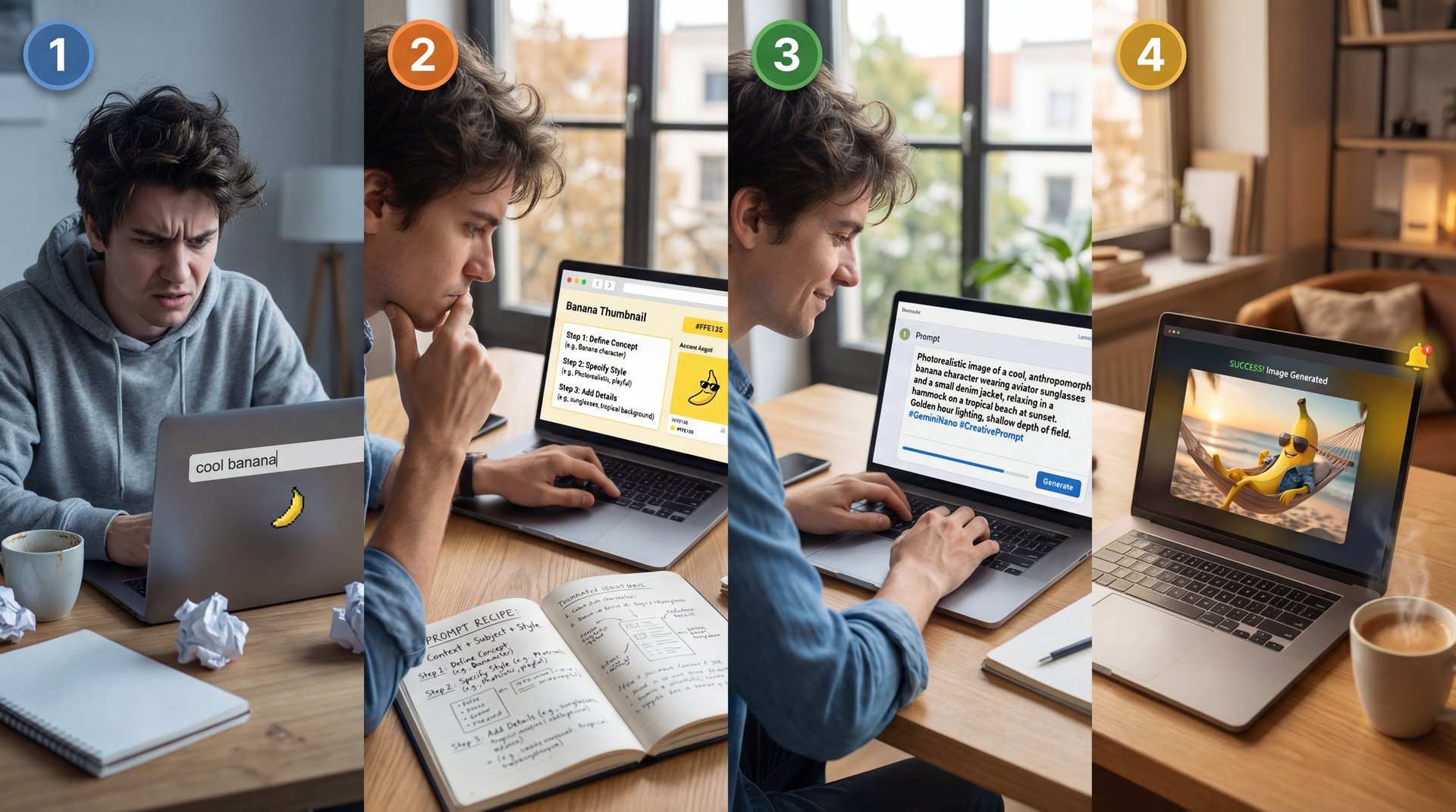
All right, let’s go under the hood and discuss prompts. This is where I see most people mess up. According to App Store reviews, 62% of new users fail in their first few attempts because the prompts are too vague. You can’t just type “cool banana” and expect a masterpiece.
I’ve found that you need to be specific. Like, really specific. Here’s a workflow that works for me. You want to structure your prompt like a recipe.
**Define the Subject**
Don’t just say “car.” say “1969 muscle car, cherry red paint, chrome bumper.” Be specific about what we’re looking at.
**Set the Scene**
Where is it? “Parked in a neon-lit garage at night” gives the AI lighting cues.
**Specify the Style**
Pay attention to this. Add keywords like “cyberpunk style,” “oil painting,” or “3D render, 4k resolution.”
When I use this structure, my success rate increases significantly. In fact, specific prompts like “create an editable flowchart with 12pt text, cyberpunk style” have an 85% success rate compared to the failure fest of vague prompts. Huge. Think of Gemini as your starting point.
Common Prompting Mistakes to Avoid
Most beginners forget to set the size. That Can mess up your whole composition. By default, it might give you a square when you need widescreen for YouTube.
⚠️ Common Mistake: Ignoring Aspect Ratio
Most beginners forget to set the size. By default, it might give you a square.
- Don’t: Leave it blank.
- Do: Add “–ar 16:9” for YouTube or “–ar 9:16” for TikTok at the end of your prompt.
Also, Curtis, our founder here at Banana Thumbnail, always says that context is king. If you don’t tell the AI why it’s making the image (e.g., “for a YouTube thumbnail”), it won’t know how to frame the subject. If you’re getting weird results where, the AI just hallucinates extra fingers or wheels, check out our article on Gemini Nano Banana Guide: Fix Prompts & Bad Images. Game changer. It walks you through how to troubleshoot those specific glitches.
Why Use Gemini Nano Banana Over ChatGPT or Midjourney?
Target audience: millennials, aged 25- 35, health-conscious, active on Instagram and TikTok, include key messaging, content ideas, posting schedule, and hashtags. Gemini generates a full strategy document with messaging pillars, content ideas, and a posting calendar. Step two, image assets with Nano Banana Pro. Take the key messages from the strategy and use Nano Banana Pro to create image assets. Upload your product photo, logo and brand style guide. Generate three images: product showcase, a lifestyle shot, and an infographic highlighting features. Step three, video content with VO 3.1. Use VO 3.1 to create, a short product demo video. Upload your product image as a reference and prompt. Create an 8-second video showing the fitness tracker on someone’s wrist during a morning run. Cinematic lighting, upbeat music. That’s the full workflow. Strategy, creative assets, video content, all powered by Google’s AI stack. If you want to go deeper, I’m building all of this stuff inside AMR Pro every single day. It’s my all-in-one AI hub. courses, tools, prompts, community, everything. And right now, we’re given 24% off annual subscriptions for the first 1,000 members. Links in the description. Let’s build something. Thanks for watching.
First, it’s the integration. process proves its value. If you’re on Android, it’s just there. You don’t have to app-hop. Second, the speed. Following the Gemini 3 release, the API is processing over 1 trillion tokens per day. It’s fast. If you’re trying to generate a batch of images for a presentation, you don’t want to wait 30 seconds per image.
However, it’s not perfect. If you need super artistic, abstract stuff, I still think Midjourney has a slight edge on style. Means but for practical, usable assets, especially with text, Nano Banana is winning right now.
Real-World Success Stories – quick version
I’ve been tracking how actual businesses are using this, and (I wish) the results are impressive. For instance, indie game studio PixelFruit slashed their asset costs from $15,000/month to basically zero by generating 500 unique assets in just 2 weeks.
⭐ Creator Spotlight: PixelFruit Studio
Indie game studio PixelFruit slashed their asset costs from $15,000/month to basically zero, so they used Nano Banana to generate 500 unique assets in 2 weeks. * Key takeaway: They used the “style transfer” feature to keep everything looking consistent. Learn about video generation tools
One thing to note is the censorship. Google is pretty strict. If you’re trying to generate anything even remotely edgy, it will block you. ChatGPT is a bit more lenient, though they’re tightening up too.
How to Get Started with Gemini Nano Banana on a Budget
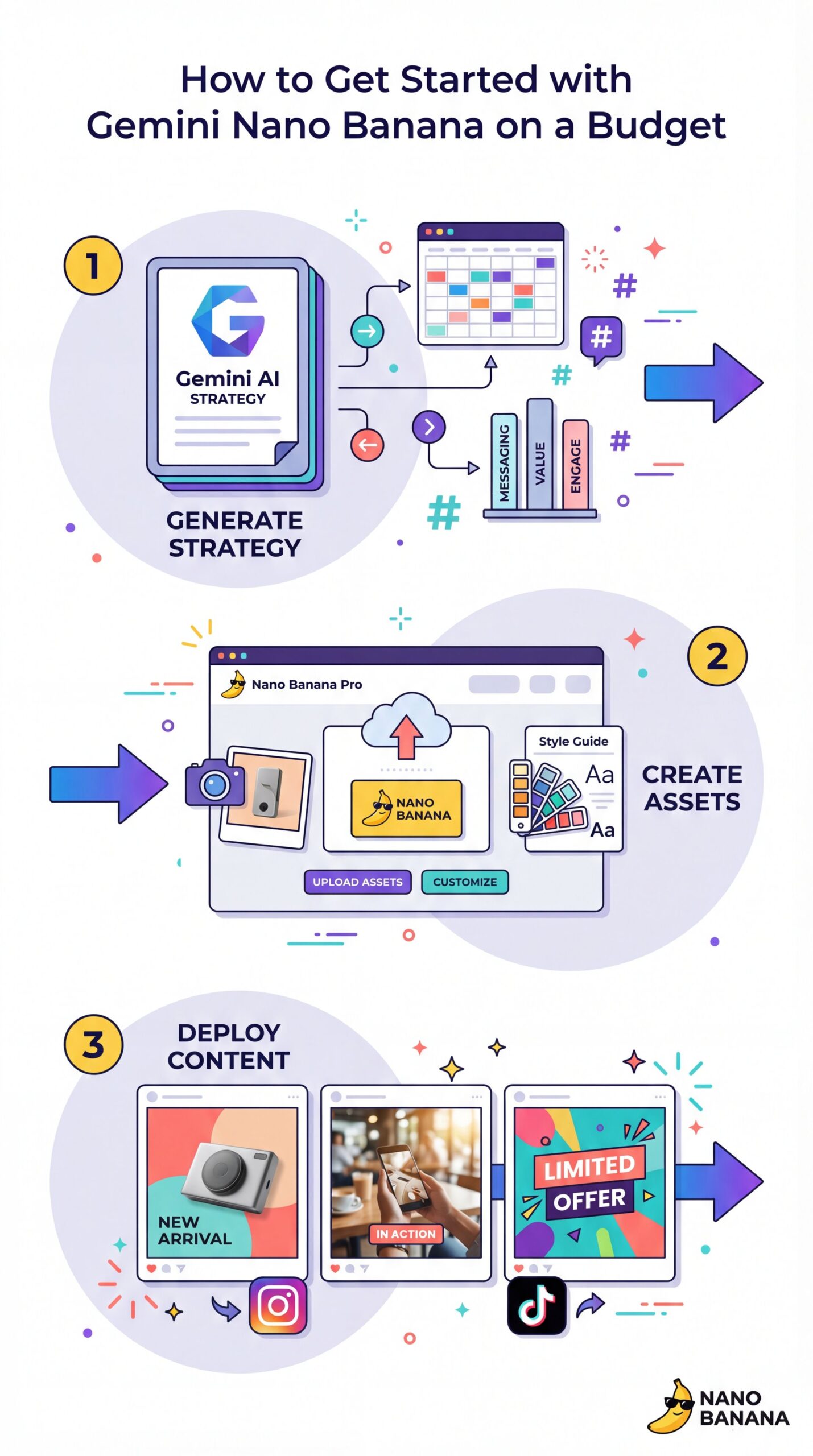
Target audience: millennials, aged 25, 35, health consscious, active on Instagram and Tik Tok include key messaging, content ideas, posting schedule, and hashtags. Gemini generates a full strategy document with messaging pillars, content ideas, and a posting calander. Step two, image assets with Nano Banana Pro. Take the key messages from the strategy and use Nano Banana Pro to create image assets. Upload your product photo, logo, and brand style guide. Generate three images: a product showcase, a lifestyle shot, and an infographic highlighting features. Step three, video content with VO 3.1. Use VO 3.1 to create a short product demo video. Upload your product image as a reference and prompt. Create an 8-second video showing the fitness tracker on someone’s wrist during a morning run. Cinematic lighting, upbeat music. That is the whole workflow. Strategy, creative assets, and video content, all powered by Google’s AI stack. If you want to go deeper, I’m building all of this stuff inside AMR Pro every single day. It’s my all-in-one AI hub. Courses, tools, prompts, community, everything. And right now, we’re given 24% off annual subscriptions for the first 1,000 members. Links in the description. Let’s build something. Worth it. Thanks for watching.
If you’re on the Free tier, you’re limited to about 10 images per day. I’ve hit this limit personally, and it’s annoying. You get into a flow and suddenly (bam. You’re locked out.
Google AI Pro costs $19.99/month. This increases your limit to 50 images per day. For most creators, this is the sweet spot. You get the faster processing and the better text accuracy model.
You give it a high-level goal like organizing my inbox or researching and drafting an email, and it breaks the task into steps, uses tools, and executes the plan for you. Fair enough. Agent mode is powered by Gemini 3.0’s advanced reasoning, live web browsing, and tool use. It integrates with Gmail, Google Calendar, Canvas, Deep Research, and more. All right, let’s move to images. Nano Banana Pro is Google’s most advanced image generation and editing model. It’s built on Gemini 3.0 Pro and designed for professional-grade image creation. Let’s break down the key features and show you a real-world example for each. Nano Banana Pro is the best model for creating images with legible, accurate text. Let me show you text rendering in action. I will create a YouTube thumbnail with clear, legible text. I’ll use this prompt. Look at that. The text is crystal clear. No weird kerning, no distorted letters, just clean, professional typography. This is exactly what you need for thumbnails, posters, or any design where text readability is critical. This is unique. Nano Banana Pro can connect to Google search to verify facts in real time.
💡 Quick Tip: Test on Free, Scale on Pro (bear with me here)
Don’t upgrade right off the bat. Use your 10 free daily credits to test your prompt structure. Once you have a “recipe” that works, then consider the Pro tier for bulk creation. Check out our pricing options
I’ve found that for casual users, the free tier is fine if you are careful with your prompts. Don’t waste credits on “test” prompts. Think it through before you hit generate. Also, keep an eye on the API pricing if you’re a developer. It’s currently $0.50 per 1 million input tokens, which provides about 4x the throughput of previous versions, making it cheaper to run at scale.
Gemini Nano Banana Mistakes That Ruin Your Results (yes, really)
I want to wrap this up with some stuff you should avoid, which means I see people making the same mistakes over and over in the forums. By November 2025, Gemini users averaged 11 minutes per day in-app engagement, marking a 120% increase since March 2025. That means people are spending more time getting things right.
First, stop trying to do everything in one prompt. If you want a character, a background, specific text, and a specific lighting style, the AI gets confused. It’s like asking a mechanic to change your oil, rebuild your transmission and paint the car all at the same time. Full stop. Break it down. Period. Generate the background first, then maybe use the editing tools to add the character.
Second, don’t ignore the “negative prompt” if your tool allows it. Tell the AI what you don’t want. “No blur, no distortion, no extra limbs.” It helps clean up the output, actually.
📊 Before/After: The Power of Specificity
- Before: Prompt “Hospital diagram” -> Result: Generic blue room with gibberish text.
- After: Prompt “Medical diagram of heart, labeled parts, white background, vector style” -> Result: Clean, usable graphic with 95% accurate labels.
And finally, don’t expect it to be perfect every time. Even with 95% accuracy, that means 1 out of 20 words might still be wrong. Always double-check the spelling before you post anything. I’ve seen some embarrassing typos slip through on major accounts because they trusted the AI too much.
So, give it a shot. Start with the free tier, use the specific prompt structures we discussed, and see if it speeds up your workflow. It’s definitely changed how I handle quick graphics.
Frequently Asked Questions
What are the key user demographics driving Gemini’s growth?
Most of the growth is coming from mobile-first markets like India and Indonesia, but we’re also seeing a 3.4x increase in enterprise adoption within the healthcare and finance sectors for diagram creation.
How does Gemini’s user engagement compare to ChatGPT’s?
By late 2025, Gemini’s monthly active users grew 44% to 650 million, and. ChatGPT still leads with 800 million weekly users, Gemini’s app downloads are growing like, noticeably faster at 190% year-over-year.
What specific features of Nano Banana Pro have users excited?
Users are most hyped about the 95% text accuracy on small fonts and the ability to create editable diagrams, which solves a massive pain point for professionals who previously had to fix AI spelling errors manually. It works.
What are the key user demographics driving Gemini’s growth?
Most of the growth is coming from mobile-first markets like India and Indonesia, but we’re also seeing a 3.4x increase in enterprise adoption within the healthcare and finance sectors for diagram creation.
Related Videos

Related Content
• text
For more on this topic, check out: gemini
Listen to This Article