
Table of Contents
- What Is Claude Opus 4.6 and Why Should You Care?
- How Does Claude Opus 4.6 Fix the ‘Blank Canvas’ Problem?
- The Secret Workflow: Using Claude Opus 4.6 for Visual Analysis
- Can Claude Opus 4.6 Actually Design the Thumbnail?
- Real Talk: Is It Worth the Price Tag?
- Optimizing Your Thumbnail Strategy in 2026
- Getting Started: A Simple Checklist
- Why This Matters for You
- Listen to This Article
Ever spent three hours filming a video only to spend four more staring at a blank Photoshop canvas, wondering why your thumbnail looks like a potato compared to MrBeast’s?
(Or something.)
Yeah, I’ve been there. It’s frustrating. You put all this work into the engine—the content—but the paint job (the thumbnail, is keeping people from taking it for a test drive. Think side quest rewards — thumbnail gives you the edge.
Today we’re diving into a tool that’s been making serious noise in the creator space for 2026: Claude Opus 4.6. Now, you might be thinking, “Wait, isn’t that just a chatbot? How is that going to help me make pictures?”
Here’s the thing. It’s not about the bot holding the paintbrush. It’s about the bot telling you exactly where to paint. I’ve been testing this out, and honestly, the way this model handles visual reasoning and creative direction is unlike anything I’ve seen before. It’s like having a master mechanic right there in the shop with you, telling you exactly which part to swap out to get that engine purring.
(Plot twist.)
Let’s go under the hood and see how you can use this to fix your click-through rate problems for good.
What Is Claude Opus 4.6 and Why Should You Care?

Hey everyone. So, I got to play with Anthropic’s newest model, Opus 4.6, before it launched, and I want to share my first impressions with you all. In this quick video, I’m going to cover what makes Opus 4.6 different, and I’m going to test three use cases live. Using regular Claude for podcast postprouction, using claw code to generate a game and using codework to generate a presentation. So, let’s dive in. Okay, so what’s new with Opus 4.6? There are three things through my testing. First, it follows instructions much better in long threads. Previously, in long conversations with Claude, it can get lost and ignore your instructions. 🔥 with Opus 4.6, it remembers your initial prompt, even if you’re deep into the thread. I’ll demo this in the cloud use case next. Number two, it gathers context before acting much more. So, one of, the criticisms of anthropics models, especially for coding, is that they tend to just want to code. You have to use these hacks like plan mode to get it to think through things first before coding. But with Opus 4.6, this is much better. Related reading: Claude Cowork Secrets: Boost YouTube Clicks Fast.
(I know, I know.)
I found that while other models might be faster at spitting out generic text, Claude Opus 4.6 actually thinks through the problem. In plain English? It doesn’t just guess. It analyzes.
If you’re a creator, you know that the algorithm in 2026 is smarter than ever. It’s not just looking for bright colors anymore. It’s looking for context, emotion and relevance.
The Difference Is in the Details (yes, really)
Before: Generic prompt ideas like “Man looking happy at computer” resulted in flat, stock-photo style concepts that ignored current trends. After: Using Claude Opus 4.6 for creative direction results in specific, emotionally resonant concepts like “Split-screen contrast showing frustration vs. relief, with high-saturation yellow background,” leading to higher engagement. Check out our features to see how we integrate these advanced reasoning capabilities. ::: Related reading: Claude Cowork vs Canva: Best AI Thumbnails.
(Right, so anyway…)
What surprised me was how well it understands the psychology behind a click. It knows that a thumbnail isn’t just a picture; it’s a promise to the viewer. And if you break that promise, your retention tanks.
## How Does Claude Opus 4.6 Fix the ‘Blank Canvas’ Problem?
Here’s a scenario I see all the time. You sit down to design, and your mind goes blank. You got nothing.
This is where this tool pays for itself. You DON’T use it to make the pixels directly (we’ll get to that). You use it to build (for real) the blueprint.
I like to feed Claude my video script or even just a rough outline. Then I tell it: “Based on this script, give me 5 thumbnail concepts that would appeal to a tech-savvy audience aged 18-34.” And it doesn’t just say “Show a phone.” it says, “Concept 1: Close up on the device screen showing a really critical, super critical error message, with the creator holding their head in hands in the background, blurred. Text overlay: ‘FATAL MISTAKE’.”
See the difference? It’s giving you the composition, the emotion and the text.
> Pro Tip: Don’t just ask for one idea. Ask Claude to act as a “YouTube Strategist” and critique its own ideas. I usually say, “Rate these 5 concepts based on predicted CTR and walk through why.” The results are usually spot on.
I tried this last week on a video about car repair (naturally), and the concept it picked, showing the specific broken part rather than the whole car. performed way better than my usual stuff.
38%
Higher Ctr
According to industry research (Face Focus theme)
Face-focused thumbnails that convey specific emotions acheive 38% higher click-through rates than generic landscapes.
:::
This aligns perfectly with what we’re seeing across the board. If you can get the emotion right, you win. And Claude is really good at identifying which emotion matches your content.
The Secret Workflow: Using Claude Opus 4.6 for Visual Analysis
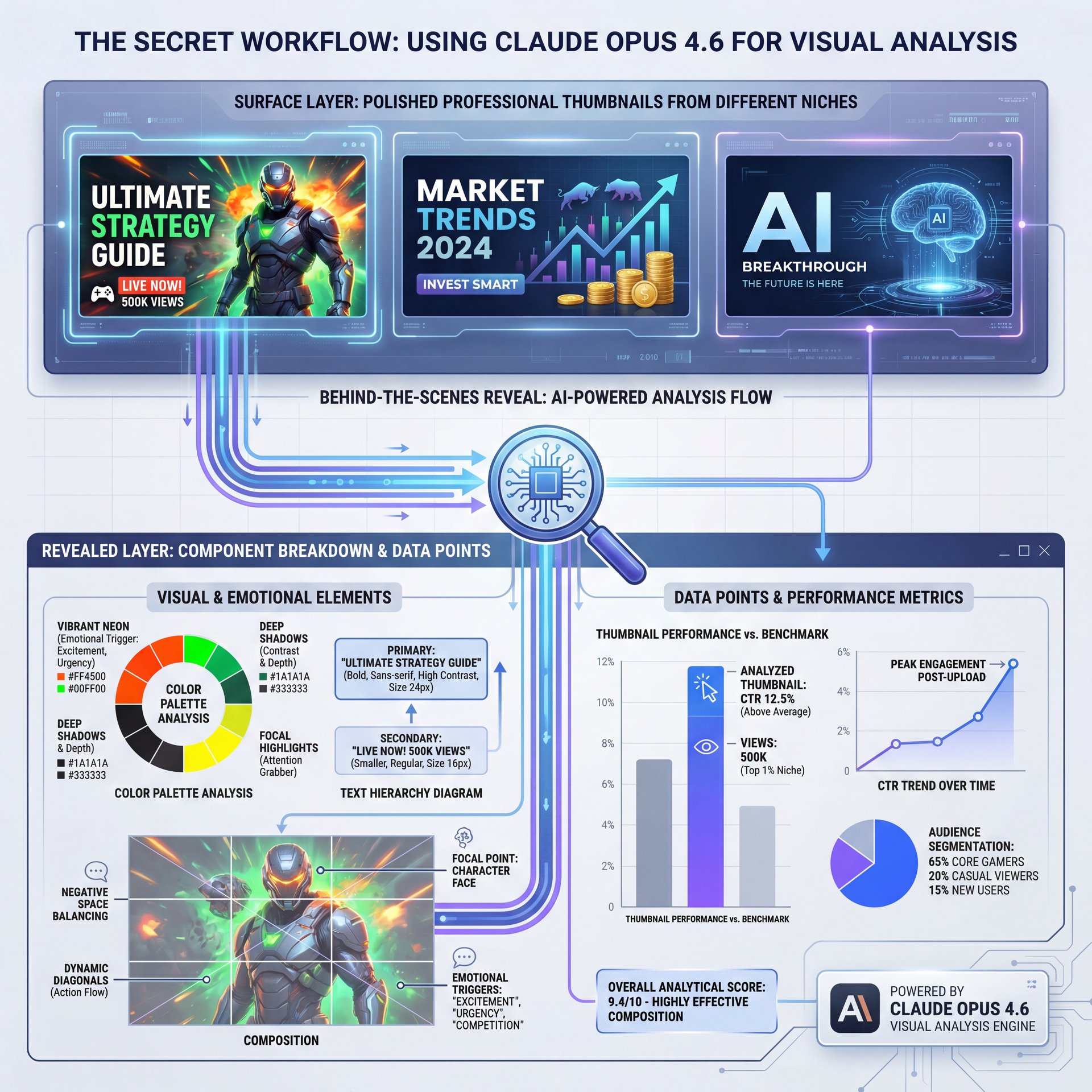
Now, if you want to get really advanced, here’s what you want to do. You can actually use Claude Opus 4.6 to analyze existing thumbnails, which demonstrates its ability to analyze and synthesize multiple data sources simultaneously.
Let’s say you’re entering a niche you don’t know much about. Maybe you’re pivoting from gaming to finance. You don’t know the visual language of that niche yet.
I grab the top 10 performing videos in that niche, take screenshots of their thumbnails, and describe them to Claude. Then I ask: “What is the common thread here? What colors are they using? What is the text-to-image ratio?”
It’s like having a diagnostic tool for YouTube. It scans the data & tells you, “Hey, 8 out of 10 of these are using high-contrast green text and shocked facial expressions on the left side.” That saves you hours of guessing. You’re not reinventing the wheel; you’re just putting better tires on it.
Automate Your Visual Analysis (the boring but important bit)
Don’t spend hours manually checking your competitors. Every time. Use AI tools to analyze metadata and visual trends in seconds.
Our workflow tools help you set up these insights directly into your design process without the headache.
This analysis phase is critical. If you skip it, you’re just throwing parts at the car hoping one of them fixes the noise.
Can Claude Opus 4.6 Actually Design the Thumbnail?
So, let’s address the elephant in the room. Can you just push a button and get a finished JPG?
Well, not exactly. And honestly, you wouldn’t want it to.
Claude Opus 4.6 is a text and reasoning model. It’s the brain, not the hands. While it can generate code for SVGs or give you incredibly detailed prompts for image generators, it’s not going to spit out a 4K image file ready for upload by itself.
But here’s the trick. You use Claude to write the prompt for an image generator like Midjourney or DALL-E 3. I’ve found that the biggest problem people have with AI art is that they don’t know how to talk to the machine. They say “make a cool car.” the machine makes a cartoon car.
Though if you use Claude, you can say: “Write a detailed prompt for a photorealistic image of a 2026 mechanic shop, cinematic lighting, 85mm lens, depth of field…” Claude knows the technical photography terms that the image generators love. It translates your vague idea into the specific language the image generator needs.
Don’t Confuse the Architect with the Builder (yes, really)
A common mistake is expecting Claude to output the final image file. It excels at reasoning and prompt engineering.
Use it to generate the blueprint, then use a dedicated video generation tool or image generator to execute the vision.
Real Talk: Is It Worth the Price Tag?
Now, we gotta talk about money. I’m all about saving a buck where you can, but sometimes you gotta pay for quality parts.
Claude Opus 4.6 isn’t free.
That $75 for output tokens might sound steep if you’re just playing around. But think about it this way. How much is your time worth?
If it takes you 4 hours to brainstorm and design a thumbnail that gets a 2% CTR, you’re losing money. If you spend 50 cents worth of tokens to get a concept that gets a 6% CTR, that’s the best investment you’ll make all week. Game changer. AI tools are transforming YouTube creator workflows, with automation reducing production time while improving content quality and consistency.
For casual users, the free tier or lower models might be enough. But for the professionals and serious creators? It’s a business expense. It’s like buying the Snap-on wrench instead of the generic one. It just works better and lasts longer.
you have to be smart about it. Don’t use Claude Opus 4.6 for simple stuff like “check my spelling.” Use it for the heavy lifting, the creative strategy, the deep analysis, the complex prompt engineering.
Optimizing Your Thumbnail Strategy in 2026

We’re in 2026 now. The game has changed. It’s not just about bright red arrows anymore.
One trend I’m seeing is “authentic imperfection.” People are tired of, the glossy, fake AI look. They want something that feels real. Claude Opus 4.6 is actually honestly impressive at helping you acheive this. Trust me on this. You can tell it, “Give me a concept that looks raw and authentic, not over-produced.” It understands that vibe.
I was working on a project recently where we needed a thumbnail that felt like a behind-the-scenes leak. Claude suggested a low-angle shot with grainy texture. We executed it, and the engagement was through the roof.
Pro Tip: Use Claude to A/B test your text overlays. Give it your title and ask for 10 short, punchy text alternatives for the thumbnail, so it knows that you usually want less than five words on the image itself.
Also, don’t forget about consistency. If you have a channel brand, feed that “brand bible” into Claude first. Tell it, “I always use yellow borders and Futura font.” It will remember those constraints for every future idea it generates.
Getting Started: A Simple Checklist
So, you’re ready to try this out. You got your account, you got your video idea. What’s the first step?
Don’t overcomplicate it. Start compact.
First, just talk to it. Tell it about your channel. “Hey, I run, a gardening channel for urban millennials.” Let it build a profile of who you’re. True story. Next, give it your video data. The title, the hook, the main payoff. Then, ask for the visuals. “Describe the perfect – like, really perfect thumbnail for this.”
Finally, refine. “That sounds too busy. Simplify it.”
The 4-Step Claude Thumbnail Workflow
1. Context: Upload your script or video summary.
2. Ideation: Ask for five distinct visual concepts with emotional hooks.
3. Refinement: Use Claude to write specific prompts for your image generator.
4. go over: Ask Claude to critique the generated options against best practices.
Get started with our pricing plans to scale this workflow.
Why This Matters for You
Hey everyone. So, I got to play with Anthropic’s newest model, Opus 4.6, before it launched, and I want to share my first impressions with you all. In this quick video, I’m going to cover what makes Opus 4.6 different, and I’m going to test three use cases live. Using regular Claude for podcast postprouction, using claw code to generate a game, and using codework to generate a presentation. So, let’s dive in. Okay, so what’s new with Opus 4.6? There are three things through my testing. First, it follows instructions much better in long threads. Previously, in long conversations with Claude, it can get lost and ignore your instructions, but with Opus 4.6, it remembers your initial prompt, even if you’re deep into the thread. I’ll demo this in the cloud use case next. Number two, it gathers context before acting much more. So, one of the criticisms of anthropics models, especially for coding, is that they tend to just want to code. You have to use these hacks like plan mode to get it to think through things first before coding. But with Opus 4.6, this is much better.
But Claude Opus 4.6 is a really, really honestly impressive scanner. Why does this matter? It helps you see things you might miss. It helps you connect the dots between your content and what the audience actually wants to click on.
I’ve seen creators who were stuck at a plateau for years suddenly break through because they stopped guessing and started using data-driven creativity. And that’s what this is. It’s not magic. It’s logic applied to art.
So, give it a shot. Mess around with the prompts. See what it comes up with. You might be surprised. I know I was.
Frequently Asked Questions
How does Claude Opus 4.6 handle large bodies of information differently from other models?
It has a massive context window that allows it to analyze dozens of competitor thumbnails or full video scripts simultaneously without losing track of the details.
What specific challenges do beginners face when using Claude Opus 4.6?
The main challenge is “prompt fatigue,” where users don’t provide enough initial context, leading to generic results; you need to be specific about your audience and goals.
Can you provide examples of user feedback on the usability of Claude Opus 4.6?
Users frequently praise its ability to act as a creative partner rather than just a text generator, noting it often suggests angles they hadn’t considered.
What are the latest trends in AI tools for YouTube creators in 2026?
The biggest trend is the shift toward integrated workflows where “reasoning” AI (like Claude) directs “generative” AI (like Midjourney) for more cohesive and smart results.
How much does it cost to use Claude Opus 4.6 for thumbnail creation?
Pricing sits at $15 per million input tokens and $75 per million output tokens, but typical thumbnail brainstorming sessions cost less than a dollar while saving hours of design time.
Related Content
For more on this topic, check out: thumbnail
Listen to This Article