Table of Contents
- What Makes Nano Banana Pro Good at Thumbnail Design?
- How to Create Nano Banana YouTube Thumbnails Step-by-Step
- Best Practices for Prompts, Text Rendering and CTR
- Nano Banana Pro vs Other AI Thumbnail Generators
- Workflows for A/B Tests, Series Branding, and Localization
- Pricing, Access and Where Nano Banana Fits in 2025
- Listen to This Article
“Give me 10 minutes,” said Alex Rivera, our Senior Content Analyst, as we shared coffee and I complained about spending two hours masking hair for a thumbnail. He pulled out his phone, opened Gemini, and generated three readable options while my latte cooled. The best part? We resized them for YouTube, and the text remained legible. That moment shifted my perspective from wondering “if” Nano Banana could be integrated into a real thumbnail workflow to “how” to do it.
YouTube draws 2.7 billion monthly users. Plus, 63% of views happen on mobile devices where blurry text at 1280×720 kills performance. Nano Banana Pro, released in November 2025, achieves 94% text rendering accuracy compared to 60-70% in competing models. Creators switching to the platform report CTR increases between 22% and 65% within 30 days. That pushes channels from an average 2.1% to 4.8%. So if you’ve battled AI’s common spelling issues, you know exactly why that accuracy matters in your analytics.
Here’s Why This Matters for Your Channel
At YouTube sizes, your words act as design anchors. Because 63% of views happen on phones, headlines must be bold, uncluttered, and readable when scaled down. Nano Banana Pro understands letterforms and spacing well enough to avoid the “melted-font” look many diffusion models produce. That’s often the difference between 2% and 5% CTR for most channels.
The platform uses multimodal reasoning first, pixels second. Instead of blindly painting, it analyzes composition, focal hierarchy, and text placement before rendering. That process explains why spelling accuracy is approximately 94% and text remains legible at small sizes. When thumbnails live or die by readability, that matters more than hyper-realistic details.
So What Does This Mean for Growth?
Creators implementing data-driven thumbnail strategies see CTR gains of 22-65% in their first 30 days. Nano Banana’s spelling stability drives that surge. You get native 2K-4K output with studio controls for lighting, camera angles, and color grading. Plus, pixel-perfect 1280×720 support maps cleanly to YouTube’s spec. If you’ve tried cropping a square 1024 image into 16:9 and lost crucial text, this alone feels like an upgrade.
Meanwhile, multi-image composition keeps character consistency across up to five people and 14 objects. So you can build a coherent series look that older AI models struggled to repeat without drift. This is where it stops being a novelty and becomes a brand tool. Because Nano Banana Pro maintains likenesses—same host, same jacket, same facial markers—your series tiles look like they belong together.
That’s especially useful for playlists, multi-part tutorials, and global versions of the same video. Instead of spending hours recreating the same face and pose, you lock that in with a prompt pattern and focus on the story. From hands-on experience, AI-generated headlines often need a quick human check for line breaks. However, the model’s ability to suggest compositions based on story descriptions cuts down on the mental strain of starting from scratch. Rather than facing a blank page, you’re reviewing and selecting from solid starting points.
What Makes Nano Banana Pro Good at Thumbnail Design?
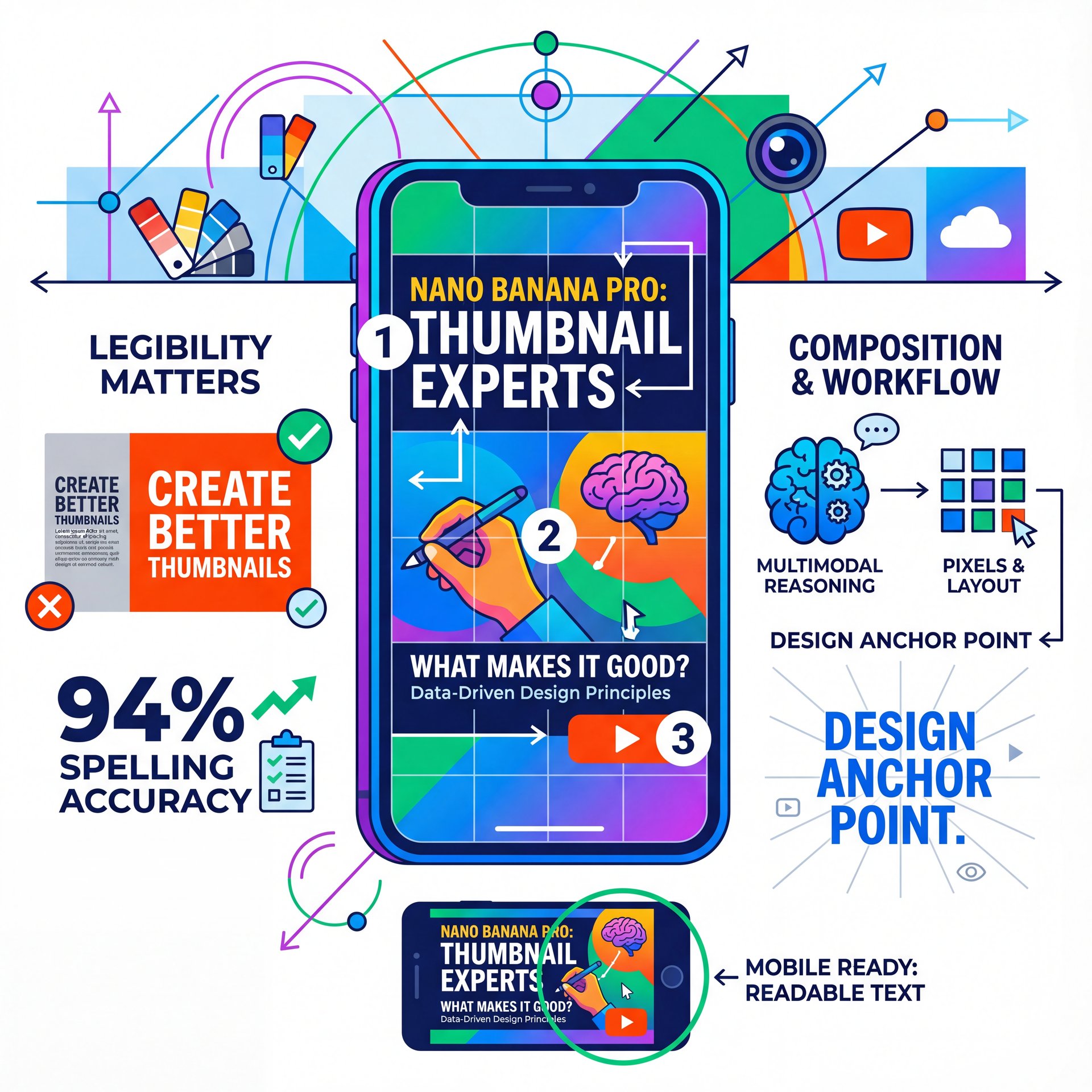
The platform uses multimodal reasoning first, pixels second. Instead of blindly painting, Nano Banana Pro analyzes composition, focal hierarchy and text placement before rendering. That process explains why spelling accuracy is approximately 94% and why text remains legible at small sizes. When thumbnails live or die by readability, that matters more than hyper-realistic details.
Why text rendering accuracy changes CTR
At YouTube sizes, your words act as design anchors. Because 63% of views happen on phones, headlines must be bold, uncluttered and readable when scaled down. Nano Banana Pro understands letterforms and spacing well enough to avoid the “melted-font” look many diffusion models produce. That’s often the difference between 2% and 5% CTR for most channels. Creators implementing data-driven thumbnail strategies see 22-65% CTR gains in their first 30 days, and Nano Banana’s spelling stability drives that surge.
Studio-level controls you can actually use
You get native 2K-4K output with studio controls for lighting, camera angles and color grading. Plus, pixel-perfect 1280×720 support maps cleanly to YouTube’s spec. If you’ve tried cropping a square 1024 image into 16:9 and lost crucial text, this alone feels like an upgrade. Meanwhile, multi-image composition keeps character consistency across up to 5 people and 14 objects. So you can build a coherent series look that older AI models struggled to repeat without drift.
Character consistency for series branding
This is where it stops being a novelty and becomes a brand tool. Because Nano Banana Pro maintains likenesses—same host, same jacket, same facial markers—your series tiles look like they belong together. That’s especially useful for playlists, multi-part tutorials and global versions of the same video. Instead of spending hours recreating the same face and pose, you lock that in with a prompt pattern and focus on the story.
(Quick tangent.)
From hands-on experience, AI-generated headlines often need a quick human check for line breaks. But the model’s ability to suggest compositions based on story descriptions reduces the mental strain of starting from scratch. Rather than facing a blank page, you’re reviewing and selecting from solid starting points.
Nano Banana Pro
Reasoning-led image generation
- ✓ Clean text + consistent characters
YouTube Studio A/B Testing
Swap thumbnails and measure CTR
- ✓ Validate what actually works
Banana Thumbnail Workflows
Repeatable, documented steps
- ✓ Faster execution across teams
Cost and time: why teams are switching
Thumbnail creation time drops by 85%, from 180 minutes to 27 minutes including refinements and export. Creators demonstrate this in workflow demos. The API costs $0.139 per 2K image, versus $75-150 per freelance thumbnail—a 99.84% cost reduction. For channels producing 12 videos monthly, those savings free up budget for scripting, research or equipment that drives actual growth.
Pro Tip: Treat Nano Banana like an art director. Give it the emotional arc (“shock,” “curiosity,” “authority”), the target audience and the tiny-screen constraint, then push two variations max into an A/B test.
How to Create Nano Banana YouTube Thumbnails Step-by-Step
Let’s walk through building a clean, legible 1280×720 thumbnail with character consistency and a bold headline. You can do this in the Gemini app, which offers 3-5 free generations per day. Or upgrade to Google AI Pro for $19.99/month for higher volume. For batch work, call the API. This process builds on the flow we outlined in AI YouTube Thumbnail Creator: Make Thumbnails in 30s (2025).
Set your canvas and constraints
Start by stating “16:9, 1280×720” in your prompt. Describe your subject, camera angle and background simplicity. Ask for, you know, a text-safe area and be explicit about headline length—aim for 3-6 words—and placement, like left third or upper right. Nano Banana Pro respects structure when you give explicit constraints.
Frame the story
State the emotion (shock, curiosity), the subject (creator or product), and the promise in one line.
Lock the layout
Specify “16:9 at 1280×720,” text on left third, main face right, medium close-up, clean background.
Demand legibility
Ask for “uppercase sans serif, 94%+ spelling accuracy, 4–6 words, high contrast for mobile.”
Prompt that works for beginners
Try this template: “16:9 (1280×720), studio-lit medium close-up of [creator name], angled 15° camera tilt, bold color pop background with soft gradient, headline: ‘STOP WASTING TIME’ in uppercase sans-serif, 5 words max, left third, high contrast, clean kerning, no extra objects, maintain character consistency with prior image of [creator name], generate 2 variations for A/B test.”
Refinement and export details
For cropping flexibility, request 2K-4K output. Confirm spelling before upscaling or compressing. When downsizing to 1280×720, check the mobile preview on your actual phone, not a 27″ monitor. Micro-text that looked fine on desktop can collapse at arm’s length. Save your prompt alongside the asset so you can reproduce the look later.
💡 Mobile-Legible Text in One Pass
Use 4–6 words, uppercase, thick sans serif, and color pairs like white text on deep blue or black on neon yellow. For a repeatable setup, build a mini-pipeline from our workflow examples and reuse the same text-safe area and color palette across videos.
Testing two great options beats chasing ten “meh” ones
It’s tempting to generate 10-15 versions. Don’t. Pick two clear hypotheses: high-contrast face versus big-text dominant or surprise expression versus calm authority. Put them head-to-head in YouTube Studio’s experiments, then carry the winner’s pattern forward.
Best Practices for Prompts, Text Rendering and CTR
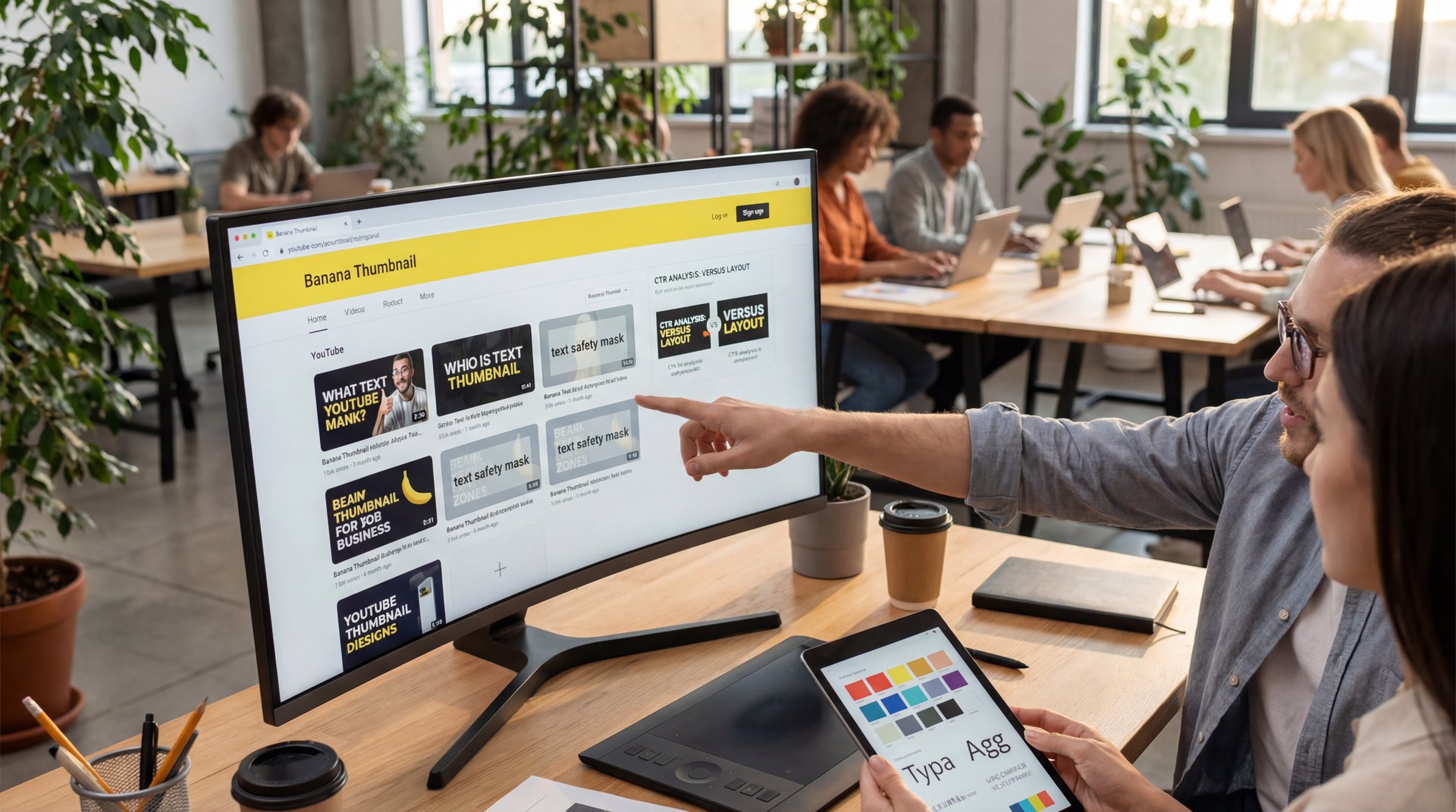
The solution is to prompt like a designer and review like a marketer. Here’s how to keep your Nano Banana YouTube thumbnails both attractive and performant.
What to include in a great prompt
- Aspect ratio and size: “16:9, 1280×720 output supported, render at 2K”
- Text constraints: “five words, uppercase, thick sans serif, 94%+ spelling accuracy”
- Composition: “face right, text left, medium close-up, surprisingly easy gradient background”
- Emotion and audience: “spark curiosity for first-time viewers, not subs”
- Character consistency: “match [host name] from prior shoot; same jacket and hair”
Making text readable on tiny screens
Ask Nano Banana Pro for a “text safety mask” or “text-safe area.” It won’t usually draw one, but when it does, it places headlines in clean, high-contrast zones. If text feels thin, request a weight bump: “bold weight 800, 3–4% tracking.”
📋 Thumbnail QA Checklist
- 4–6 word headline, no line over ten characters
- Face at 30–50% of frame, eyes visible
- Contrast ratio > 4.5:1 for headline
- Test crop at 320px wide on phone
Save this as a reusable step in Banana Thumbnail Workflows to avoid last-minute fixes.
Reduce optimization fatigue without losing rigor
Intermediate creators hit a wall when each A/B variant takes 15-30 minutes to run. Let Nano Banana Pro propose two layout families, then spend design time only on the winner. Because the technology cuts total thumbnail creation time by 85%, your energy shifts from production to learning—where the upside lives.
Pro Tip: If you’re debating color, test warm 😬 background + cool text versus cool background + white text. Keep the headline identical so the only variable is palette.
Nano Banana Pro vs Other AI Thumbnail Generators
Many AI thumbnail tools handle only a fraction of what’s needed. Poor spelling or layouts that fail at small sizes drag down CTR. However, Nano Banana Pro differentiates itself with 94% text rendering accuracy and reliable multi-image composition for up to five people and 14 objects. That makes it suitable for ongoing channel use rather than one-off trials.
(Stick with me here.)
How it stacks up in 2025
- **Text rendering**: 94% accuracy versus 60-70% elsewhere
- **Multimodal reasoning**: Better layout and object relationships before pixel work
- **Native 2K-4K**: Sharp exports that scale cleanly to 1280×720
- **Series consistency**: Same host, outfit and props without character drift
- **Cost**: $0.139 per 2K image via API versus $75-150 per freelance deliverable
When templates still make sense
For ultra-simple text-only graphics, a template app is fine. However, if your CTR depends on a recognizable host face, the multi-image composition and character consistency from Nano Banana Pro are hard to beat. It behaves like an AI creative director: you set the strategy, and it proposes viable options.
(I know, I know.)
📊 Before/After: 30-Day Nano Banana Switch
A channel at 2.1% CTR tested two Nano Banana layouts per video and averaged 4.8% CTR after 30 days. Production time dropped from ~180 minutes to 27 and costs moved from $75–$150 per thumbnail to ~$0.139. See how similar gains are achievable with feature-level controls.
Specs that match platform rules
Export at 1280×720 or higher with a 16:9 aspect ratio, and keep bright graphics within safe values to avoid compression artifacts. Bookmark YouTube’s thumbnail guidelines for official requirements.
Workflows for A/B Tests, Series Branding, and Localization
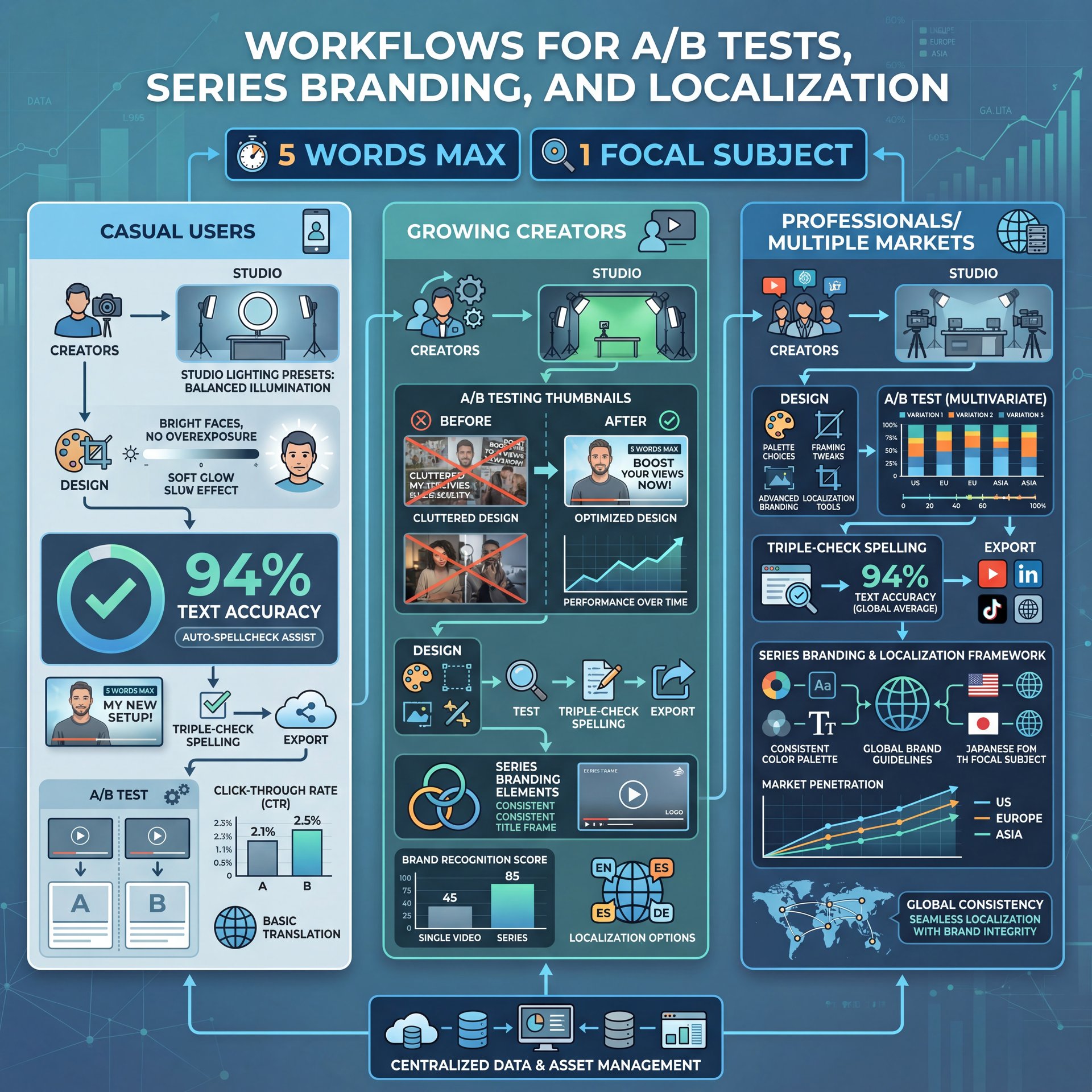
Let’s tackle pain points for three audiences: casual users, growing creators, and professionals managing multiple markets.
Casual creator: “I just want readable text”
Your biggest enemy is illegibility. Set two rules: five words max and one focal subject. Use Nano Banana Pro’s studio lighting presets to keep faces bright without blowing them out. Because text accuracy tracks at 94%, you can trust what you see—still, triple-check spelling before export. If you’re new to testing, we unpacked palette choices and framing tweaks in YouTube Thumbnail Design 2025: Boost CTR 200% with AI.
Growing creator: “I’m exhausted by A/B testing.”
You’re doing, you know, the right work, it’s just a lot. Let Nano Banana Pro propose two distinct layouts—maybe one text-dominant and one face-dominant—and only polish those two. Libraries of reusable constraints (same headline length, same safe area) mean each new test set up in seconds, not minutes. Channels running disciplined experiments often hit that 22-65% CTR improvement band within the first month because they stop guessing.
Define the hypothesis
“Bigger face vs bigger text,” or “warm background vs cool background.”
Generate two variations
Use identical headlines and facial expression notes to isolate one visual variable.
Launch Studio experiment
Run each for equal impressions and pick the winner based on CTR only.
Professional teams: “We localize at scale”
Localization multiplies workload 3-5x. Nano Banana Pro’s character consistency across up to five people is valuable here: the same pose and eye line, different language text. Because the model keeps letters crisp, you can run Spanish, Portuguese and German headlines without re-laying everything in a design tool. For markets with right-to-left scripts, specify “mirror layout with headline right third” to keep visual rhythm.
⭐ Creator Spotlight: Global Series, One Look
A multilingual productivity channel standardized a two-pose layout and swapped headlines for six markets in under an hour using Nano Banana’s composition locks. They staged ideas in our video-gen pipeline, then exported localized thumbs without re-shoots.
Integrations that reduce friction
- **Free through the Gemini app**: 3-five generations daily for quick tests
- **Google AI Pro ($19.99/month)**: 50-100 daily high-quality generations for consistent output
- **API at $0.139 per 2K image**: Ideal for batch workflows and programmatic variations at scale
- **Slides and Docs**: Paste renders, align with brand colors, and handoff to stakeholders fast
Pricing, Access and Where Nano Banana Fits in 2025
The creator economy reached $149.4 billion in 2024 and is projected to reach $1,072.8 billion by 2034 at 21.8% CAGR. That explains why 51% of video marketers now use AI in their processes. Nano Banana Pro fits this landscape for thumbnails, with free access via Gemini for 3-five daily generations. Google AI Pro at $19.99/month serves regular users, and API pricing at $0.139 per 2K image works for larger operations. Compared to freelance fees of $75-150 per thumbnail, this shift makes financial sense for reallocating budgets.
Where it shines and where it doesn’t
The model excels at legible text, consistent character branding, and professional-grade multimodal generation. It may require minor tweaks for complex scenes with small transparent items, such as hair or glass details. However, for most YouTube needs—clear stories, prominent faces and sharp headlines—it acts as a dependable tool.
Implementation tips that stick
- Lock a series template: same grid, same text-safe area, different headline
- Keep a palette: one warm, one cool, test them monthly
- Archive prompts following to thumbnails to maintain consistency with new team members
This process work quietly drives CTR.
💡 Batch the Right Way to Save 85%
Queue two layouts per video topic and export both at 2K, then downscale to 1280×720 after mobile checks. For teams, create a reusable pipeline in Banana Thumbnail Features so new editors only choose headline and color.
Related Videos

Related Content
For more on this topic, check out: nano
Listen to This Article