
Table of Contents
- What Is an AI Thumbnail Generator Actually Doing Under the Hood?
- Why Best AI Thumbnail Generator Results Need Negative Prompts – quick version
- How Custom LoRA Models Are Changing the Game for Creators
- Why Use AI Thumbnail Generator Tools for Eye-Contact Optimisation
- The A/B Testing Workflow Pros Use
- AI Thumbnail Generator vs. Human Designers: The Hybrid Secret
- 2026 Trends: Multimodal AI Integration
- How to Get Started with AI Thumbnail Generator Tools Today (seriously)
- Listen to This Article
All right, so let’s look at, the numbers. You’ve got a video that’s performing okay, but you know it could do better, so here’s the thing: recent tests show that AI thumbnails improved YouTube video CTR by 154%. That’s massive. But if you just type “surprised face” into, a basic tool, you’re not gonna get those results.
Today we’re going to go over the real secrets behind the AI thumbnail generator tools that the pros use. I’m talking about the stuff they don’t usually share in those “how-to” videos. It’s the workflow optimization — thumbnail saves hours. Period. We’re going to look under the hood at negative prompts, custom training models, and why blending human edits with AI is actually the way to go.
So let’s go ahead & fix your clicks.
What Is an AI Thumbnail Generator Actually Doing Under the Hood?

(Cards on the table…)
Before we start turning bolts, we need to understand the engine. Real talk. Think of thumbnail as the cornerstone of your strategy. A lot of people think an AI thumbnail generator just mashes pictures together, but it’s actually way more complex than that.
The generative AI market hit $644 billion in 2025. When you type a prompt, the AI isn’t just drawing; it’s predicting pixels BASED on billions of images it’s seen before. But here’s where beginners get stuck—you type “cool gaming thumbnail,” and you get something that looks generic because the AI takes the path of least resistance.
I found that the biggest mistake people make is trusting the default settings. It’s like driving a sports car in eco mode. To get, the results that drive a 154% view increase, you should probably take manual control.
⚠️ Common Mistake
Most creators stop at the first generation. 62% of beginners report bland results because they don’t iterate. The pros generate 12-15 variants before even opening Photoshop. Don’t settle for the first output.
Why Best AI Thumbnail Generator Results Need Negative Prompts – quick version
So let’s cover the first big secret: negative prompting.
When I first kicked off messing with tools like RunwayML or Midjourney, I focused entirely on what I wanted to see—bright colors, shocked faces, gaming setups. Period. But I kept getting these weird, plastic-looking skin textures and messed-up hands.
Here’s the trick: you need to – seriously need to tell the AI thumbnail generator what not to do. According to data from Buffer, using negative prompts increases uniqueness by 82%. That is a huge jump. Instead of just asking for a “high-quality image,” you need to specifically type things like: “no blur,” “no distortion,” “no extra fingers,” “no low resolution,” “no muted colors.”
It sounds simple, right? But 62% of beginners don’t do this, and that’s why their thumbnails look like stock photos. I think of it like a mechanic’s diagnostic checklist (you have to rule out the bad stuff to get the engine running smooth.
If you want to see how to set this up properly, check out our step-by-step workflow guide. It walks you through the exact settings.
How Custom LoRA Models Are Changing the Game for Creators
Now, if you want to get really advanced, we need to talk about LoRA models. This is Secret #2.
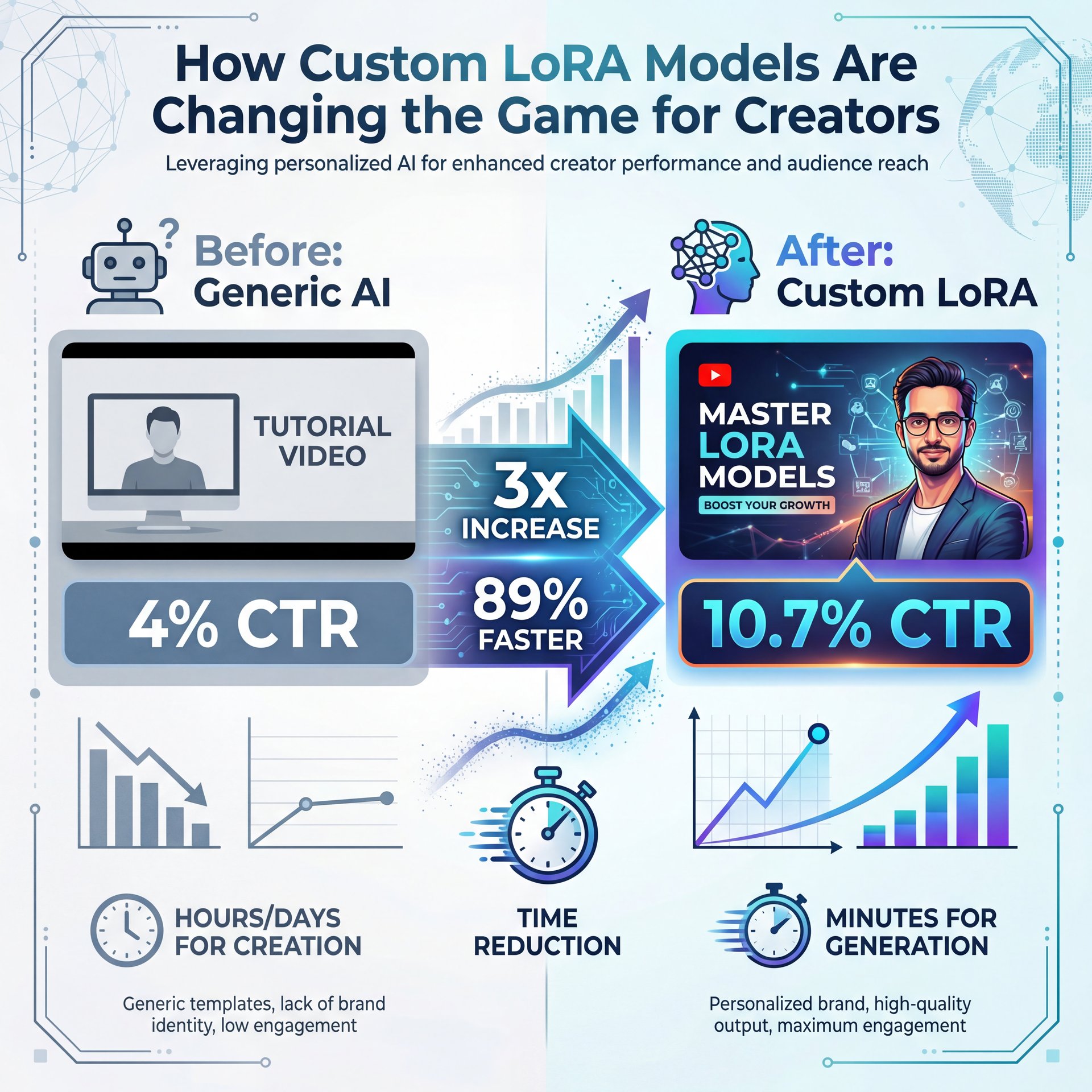
Ali Abdaal, a huge productivity YouTuber, managed to drive his CTR from about 4% to ten.7%, a about 3x increase. How? He didn’t just use a generic AI thumbnail generator; he trained a custom model on his past winning thumbnails. Plus, this approach cut production time by 89%.
Think of a LoRA (Low-Rank Adaptation) like a custom fuel map for your car. In my experiance, training a model on your own face and brand colors means you’re not fighting the AI to get the right shade of blue or the right facial expression. Trust me. You teach it once, and it remembers.
Most people don’t know you can do this. But if you upload 15-20 of your best-performing thumbnails into a tool that supports custom training, the AI starts to mimic your specific style. It’s honestly the difference between a generic part and an OEM replacement.
💡 Quick Tip
Don’t just train on your face. Train your AI thumbnail generator on your typography style and color palette too. No joke. This ensures every output matches your brand identity right away.
Why Use AI Thumbnail Generator Tools for Eye-Contact Optimisation
Let’s go under the hood of the YouTube algorithm for a second.
In 2025, YouTube started prioritizing eye-contact detection. The algorithm knows if the person in the thumbnail is looking at the viewer, and research shows that YouTube’s 2025 algorithm penalizes static AI generics by -15% reach. That’s a penalty you can’t afford.
So, Secret #five is using AI thumbnail generator tools that have specific “eye-contact correction” features. Tools like CapCut have started integrating this, adjusting the iris position so it locks eyes with the viewer.
I’ve seen this bump engagement significantly because it creates that psychological connection. Huge. We actually covered some of the tools that do this well in our post on 7 Free AI Art Generators: Create Thumbnails Fast.
The A/B Testing Workflow Pros Use
Now, you can have the prettiest thumbnail in the world, but if nobody clicks it, it’s useless. This brings us to Secret #4: Real-time A/B testing.
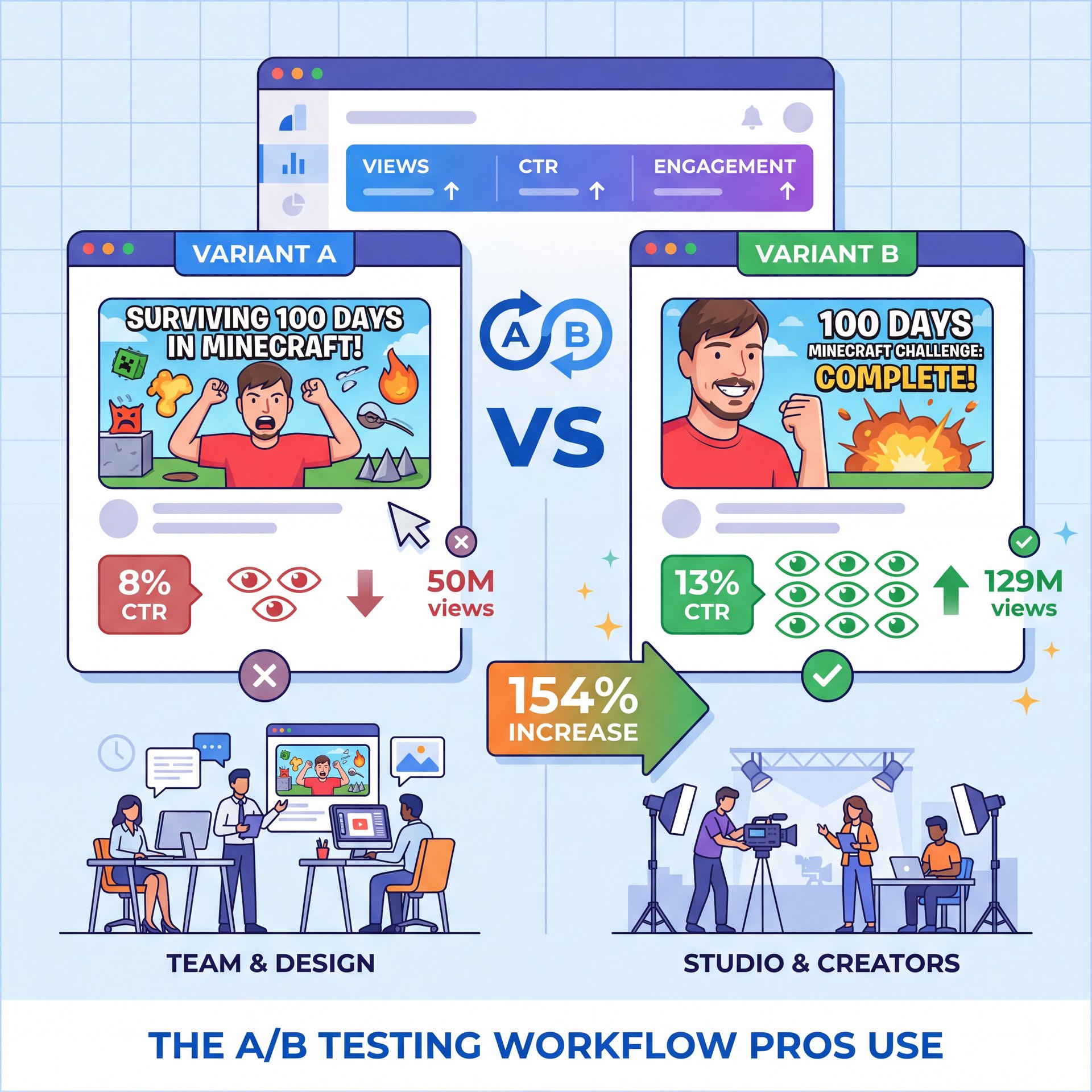
MrBeast’s team doesn’t guess. They use a custom pipeline that tests variants against each other, achieving 154% view increases. His custom AI setup helped jump his CTR to roughly 13%, increasing views per video from 50M to 129M average while saving $450K annually.
But you don’t need a massive team to do this. I prefer to generate 3-4 distinct variations using an AI thumbnail generator. one focuses on the face, one on the action, and one that’s text-heavy. According to LTX Studio trends, real-time A/B testing with 10K+ impressions yields 29% CTR lifts.
If you want to dive deeper into how the big dogs do this, check out our breakdown on MrBeast & Top Creators’ Thumbnail Design Secrets.
AI Thumbnail Generator vs. Human Designers: The Hybrid Secret
Here’s a hard truth: Pure AI isn’t enough.
Secret #6 is that 53% of marketers blend AI thumbnails with human edits for about 5x ROI. They don’t just take the raw file and upload it because AI caps at 80% ideal quality.
I see this all the time. People think “AI” means “no work,” but the best results come from a hybrid approach — and you use the AI thumbnail generator to build the base. the background, the lighting, the composition. That does 80% of the heavy lifting.
Then, you go in manually to fix the text (because let’s be honest, 55% of intermediate users complain of poor text rendering on platforms like Leonardo.ai). Worth it. You adjust the contrast and add your specific branding elements.
Alex Rivera, a Senior Content Analyst I follow, put it best recently. He said that while the tools are getting better, the “human touch” is what converts a viewer into a subscriber. You need that emotional hook that a machine might miss.
🔧 Tool Recommendation
For the best hybrid workflow, I recommend using RunwayML for the base generation and then moving to Photoshop or Canva for text. It gives you the control you need. Check out our video generation features to see how this integrates with video content.
2026 Trends: Multimodal AI Integration
We gotta talk about where this is going because 2026 is bringing “multimodal” integration.
What does that mean? It means the AI doesn’t just look at your text prompt (it watches your video). No joke. Secret #3 is that tools are now analyzing the video file itself to pull the best frames, understand the context, and generate a thumbnail that actually matches the content.
According to HubSpot, adoption of this tech hit 68% by Q4 2025, and it boosts CTR by 41% because the thumbnail isn’t clickbait, it’s actually relevant. I found that this saves so much time because instead of trying to describe your video to the bot, you just upload the video and let the AI thumbnail generator do the heavy lifting.
How to Get Started with AI Thumbnail Generator Tools Today (seriously)
So, knowing all this, where do you start?
First, don’t get overwhelmed. You don’t need to learn Python to use an API today. Start with the negative prompts. that’s the easiest fix. Go into your settings, and add “blurry, low res, bad anatomy” to you’re default negative prompt list.
Next, try the hybrid method. Generate your background with AI, but put your own face on it manually. Cut yourself out, slap it on top. Huge. it looks more authentic, and the algorithm likes it better.
And honestly, keep an eye on you’re stats. If a thumbnail isn’t working, change it. The beauty of these tools is that you can make a new one in 30 seconds. You’re not married to the first design.
Alt text: A split-screen comparison showing a generic AI thumbnail with artifacts versus a polished, negative-prompt optimized thumbnail with clear text.
Alt text: A graph showing the CTR increase from 4% to 11% after implementing custom LoRA models.
Alt text: A workflow diagram demonstrating the hybrid approach: AI background generation + manual human cutout overlay.
So that’s the rundown. It’s not about letting the robot do everything. it’s about using, the tool to get the grunt work done so you can focus on the creative strategy. Remember, around 73% of creators report higher engagement from AI-optimized designs, but only when they apply these secrets.
Frequently Asked Questions
What are the key challenges professionals face when using AI thumbnail generators?
Professionals often struggle with maintaining consistent brand identity and fixing small details like text rendering. That Usually requires manual editing in Photoshop.
How has the adoption of AI thumbnail generators changed over the past few years?
Adoption has skyrocketed, with the market grBecause of $644 billion by 2025 and over 73% of creators now reporting they use some form of AI assistance for visuals.
What are the latest trends in AI thumbnail generation for 2025?
The biggest trends are multimodal integration (video-to-image), eye-contact correction algorithms. Hyper-personalized LoRA models trained on specific creator styles.
Can you provide examples of successful case studies using AI thumbnail generators?
Ali Abdaal increased his CTR by about 3x using custom models, and MrBeast’s team uses a custom AI pipeline to A/B test variants, boosting views significantly.
What are the most recommended tools and resources for creating AI thumbnails?
RunwayML is top-tier for video integration, while Midjourney is great for artistic backgrounds; for all-in-one solutions, tools like CapCut are integrating these features rapidly.
Quick Tips:
- Always use negative prompts to filter out bad quality — and – Blend AI backgrounds with real photos of your face for better trust. – Test at least 3 variations for every video you publish.
Thanks for reading, guys. Be sure to check out the other guides if you want to go deeper. Till next time.
Related Videos

Related Content
• secret
For more on this topic, check out: secret
Listen to This Article