Table of Contents
- What are the latest AI background removal tricks in 2025?
- How to batch background removal without losing quality
- Edge refinement for hair, fur, and glass: practical workflow
- High-resolution exports and formats for print and digital
- Real-world pitfalls and fixes: speed, consistency, and cost
- 🎧 Listen to This Article
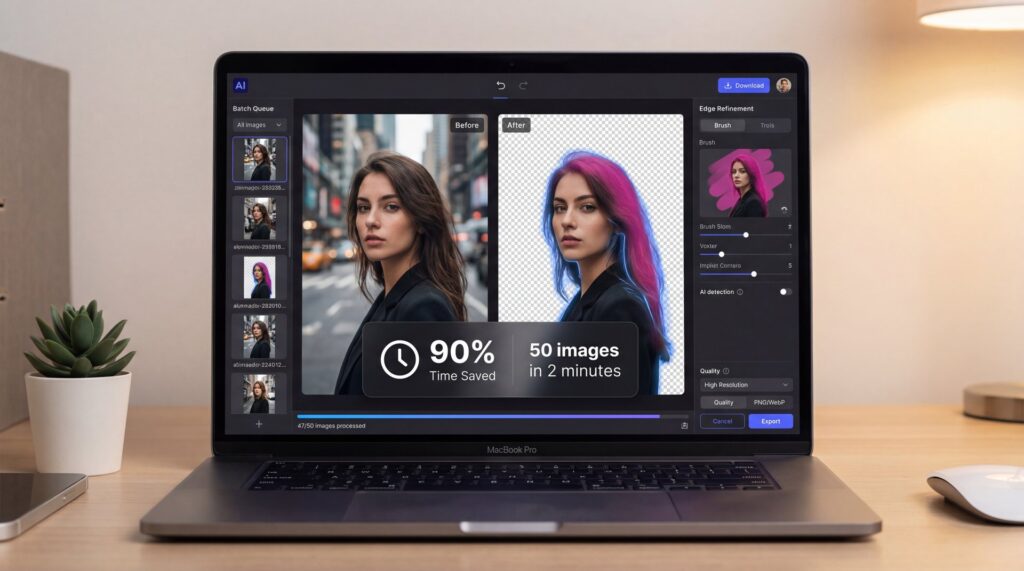
Manual cutouts are slow, inconsistent, and exhausting. AI background removal tricks are changing that equation in 2025. When you use the right workflow, you can cut editing time by 90%, with clean cutouts coming back in under ten seconds per image. This guide covers five specific tricks that work for social graphics, video thumbnails, product shots and print-ready assets—all without living inside the Pen tool.
The real value goes beyond AI handling the heavy lifting—it’s about establishing processes that integrate smoothly into your routine. For someone tidying up a headshot, a straightforward one-click solution is ideal – like, really ideal. Creators dealing with ongoing production benefit from batch processing that preserves fine details like hair. Design and marketing teams need outputs that maintain consistency and high resolution, scaling up to 10K for digital displays and physical prints. We’ll cover what’s effective right now, point out where challenges still arise, and explain how to achieve professional-grade results without spending ages tweaking settings.
What are the latest AI background removal tricks in 2025?

Three shifts define the landscape: speed, scale, and precision. Speed is obvious—average processing is now under ten seconds per image across leading tools, compared to 15+ minutes of manual masking. Scale is where it gets interesting: batch image processing can handle up to 3,000 images in one go and finish in under two hours. That used to be a full workweek of clicking. Precision caught up, too, thanks to edge refinement tools, manual brush overrides, and alpha curve controls. For tricky subjects like hair, fur, you know, and semi-transparency, many workflows now reliably hit 95%+ accuracy when you give the model clear subject separation.
A few names keep coming up in creator circles. Aiarty Image Matting gets cited for high-resolution output and clean hair edges. WithoutBG is an open-source option teams are self-hosting for privacy and custom tuning. All-in-one studios like 1min.AI are pulling background removal into a larger toolkit with generation, upscaling, and object replacement. The larger story behind this: the AI image editor market is valued at $88.7 billion in 2025 and projected to reach $229.6 billion by 2035, which explains the serious feature velocity.
Accuracy still has caveats. Complex glass, frizzy hair against backgrounds with similar colors and motion blur can trip up even the best models. But here’s the trick most people miss: think of AI background removal as automatic processing with a crucial human finish. Let the AI model get you 90–95% there in seconds, then use a few brush strokes to fix the edges that matter to your viewer. That combination is faster than chasing any “perfect automatic” promise.
Another practical upgrade in 2025 is output size. High-resolution cutouts up to 10K with 2x upscaling make print and large canvas designs feasible without fear of soft edges. That’s not a spec box to skim past; it means your product catalog and trade show graphics can come straight from an AI background remover without sending every image to a retoucher. If you’re building a reusable workflow for a team, that’s significant.
How to batch background removal without losing quality

The first trick that saves hours is batching. Creators and e-commerce teams love it because it takes 20-hour product shoots and turns them into a two-hour queue. But there’s a catch: batching garbage in still gives you garbage out. You’ll keep quality high if you prep assets: consistent framing, even lighting, and a neutral backdrop will dramatically reduce edge weirdness. Keep subject exposure slightly brighter than background, so the model sees the separation.
If you’re processing thousands, segment by category: people, shiny products, fabric, pets. Each group has different edge behaviors, and many tools let you save presets or model variants per group. It’s not glamorous, but it’s faster than cleaning 200 halos on metal water bottles because you mixed them with low-contrast hoodies in the same run.
Two levers matter most. First, your output format: PNG for transparent background generator exports, TIFF for print workflows and layered PSD if you need to hand off to a designer. Second, always inspect at 100% zoom on a sample batch before you run the full set. It’s the best way to prevent a thousand slightly-soft edges that you won’t notice until your ad is live.
Two common mistakes with batching: over-aggressive feathering, which results in soft, muddy edges, and under-refinement, which gives you crunchy, jagged outlines. The best fix is a middle-ground approach—let the automatic cutout do its job, then apply a 0.five–1px edge refine or anti-aliasing pass. Even these small numbers make a difference when exporting for social or web.
💡 Quick Tip — Batch presets that don’t fail
Save separate presets for “people,” “products: glossy,” and “fabric” so your batch background removal stays consistent. If you’re building this into a workflow, map your presets and review steps in Banana Thumbnail Workflows so anyone on your team can run it the same way.
For volume jobs, the speed is worth the risk of occasional misses. Use a review pass to catch edge cases. If you’re worried about brand-critical shots like hero images or app store screenshots, run those as a small priority batch and give them an extra minute of attention.
Edge refinement for hair, fur, and glass: practical workflow
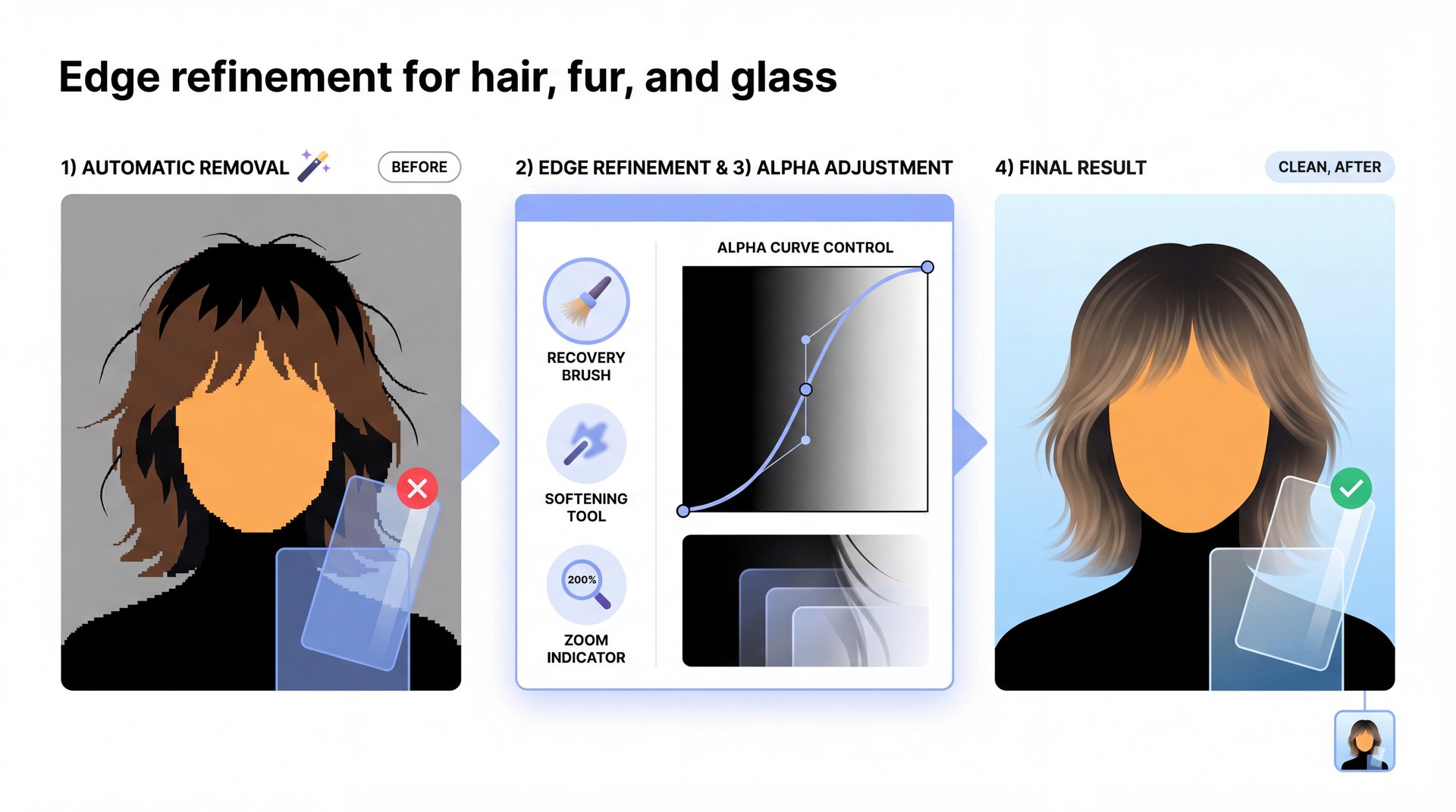
Hair and fur need clean alpha channels; glass needs believable transparency; semi-transparent fabrics need both. The trick: run automatic removal first, then switch to edge refinement tools. Use a narrow brush to recover wisps of hair or fur and soften aliasing. Alpha curve controls are your best friend—pull the mid-tones slightly to bring back near-transparent edges without turning the background gray. For portraits, tap a hair recovery brush and zoom to 200% on flyaway sections. For animals, work in small arcs that follow the natural direction of fur to avoid an unnatural “comb” look.
Transparent objects are a different beast. You’re not just cutting out edges; you’re implying how light passes through them. If your tool supports background color sampling, use it to keep refraction looking realistic. If not, add a faint inner shadow or subtle gradient on the object after removal to reintroduce depth, especially when placed on white or flat backgrounds. It’s a subtle change, but your eye will spot the difference.
Pro Tip: Don’t over-clean glass. Keep tiny edge imperfections; perfect edges make transparent objects look fake when composited onto flat backgrounds.
One more workflow win: post-process upscaling. Some tools include 2x upscaling during export. Exporting at native resolution, doing refinement, then running a single upscale pass maintains edge fidelity and reduces the “plastic” look that sometimes creeps in when denoise gets aggressive
📊 Before/After — Why refinement matters
A quick 30-second edge cleanup on hair & glass will improve perceived quality far more than re-running the model three times. Try it with clear before/after layers, then finalize. You can review this exact flow in Banana Thumbnail Features for layer-based tweaks and alpha curve control.
High-resolution exports and formats for print and digital
Here’s where 2025 changed the game for professionals: high-resolution cutout support up to 10K, often with a clean 2x upscale option. For social and thumbnails, you won’t notice beyond sharpness. For print, signage and big hero banners, it’s everything. You can cut a product and drop it into a 24×36 poster without fuzz or stair-stepping on the edges. Keep a “print master” at the largest needed size, then downsize for web to avoid multiple rounds of compression.
For creators moving fast, consistent DPI and color management are key. Export your transparent PNG at high base resolution, then compress with a web-friendly tool only at the end. Never compress twice. If you’re posting to YouTube, aim to keep your final thumbnail at 1280×720 or 1920×1080—YouTube compresses images aggressively anyway, so start with the cleanest cutout possible.
Pro Tip: If you’re exporting for both print and web, keep a separate folder for high-res masters and never overwrite them. Downscale copies for social to prevent generational quality loss.
The other reality is cost. High-res exports can count as “premium” in some tools. If you’re producing lots of large assets, do the math on per-image pricing versus a subscription or credit model. It’s still cheaper than manual retouching hours, but it’s worth optimizing.
Aiarty Image Matting
High-fidelity matting with hair/fur recovery
- ✓ Clean edges and 10K-ready exports
WithoutBG (self-host)
Open-source remover you can run privately
- ✓ Control, privacy, and predictable costs
1min.AI Studio
All-in-one editing with remove, upscale, replace
- ✓ One workspace for multi-step edits
Pairing these tools strategically enhances overall efficiency, selecting based on needs like precision, data security, or integrated editing steps to create a workflow that’s both effective and adaptable.
Real-world pitfalls and fixes: speed, consistency, and cost
Several common issues can arise with AI background removal, starting with the misconception that it can compensate for poor initial conditions like inadequate lighting or cluttered scenes. If subjects merge visually with their backgrounds, models struggle to define edges accurately. Addressing this during shooting—by illuminating the foreground more prominently, ensuring physical distance, and choosing plain surfaces—leads to stronger results overall. This preparation not only improves cutout quality but also enhances the base images themselves.
Another frequent challenge is maintaining uniformity across outputs, especially when using multiple tools, which can result in mismatched aesthetics in a cohesive project. Developing a style guide that specifies edge treatments, shadow styles, and color choices, along with standardized presets, helps keep everything aligned, which is crucial for branding in thumbnails or daily content.
⭐ Creator Spotlight — From 7 hours to 45 minutes
A creator batch-removed 600 product shots, then composited seasonal backgrounds and text in one pass. Using layer-friendly tools in Banana Thumbnail Features or exporting to your editor of choice, they cut a full-day task down to under an hour—and kept hair and fabric detail.
The third pitfall is cost creep. Batch background removal might feel cheap per image at first, but that changes once you scale up. Know your usage. If you’re processing hundreds of images weekly, subscription and self-hosted models can become far more cost-effective than per-image credits. Do a spreadsheet calculation.
Then there’s the performance question: will faster cutouts move the needle for your business? In e-commerce, the answer is yes. Clean background removal and consistent product presentation have been directly tied to real performance improvements, like one case that reported a 30% conversion lift after standardizing product images and backgrounds. Speed isn’t, you know, the only reason to adopt these AI background removal tricks; consistency and clarity directly translate to trust, and trust sells.
Pro Tip: Keep a dedicated folder for “difficult subjects” like curly hair, glass, fur or motion blur and re-test it monthly against your current tool stack. It’s the fastest way to know when a software update has improved your real-world results.
(Long story short.)
To anchor these numbers with credible sources: industry data shows that AI-powered background removers cut manual editing time by up to 90% with average processing under 10 seconds. Remove.bg processes over 100 million images a month, with 95% of users citing speed and accuracy as their primary reasons for adoption. Companies are increasingly formalizing AI oversight because these tools are now central to core workflows. You’re not just saving time; you’re aligning your visual workflow with how the industry operates now.
If you want to see this in action, check out this helpful tutorial:
AI Background Removal in E‑commerce (Case Study) (https://www.youtube.com/watch?v=AzHzOFzlqr8)
Frequently Asked Questions
What are the latest advancements in AI background removal tools?
Faster batching (up to 3,000 images at once), 10K exports with 2x upscaling and better edge refinement tools with manual alpha controls are the big 2025 upgrades.
How does Aiarty Image Matting compare to other AI background removal tools?
Aiarty stands out for hair/fur accuracy and high-res outputs, making it strong for portraits and detailed product edges.
How does the self-hosted AI tool ‘withoutbg’ perform in real-world applications?
It’s reliable for privacy-focused teams and large batches, with predictable costs if you’re willing to manage setup and hardware.
External references mentioned:
- Time savings and market context via Photoroom’s 2025 data (https://www.photoroom.com/blog/ai-image-statistics)
- Remove.bg usage and user reasons noted in 1min.AI’s comparison (https://1min.ai/remove-bg-alternative)
- AI oversight trend in corporate disclosures (https://corpgov.law.harvard.edu/2025/10/28/cyber-and-ai-oversight-disclosures-what-companies-shared-in-2025/)
Related Videos
Looking for more? Check out these helpful tutorials:
Related Content
• trick
For more on this topic, check out: tricks
- Best AI Background Remover 2025: 4K Output & Batch Process
- AI Background Removal with Google Nano Banana
- How to Remove Backgrounds Using AI (Perfect for Fashion Designers)
- CANVA AI JUST CHANGED THE GAME 🤯 (How to Use Canva AI- Complete Tutorial)
🎧 Listen to This Article