Table of Contents
- What Are AI Thumbnail Generators Actually Doing in 2026?
- Why Use AI Thumbnail Generators Over Manual Design?
- The 7 Best AI Thumbnail Generators Ranked
- How AI Thumbnail Generators Fix The “Blank Canvas” Problem (seriously)
- Scaling Up: AI Thumbnail Generators for Creators and Pros
- How to Get Started With AI Thumbnail Generators Today
- Listen to This Article
All right, let’s clear something up right away. It’s 7 that drives results. There is a huge myth going around that you just type “make me a viral YouTube picture” into a box and suddenly you get a million views. Honestly, it doesn’t work like that.
If you wanna use AI thumbnail generators to actually get clicks, you should probably understand what’s under the hood. The AI video generator market reached $788.5 million in 2025. Now, it projects to hit $3.44 billion by 2033. That’s a massive 20.3% growth rate. I mean, 96% of social media professionals are using AI daily now. So if you’re still doing everything by hand, you’re falling behind.
Today we’re gonna go over the top tools available right now, so i’ll show you what works, what breaks, and how to actually get results. Let’s go ahead and dive in.
What Are AI Thumbnail Generators Actually Doing in 2026?
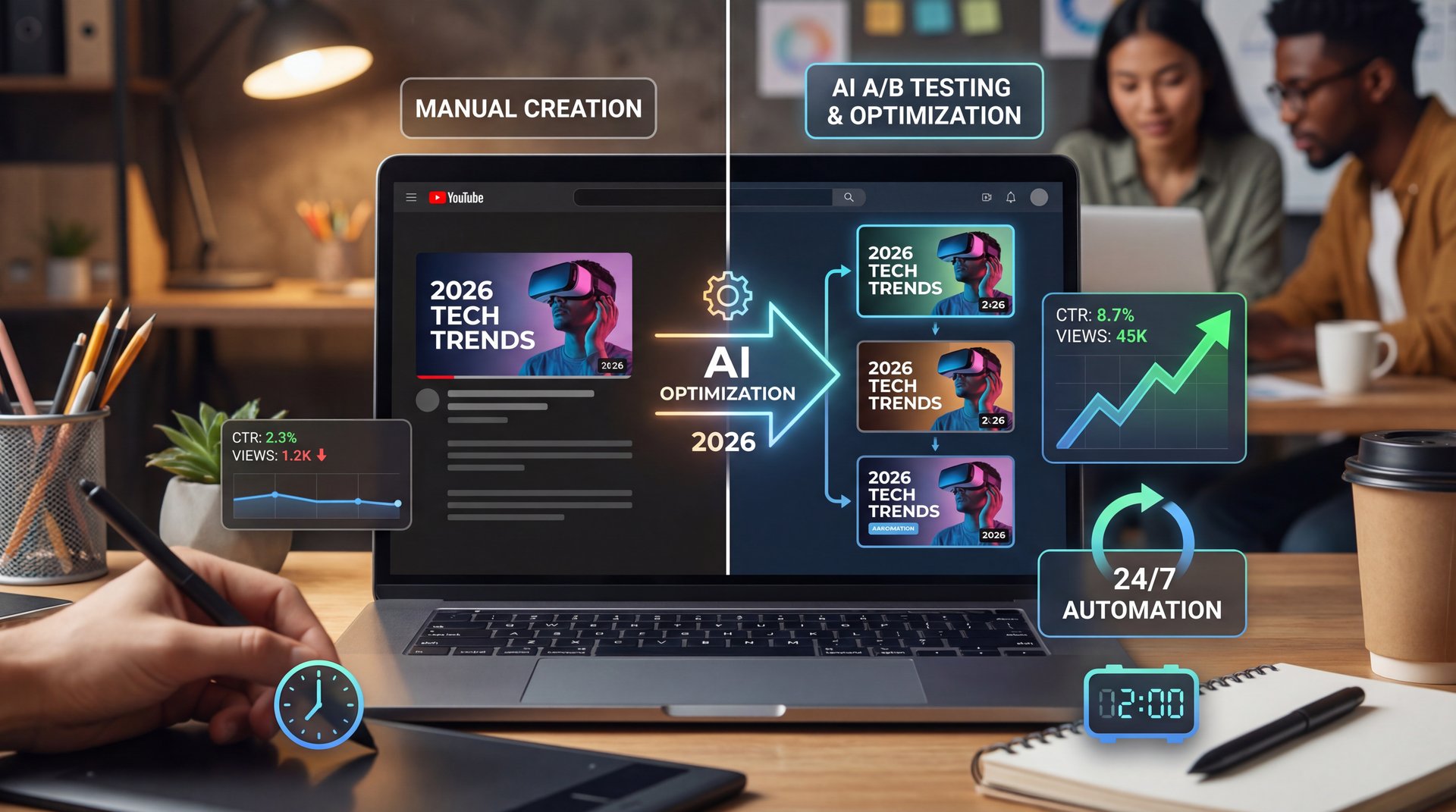
They can automatically swap out your thumbnail to see which one gets more clicks, constantly optimizing your video’s performance even after it’s published. This is like (which is wild) having a full-time design and marketing team working for you 247s. Okay, you’ve got a great video and a killer thumbnail. How do you get YouTube to show it to people? That brings us to tool number four, AI for SEO and titles. The YouTube algorithm is complex, but AI can help you crack the code. These tools analyze search trends and competitor videos to suggest highra, low competition keywords. They’ll help you craft irresistible, clickable titles that also please the algorithm. Beyond that, they can write fully optimized video descriptions and generate the perfect set of tags, ensuring your video gets discovered by the right audience. Stop guessing what people are searching for and start using datadriven AI to put your content directly in front of them. This next one feels like having a crystal ball. Tool number five is predictive analytics. Instead of creating, a video and just hoping it does well, these AI tools analyze your channel’s past performance and current trends to predict how a new video idea might perform.
The Shift to active Thumbnails
Here’s the thing about the 2026 YouTube algorithm update. It heavily favors active, GIF-like thumbnails. so, we saw active thumbnail adoption rise by 63%. Plus, this shift boosts viewer session time by 22%.
The CTR Impact
(Stick with me here.)
YouTube thumbnails influence 70-80% of click-through rates. When creators use optimized visuals, they see a 2.3x boost compared to manual designs. You can learn more about these mechanics on our homepage. Big difference. :::
What I found fascinating is that creative direction is now the real moat. An expert at LTX Studio recently noted that decision-making speed is the actual bottleneck. Why? Because 94% of AI visuals are completely indistinguishable from human designs in 2026 audience tests. The AI quality is already there. So your job is just telling it what to do.
## Why Use AI Thumbnail Generators Over Manual Design?
Let’s be real for a second. About 40% of casual users lack professional design skills. This usually leads to generic thumbnails that pull a terrible CTR of under 2%. You might spend four to six hours manually tweaking layers in Canva. But your thumbnails still look amateur. I see this all the time.
Real Creator Results
That said, here’s what you want to do if you want to scale. Look at MrBeast. He needed to scale up to 1,000+ thumbnails yearly. Manual design took 12 hours per video. So he switched to an automated workflow using Google Veo 3.1. His CTR jumped from close to 4% to 12.1%. That’s a massive 189% jump. Every time. Plus, he saved $450K annually in design fees.
On average, YouTube creators using these tools report a 154% CTR uplift based on 2025 A/B tests across 10,000 videos. Some tools like Krumzi are even achieving a 234% uplift. That’s pretty much exactly, I mean why 49% of marketers worldwide use AI for image and video generation daily according to recent industry research.
## The 7 Best AI Thumbnail Generators Ranked
All right, so let’s look at the actual tools. There are tons of options out there, but you only need to care about, a few of them.
Top Tier Tools You Should Know
First, Google Veo 3.1 currently ranks number one. It offers 4K exports and YouTube auto-sizing. You get 10 free generations per month on their basic tier. Think of video as the key ingredient here. Next is LTX Studio. I think their analytics prediction is impressive. They can auto-generate 5 variants per video and predict the winner with 89% accuracy.
Then we have Krumzi. Their main selling point is speed. You get sub-ten-second generation times. Also, CapCut AI is fantastic if you’re already editing video on your phone. For text rendering, Ideogram thumbnails are honestly hard to beat. If you run a gaming channel, a Pikzels go over will show you it handles gaming assets really well.
[icon:star] Google Veo 3.1 | Top ranked for 4K exports | Best overall quality
[icon:chart] LTX Studio | Predicts winning variants | 89% accuracy rate
[icon:bolt] Krumzi | Sub-ten-second speeds | 234% average CTR uplift
:::
(Before I forget…)
Understanding, the Costs
Now if you’re worried about pricing, I get it. Wild, right? Most top tools range from $15 to $49 per month for unlimited plans, and enterprise options sit around $99 per month for API access. However, 67% of creators face credit limits on free tiers. This usually forces a $20 to $50 monthly spend anyway. If you want to understand how these tools process images, check out our guide on the best AI image generators.
How AI Thumbnail Generators Fix The “Blank Canvas” Problem (seriously)
One of the biggest hurdles is just getting started. In fact, 52% of beginners cite having no idea where to start with prompts as their top barrier. You open the software, stare at a blank screen and freeze.
Beating Prompt Frustration
I completely understand this frustration. About 41% of intermediate creators report prompt engineering frustration. They end up with 30% unusable outputs. The tool generates blurry faces or the wrong aspect ratio. You waste your credits and get nothing useful.
Start With Templates
Don’t stare at a blank screen. The easiest way to beat prompt block is to use proven starting points. You can check out our step-by-step workflow guide to see exactly how to structure your first design.
To fix this, you need to use tools that offer a director mode. These features grew 150% in usage last year because they remove the guesswork. You just describe the vibe, and the AI handles the complex prompting. For example, instead of saying “create thumbnail with person pointing,” you can say “energetic tech go over vibe with shocked expression” and let the AI translate that into visual elements.
Scaling Up: AI Thumbnail Generators for Creators and Pros
Is your YouTube channel stuck? Are you spending countless hours editing, writing, and promoting only to see, a handful of views? What if I told you How to explosive growth in 2026 isn’t working harder, but working smarter with AI in the next ten minutes, right? Stick around because the last tool is a gamecher for your channel’s entire vibe. Let’s jump right in with the foundation of any great video, the script. You can have the best camera and editing, but a boring script means viewers will click away right away. AI script writing tools are here to solve that. These aren’t just basic text generators. They analyze top performing videos in your niche to understand what hooks viewers and keeps them watching. You feed it, a topic and it generates a structured script with a killer hook, a valuepacked middle and a strong call to action. It even suggests pacing and where to add visual elements to get more from retention. This isn’t about replacing your creativity. It’s about enhancing it, saving you hours of writer’s block so you can focus on delivering a killer performance. Not even close. Next up, the part most creators dread.
Managing Algorithim Changes
Professionals face different problems. About 28% struggle with algorithm drift. This happens when YouTube changes what it likes. Curtis, our Founder & Creative Director, always SAYS that your workflow needs to adapt faster than the algorithm changes. If your enterprise tools don’t handle team collaboration smoothly, your ROI drops fast. Some professional teams report up to a 25% drop in ROI from clunky software.
Pro Tip: Always generate at least three distinct visual concepts for every video. Testing completely different ideas works much better than just changing the background color of the same photo.
You really need deep integration with video analytics and A/B testing. That’s how you win long-term. For a deeper breakdown of scaling your channel, read through our YouTube creator guide.
How to Get Started With AI Thumbnail Generators Today
They can automatically swap out your thumbnail to see which one gets more clicks, constantly optimizing your video’s performance even after it’s published. Bottom line? This is like having a full-time design and marketing team working for you 247s. Okay, you’ve got a great video and a killer thumbnail. How do you get YouTube to show it to people? That brings us to tool number four, AI for SEO and titles. The YouTube algorithm is honestly tricky, but AI can help you crack the code — and these tools analyze search trends and competitor videos to suggest highra, low competition keywords. They’ll help you craft irresistible, clickable titles that also please the algorithm. Beyond that, they can write fully optimized video descriptions and generate the perfect set of tags, ensuring your video gets discovered by the right audience. Stop guessing what people are searching for and start using datadriven AI to put your content directly in front of them. This next one feels like having a crystal ball. Tool number five is predictive analytics. Instead of creating a video and just hoping it does well, these AI tools analyze your channel’s past performance and current trends to predict how a new video idea might perform.
(Life, man.)
Practical Steps for Success
Always set your canvas to 1280×720. That’s the standard YouTube size. Next is making sure your text is huge. Most people look at thumbnails on their phones. If you can’t read the text on a smartphone screen, the thumbnail is useless. According to official platform guidelines, keeping important, really important visual elements away from the bottom right corner is important because of the timestamp overlay.
The Speed Difference
Manual editing often takes 4-6 hours per video with inconsistent results. Using modern generation tools cuts that down to minutes while maintaining brand consistency. See the exact AI capabilities and editing tools that make this possible. Worth it. :::
(Or maybe not. Let me think.)
What surprised me was how much sustainability matters now. Low-energy models have cut generation costs by 40%. Plus, 55% of creators now prioritize green AI per recent surveys. So you’re saving money and being efficient at the same time. Just remember to keep testing your results. Big difference. That should fix your low click-through rates if you have those symptoms.
What are the top AI thumbnail generators for YouTube in 2026?
Google Veo 3.1 currently ranks first, followed closely by LTX Studio for analytics and Krumzi for generation speed. CapCut AI and Ideogram are also highly rated for mobile editing and text rendering.
How do AI thumbnail generators impact YouTube click-through rates?
They boost click-through rates by 154% to 234% on average based on recent A/B testing data. Automated A/B testing features also help predict winning variants with up to 89% accuracy.
What are the main challenges users face with AI thumbnail generators?
Beginners mostly struggle with writing effective prompts, with 52% not knowing where to start. Meanwhile, intermediate users often face restrictive credit limits on free tiers and inconsistent brand styles.
How has the adoption of AI thumbnail generators changed over the years?
Adoption has skyrocketed, with 96% of social media professionals now using AI in their workflow. Game changer. The market itself grew from $around 788 million in 2025 and is projected to reach around $3 billion by 2033.
What are the latest trends in AI video generation for 2026?
The biggest trend is multimodal integration where tools combine language models with video analysis to match themes perfectly. Worth it. active, GIF-like thumbnails are also becoming standard due to YouTube algorithm updates.
What are the top AI thumbnail generators for YouTube in 2026?
Google Veo 3.1 currently ranks first, followed closely by LTX Studio for analytics and Krumzi for generation speed. CapCut AI and Ideogram are also highly rated for mobile editing and text rendering.
How do AI thumbnail generators impact YouTube click-through rates?
They boost click-through rates by 154% to 234% on average based on recent A/B testing data. Automated A/B testing features also help predict winning variants with up to 89% accuracy.
What are the main challenges users face with AI thumbnail generators?
Beginners mostly struggle with writing effective prompts, with 52% not knowing where to start. Meanwhile, intermediate users often face restrictive credit limits on free tiers and inconsistent brand styles.
How has the adoption of AI thumbnail generators changed over the years?
Adoption has skyrocketed, with 96% of social media professionals now using AI in their workflow. Game changer. The market itself grew from $around 788 million in 2025 and is projected to reach around $3 million by 2033.
What are the latest trends in AI video generation for 2026?
The biggest trend is multimodal integration where tools combine language models with video analysis to match themes perfectly. Worth it. active, GIF-like thumbnails are also becoming standard due to YouTube algorithm updates.
:::
Related Videos


![How to start a faceless Youtube channel with AI [2026 FULL COURSE]](https://img.youtube.com/vi/EyXNKb2HsfM/mqdefault.jpg)
Related Content
For more on this topic, check out: thumbnail
Listen to This Article