Table of Contents
- What Is Prompt Engineering?
- Why Use Structured Prompts Over Guesswork?
- Best Prompt Engineering Techniques for 2025
- Common Mistakes in AI Prompt Writing
- Advanced Prompt Engineering Strategies
- Structured Prompts vs. Ad-Hoc Typing
- How to Get Started with Prompt Engineering
- Why This Matters for 2025 and Beyond
- Listen to This Article
Let’s get something straight right off the bat. It’s the API of your workflow — tool connects the pieces. There’s a huge myth floating around that AI tools like ChatGPT or image generators can somehow read your mind. People think you just type “make me a cool picture” or “write a blog,” and the computer magically knows exactly what you want. Honestly, that’s the quickest way to get frustrated. It’s like telling a mechanic, “My car is making a noise.” that doesn’t help me fix it. I need to know what kind of noise, when it happens, and where it’s coming from.
So today we’re gonna cover the nuts and bolts of talking to these machines. This is what the industry calls prompt engineering, but I just call it learning to speak the language. Whether you’re trying to generate a viral YouTube thumbnail or just get a decent email written, the words you choose matter more than the tool you use.
My colleague Jamie Chen was actually showing me some data the other day that blew my mind. Apparently, the market for this skill is projected to hit $1.3 billion by 2030 with a 27.8% CAGR. That’s a lot of money just for knowing the right words to type. So let’s go under the hood and figure out how to do this right.
What Is Prompt Engineering?
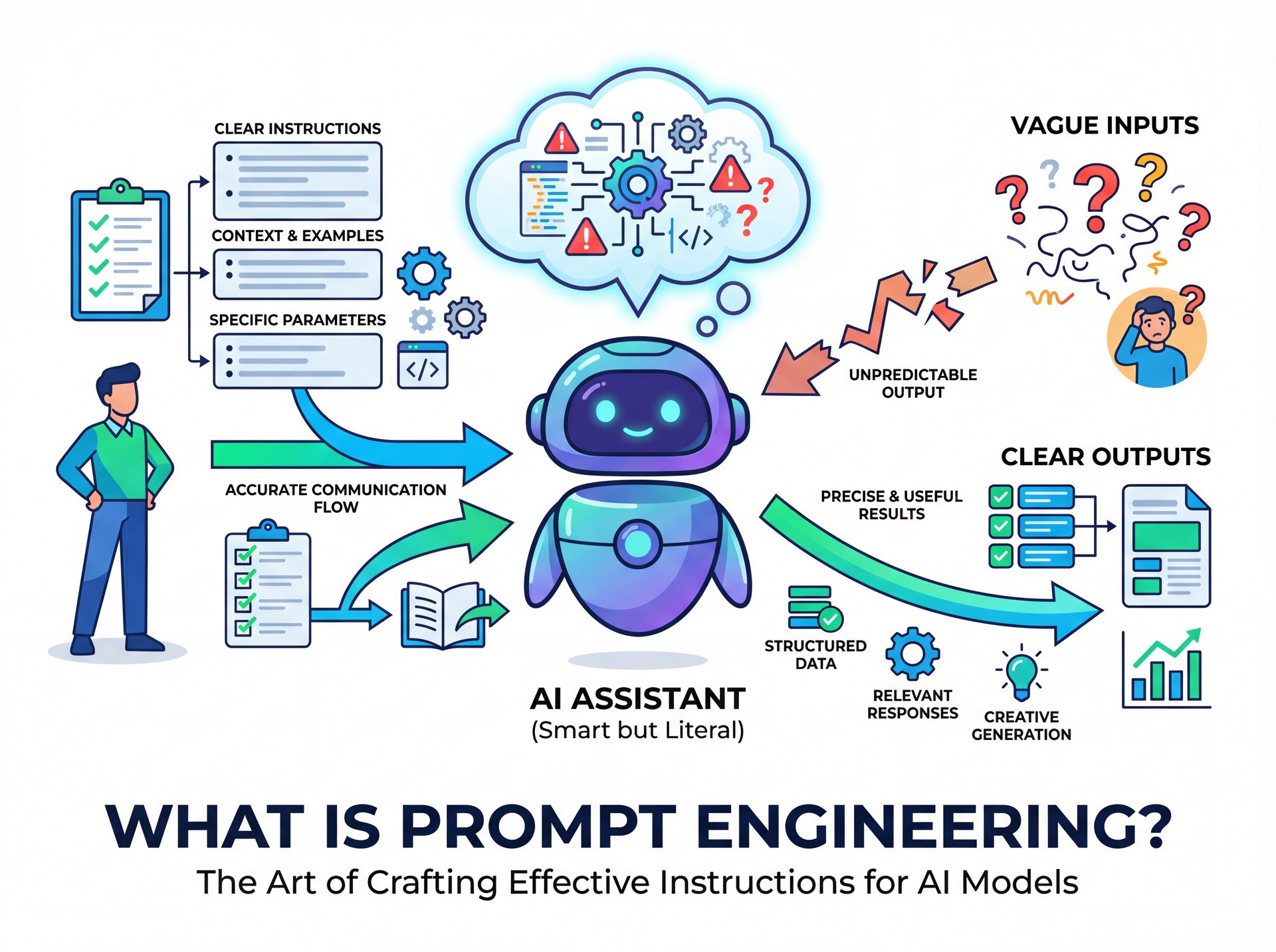
You may have heard the term “prompt engineering” and assumed that it requires a degree in computer science. However, prompt engineering is a game-changer; at its core, it’s simply about clear communication. Think of it as providing instructions to a very smart but very literal intern. If your instructions are vague, the intern is forced to guess, and more often than not, those guesses are incorrect.
Prompt engineering is basically your manual for reducing that guesswork. It’s the specific set of instructions, context, and constraints you give the AI to get the result you actually want.
I found that when I started treating the AI less like a search engine and more like a person I was training, my results got way better. You have to be specific. Instead of saying “write a story,” you say “write a funny story about a mechanic who loses his 10mm socket, under 500 words.” See the difference? One leaves everything open; the other gives a roadmap.
💰 High-Value Skill
Here’s a wild stat: Prompt engineer salaries are currently ranging from $175,000 to $335,000 annually according to recent salary data. It shows that companies are willing to pay a premium for people who can simply talk to computers effectively.
Why Use Structured Prompts Over Guesswork?
So why should you care about learning this? Prompt is the cheat code nobody told you about. I mean, can’t you just keep trying until it works? You could, but it would waste a ton of time. And in my experience, time is money.
I was reading a report recently that said companies using structured prompt engineering practices see a 3.7x ROI from their generative AI deployments compared to those who just wing it. That’s a massive difference. If you’re a creator or a business owner, you want that efficiency.
Plus, 72% of enterprises have adopted AI technologies as of 2024. If you aren’t using a structured approach, you’re falling behind. It’s like trying to diagnose a check engine light by just looking at the engine block without a scanner. You might eventually find the problem, but the guy with the scanner found it in five minutes.
Pro Tip: Treat your prompt like a recipe. If you leave out an ingredient (context) or a step (format), the cake (output) will fall flat. Always go over your prompt for “ingredients” before hitting enter.
Best Prompt Engineering Techniques for 2026

Now let’s get into the actual “how-to.” There are a few techniques that I use daily that work wonders. These aren’t just for text; they work great for visual tools too.
Role Prompting
This is my favorite approach. You tell the AI who it’s supposed to be. If I’m working on a car, I put on my mechanic hat. If I’m doing taxes, I put on my accountant hat. The AI needs that same cue.
Start your prompt with: “Act as an expert content creator…” or “Act as a senior Python developer…” This sets the tone. I was surprised by how much this changes the output. It shifts the vocabulary and the structure of the answer straight away.
Few-Shot Prompting
This seems a fancy term for “giving examples.” If I tell an apprentice to “clean the shop,” they might just sweep. But if I show them a clean bay and say, “make it look like this,” they know exactly what I mean.
In your prompt, provide 1-2 examples of what you want the output to look like. If you want a specific headline style, paste a few headlines you like first. Research shows that advanced prompting techniques like role prompting and few-shot examples can increase output quality by 38% compared to basic instructions.
Chain of Thought
If you ask a complex question, tell the AI to “think step-by-step.” this forces the model to break down the problem rather than rushing to an answer. It helps – actually helps – prevent those weird hallucinations where the AI just makes stuff up.
💡 The “Act As” Hack
Always start your complex requests with a persona. For example: “Act as a YouTube strategist with ten years of experience.” this primes the AI to access specific training data related to that field, giving you much higher quality advice instantly.
Common Mistakes in AI Prompt Writing
I see people making the same mistakes over and over again. The biggest one? Being too vague.
You know, roughly 40% of beginners struggle because they get inconsistent answers. Usually it’s because they didn’t give enough context. If you type “help me with marketing,” the AI has no idea if you’re selling cookies or cloud software.
Another issue is what we call “prompt drift.” You get a great result once, but then you try to use the same prompt a week later on a different topic and it fails. This happens because the context changed, but your instructions didn’t adapt.
Also, don’t use jargon unless you define it. If you use a specific acronym that only your company uses, the AI is going to guess what it means. And it will probably guess wrong.
For a deeper dive into fixing visual mistakes, check out our guide to AI photo editing tips which covers how specific words change image results.
⚠️ The “Do It All” Prompt
Don’t try to cram ten diffrent tasks into one prompt. If you ask for a blog post, a tweet, a LinkedIn summary, and an image prompt all at once, the quality of each will drop. Break it down. Ask for the blog post first. Then ask it to repurpose that post for social media.
Advanced Prompt Engineering Strategies

If you wanna take this to the professional level, you have to look at what’s happening in 2025. We’re moving away from just text. Now we have multimodal prompting, which means using text, images and even video as inputs.
Multimodal Context
For creators, this is huge. You can upload (hear me out) a screenshot of your video analytics and ask the AI, “Based on this data, what topic should I cover next?” Or you can upload a picture of a car part and ask, “What is this and how do I replace it?”
I personally grabbed AI thumbnail generation tools to speed up my workflow. Being able to describe a scene and have it generated saves me hours of searching for stock photos.
Prompt Libraries
Professionals aren’t typing from scratch every time. They’re building libraries. Think of this like my tool chest—I have specific TOOLS for specific jobs. You should have a document with your best prompts saved. When you need to write a newsletter, you grab your “Newsletter V2” prompt and just fill in the blanks.
This is actually becoming a major trend. Companies are treating their prompt libraries like intellectual property. It makes sense. if you figured out the secret words to get a 38% higher click-through rate, you want to keep that recipe safe.
Speaking of style, if you’re into changing up visuals, this builds on concepts from our article on AI hair color changers, where precise descriptive words are the key to getting the look you want.
🔧 Banana Thumbnail
If you’re a creator tired of guessing with image prompts, check out Banana Thumbnail. It simplifies the prompt engineering process for visuals, helping you generate high-CTR thumbnails without needing to be a “prompt wizard.”
Structured Prompts vs. Ad-Hoc Typing
Let’s look at, you know, the real difference between just typing whatever pops into your head and actually using a system.
As you can see, having a system wins every time. It’s the difference between a backyard DIY job and a professional repair.
How to Get Started with Prompt Engineering
So how do you actually start? You don’t need to buy a $300 course. Just start practicing with intent.
First, pick a task you do every day. Maybe it’s answering emails. Next, write a prompt that includes:
- **Role:** “Act as a customer support agent…”
- **Task:** “Draft a polite decline to this request…”
- **Context:** “The customer is asking for a refund outside the 30-day window…”
- **Format:** “Keep it under 100 words and use a sympathetic tone.”
Run that prompt. If the result isn’t perfect, tweak one variable at a time. Did it sound too robotic? Add “Use casual language.” Did it miss the policy? Clarify the context.
I recommend keeping a simple note on your phone or computer, and when you find a prompt that works really well, save it. Over time, you’ll build your own “cheat sheet” that’s tailored exactly to your style.
📊 The Clarity Difference
Before: “Write a YouTube title about cars.”
Result: “All About Cars” (Boring, low CTR).
After: “Write 5 click-bait YouTube titles about fixing a Toyota Camry engine noise, targeting DIY mechanics. Keep it under 50 characters.”
Result: “Camry Engine Knock? Fix It Fast!” (Targeted, punchy).
Why This Matters for 2026 and Beyond
(Ironic, huh?)
Here’s the thing about where this industry is going. The AI prompt engineering market is growing at a 27.8% CAGR and is projected to reach $1.3 billion by 2030. That’s huge growth. It means this isn’t a fad, it’s becoming a fundamental skill like typing or using Excel.
If you can master this now, you’re future-proofing yourself. Whether you’re a flat-rate mechanic like me trying to write better service notes, or a full-time content creator, the ability to translate your thoughts into machine instructions is powerful.
And honestly, it’s kind of fun once you get the hang of it. It feels like you have a superpower. You type a few lines, and suddenly you have a full project plan, a marketing strategy, or a killer image.
So don’t be afraid to experiment. But do it with a plan. Use the structures we talked about. Be specific. Give examples. And remember, the machine is only as smart as the person talking to it.
(Oh, one more thing first.)
📋 The CO-STAR structure
A popular way to remember prompt structure is CO-STAR:
Context (Background info)
Objective (What you want done)
Style (Tone/Voice)
Tone (Attitude)
Audience (Who is this for?)
Response Format (List, text, code, image?)
Frequently Asked Questions
What are the most common pain points for beginners in prompt engineering?
Beginners usually struggle with not knowing exactly what to type to get the desired result. They also face issues with inconsistent answers from the AI and a general fear of “breaking” the model with the wrong instructions.
How has the adoption rate of ChatGPT compared to other platforms like Facebook and Instagram?
ChatGPT saw incredibly rapid adoption, reaching 1 million users in just 5 days. In comparison, it took Instagram about 2.5 months and Facebook roughly ten months to reach that same milestone.
What are the latest trends in prompt engineering for 2025?
The biggest trends include a shift from single “magic prompts” to reusable prompt libraries and patterns. We’re also seeing a massive rise in multimodal prompting, where users combine text, images and video in their instructions.
Can you provide examples of successful case studies in prompt engineering?
Companies implementing structured prompt engineering have seen a 3.7x ROI on thier AI deployments. For instance, customer support teams using refined prompt patterns often see significant reductions in ticket resolution times. (In theory.)
What tools and resources are recommended for advanced prompt engineers?
Advanced engineers often grabbed dedicated prompt library tools and testing frameworks to manage their workflows. Platforms that allow for version control of prompts, you know, and multimodal inputs are becoming needed for professional work.
Does prompt engineering really require technical coding skills?
No, prompt engineering is primarily about logic and clear communication, not coding. While understanding how the model works helps, the core skill is effectively using natural language to guide the AI.
How much do prompt engineers typically earn?
The demand for this skill is high, with salaries currently ranging from $175,000 to $335,000 annually. This reflects the specialized value companies place on bridging the gap between business goals and AI capabilities.
Is prompt engineering relevant for image and video generation?
Absolutely, it’s critical for tools like Midjourney or Banana Thumbnail. Describing lighting, camera angles, and artistic styles specifcally is the only way to get consistent, high-quality visual results.
Related Videos
Related Content
• guide
• guide
For more on this topic, check out: guide
Listen to This Article